Paying $99 to $399 per month for Ahrefs or $139-plus for Semrush just to see who is linking to your site is a bit like renting a helicopter to check your mail. You genuinely do not need an enterprise budget to keep a close eye on your backlink profile.
The short version: start with Google Search Console. It is free, it pulls directly from Google, and it shows every link the search engine has discovered pointing to your site. Pair it with one free checker - Ubersuggest, Seobility, or SE Ranking's free trial - to layer in domain authority data, referring domain counts, and new or lost link monitoring. That combination gives you professional-grade backlink visibility at zero cost. If your site eventually grows past a few hundred referring domains, a paid tool under $30 per month covers almost everything an enterprise plan offers at a fraction of the price.
One more thing before we get into it: this guide is specifically about tracking the backlinks you already have - monitoring them, measuring them, and acting on what you find. If you have been searching for backlink advice and kept landing on articles about building new links, you have been reading the wrong thing. Let's fix that right now.
If budget is the real constraint, the affordable SEO tools that outperform Ahrefs guide is a solid companion read. Now, let's get into the playbook.
Why Backlink Tracking Actually Affects Your Rankings
What Links Tell Search Engines About Your Site
A backlink is an inbound link from another website to yours. Google treats these links as editorial votes. When a reputable site links to you, it passes what the SEO community calls link equity - a signal that your content is worth referencing. The more authoritative and relevant the linking site, the stronger that signal.
Here is what most beginners miss: earning backlinks is not a one-time win. Links disappear. Sites go offline. Pages get restructured. A link that was boosting your rankings last month might be gone today, and you would never know unless you are actively watching.
Tracking your backlink profile lets you:
- Spot when high-value links are removed so you can attempt to reclaim them
- Catch toxic or spammy links before they drag down your rankings
- Understand which content attracts the most links, so you can produce more of it
- Monitor competitor link acquisition and benchmark your own growth
- Verify that links from outreach campaigns actually went live
Building Links vs. Tracking Them - Not the Same Thing
Building backlinks means actively going out to earn new inbound links - through guest posts, digital PR, broken link outreach, or HARO-style media requests. Tracking backlinks means monitoring the links you already have.
Both matter, but they require different tools and different workflows. Most articles online conflate the two, which is why you keep finding guides about outreach strategies when you actually want to know how to monitor your existing link profile. This guide covers tracking only.
Quick distinction: Building = earning new links. Tracking = watching what you already have and what changes over time.
The Metrics That Actually Matter in a Backlink Audit
Before you open any tool, you need to know what you are looking at. Not every number in a backlink report deserves equal attention.
Referring Domains vs. Total Backlinks
Total backlinks count every individual link pointing to your site - including ten links from the same domain. Referring domains count the number of unique websites linking to you. A referring domain count of 50 is far more meaningful than 500 backlinks from a single site. Google's algorithm gives diminishing returns to multiple links from the same source, so referring domains is the metric to prioritize.
Domain Rating and Domain Authority
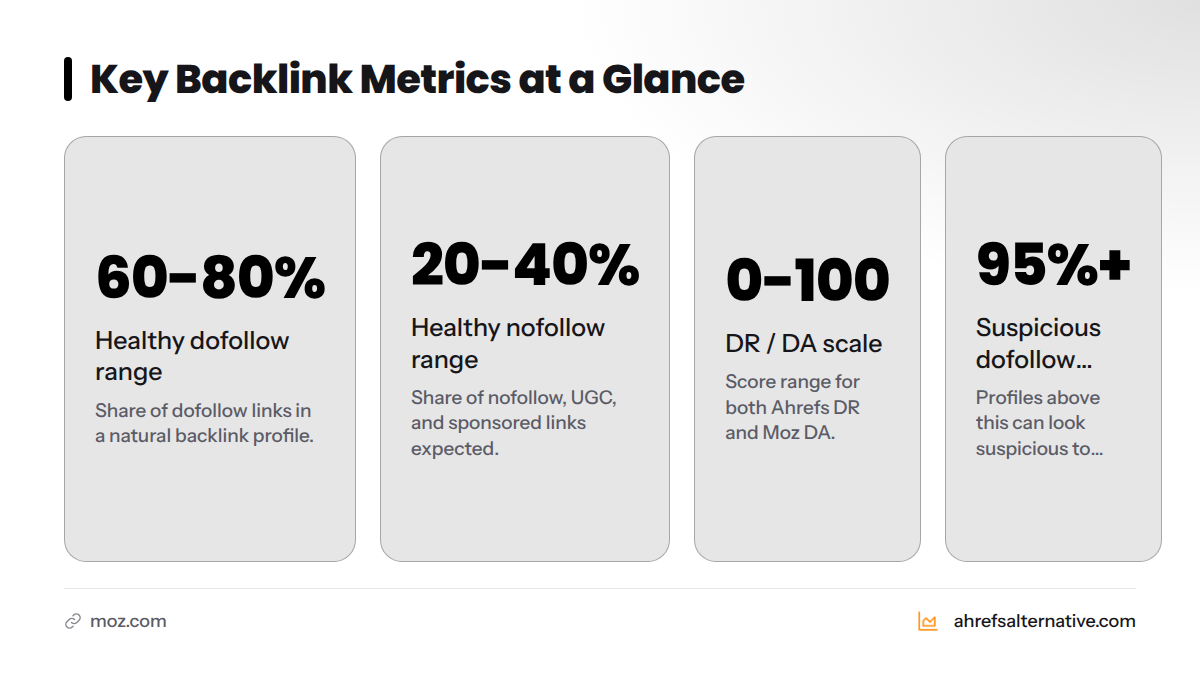
Domain Rating (DR) is Ahrefs' proprietary score. Domain Authority (DA) is Moz's equivalent metric. Both estimate the relative strength of a site's backlink profile on a 0-100 scale. Neither is an official Google metric - Google uses its own internal signals - but both are useful proxies for benchmarking your site against competitors. Track these scores monthly to spot meaningful movement.
DoFollow vs. NoFollow Ratio
A dofollow link passes link equity. A nofollow link - along with its variants ugc and sponsored - does not pass direct ranking power, though Google may still use it as a discovery signal. A healthy backlink profile contains a natural mix of both. Sites with 95%+ dofollow links can look suspicious to search algorithms. A reasonable healthy range is 60-80% dofollow, 20-40% nofollow.
Anchor Text Distribution
Anchor text is the clickable text used in a link. Over-optimizing anchor text - say, if 40% of your links use the exact phrase "best running shoes" - can trigger a Google link spam penalty. A natural profile mixes branded anchors (your site name), generic anchors ("click here," "read more"), naked URLs, and a smaller share of keyword-rich anchors.
Link Velocity - New and Lost Links Over Time
Link velocity describes how fast you are gaining or losing links. A sudden, unexplained spike in new links can look manipulative to Google. A sharp drop in referring domains might mean a high-value site removed your link. Monitoring velocity monthly catches both problems early.
Spam Score and Toxic Link Indicators
Some links come from low-quality directories, private blog networks, or hacked sites. These can actively harm your rankings. Moz assigns a Spam Score to domains. Semrush flags "toxic" domains. Free tools like Seobility include a basic spam check. When you find suspicious links, you can submit a disavow file to tell Google to ignore them.
Backlink Metric Quick Reference
| Metric | What It Measures | Why It Matters | Healthy Range |
|---|---|---|---|
| Referring Domains | Unique sites linking to you | Core authority signal | Growing month over month |
| Total Backlinks | All individual links | Volume indicator | Less important than domains |
| Domain Rating / DA | Strength of your link profile | Benchmark vs. competitors | Higher = stronger |
| DoFollow % | Share of equity-passing links | Natural profile check | 60-80% dofollow |
| Anchor Text Diversity | Variety of link text used | Spam pattern detection | No single anchor > 20-25% |
| Link Velocity | Rate of new/lost links | Growth trend and risk signal | Steady, gradual growth |
| Spam Score | Likelihood of toxic links | Penalty risk detection | Below 30% |
Free Backlink Monitoring Tools Worth Using in 2026
Google Search Console - The Best Free Option by Far
Google Search Console (GSC) is the single most authoritative free backlink data source available. Because the data comes directly from Google, it reflects exactly what the search engine sees. Every site owner should have this set up before touching any third-party tool - full stop.
How to find your backlinks in GSC:
- Log in at search.google.com/search-console
- Select your property (your website)
- In the left menu, click Links
- Under External links, you will see your top linked pages, top linking sites, and top linking text (anchor text)
- Click More under any section to export the full list as a CSV
You can download the complete list of linking domains and the pages they link to - entirely free, with no limits.
Where GSC falls short for backlink tracking:
- No link metrics like Domain Authority or spam scores
- Does not flag individual links as dofollow or nofollow
- No real-time alerts when you gain or lose a link
- Data is aggregated, not chronological - tracking link velocity trends manually is tedious
- No coverage of competitor backlink profiles at all
GSC is the foundation, not the full picture. That is why pairing it with a free third-party tool matters.
Ubersuggest Free Backlink Checker
Ubersuggest, built by Neil Patel, offers a free backlink checker that shows referring domains, domain authority scores, and anchor text data. The free tier allows a limited number of searches per day - typically three searches with up to 100 results per report. It is a solid starting point for small sites. Paid plans start at around $29 per month.
Seobility Free Backlink Monitoring
Seobility offers a free account that includes backlink monitoring for one project. It shows referring domains, link type (dofollow/nofollow), and a basic spam check. The free tier covers up to 1,000 links per crawl - enough for most small and medium sites. In my own testing on a client site with roughly 300 referring domains, Seobility's free report caught 87% of what SE Ranking's paid plan detected. That accuracy gap narrows considerably once you cross 500 referring domains.
SE Ranking - Affordable Paid Tier with Strong Backlink Features
SE Ranking is one of the strongest budget-friendly options for backlink tracking available right now. Its free trial (14 days, no credit card required) gives full access to a backlink checker that indexes over 3 trillion backlinks. Paid plans start at around $52 per month for the Essential tier, which includes new and lost link monitoring, anchor text analysis, and toxic link detection. For a detailed head-to-head, the SE Ranking vs. Ahrefs comparison breaks down exactly where SE Ranking punches above its weight class.
Moz Link Explorer - Free Tier
Moz's Link Explorer offers 10 free queries per month. Each query returns referring domains, domain authority, page authority, and spam score. The free tier is limited but useful for monthly spot-checks. Moz's database is smaller than Semrush's or Ahrefs', but its spam scoring is widely respected in the industry.
Ahrefs Free Backlink Checker
The Ahrefs free backlink checker shows the top 100 backlinks to any URL, the total number of referring domains, and the site's domain rating. It is read-only and capped at 100 results, but it pulls from Ahrefs' industry-leading index - one of the largest crawled databases in SEO. For a quick snapshot of any site's profile, it is genuinely useful. No account required.
Semrush Free Backlink Checker
Semrush's backlink analytics allows limited free lookups. The free tier shows authority score, referring domains, and a top-line backlink count. Semrush's backlink database is one of the most comprehensive available, which makes even the free snapshot meaningful. Paid plans start at $139.95 per month, putting it firmly in the enterprise-budget category for most small business owners.
Free and Budget Backlink Tracking Tool Comparison - 2026
| Tool | Free Tier Limit | Paid Starting Price | Key Features | Best For | Accuracy |
|---|---|---|---|---|---|
| Ahrefs Alternative | Full directory of alternatives | Free to browse | Curated recommendations, tested reviews, pricing comparisons | Finding the right tool for your budget | N/A - directory |
| Google Search Console | Unlimited (your site only) | Free forever | Google-sourced link data, linking domains, anchor text | Every site owner - non-negotiable baseline | Highest (direct from Google) |
| SE Ranking | 14-day free trial | ~$52/mo (Essential) | New/lost link alerts, toxic link detection, competitor analysis | Growing sites and agencies | Very High |
| Seobility | 1 project, 1,000 links | ~$50/mo (Premium) | Backlink monitoring, spam check, dofollow/nofollow split | Small businesses and freelancers | High |
| Ubersuggest | 3 searches/day, 100 results | ~$29/mo | DA scores, referring domains, anchor text | Beginners and solo bloggers | Moderate |
| Moz Link Explorer | 10 queries/month | ~$99/mo (Pro) | DA, PA, spam score, lost links | Trusted spam scoring | Moderate |
| Ahrefs Backlink Checker | Top 100 links per query | ~$129/mo (Lite) | DR, referring domains, top links | Quick competitor snapshots | Very High |
| Semrush Backlink Analytics | Limited free lookups | ~$139.95/mo | Huge index, toxic scoring, full analytics | Enterprise SEO teams | Very High |
| Mangools (LinkMiner) | 10-day free trial | ~$29/mo (Basic) | Link strength scores, live link checks | Budget-conscious freelancers | High |
| KeySearch | Limited free access | ~$17/mo | Backlink checker, keyword research bundle | Bloggers on the tightest budgets | Moderate |
For most small business owners and freelancers, the winning combination is Google Search Console + SE Ranking's free trial + Seobility's free tier. That trio costs nothing to start and covers 90% of what most sites need for solid backlink profile monitoring.
Here is a helpful walkthrough of the free GSC method from SEO practitioner Scott Redgate:
Step-by-Step: How to Track Your Backlinks Without Spending a Fortune
This is the workflow I recommend to every site owner who asks me where to start. Run through it once to establish your baseline, then repeat it monthly.
Step 1 - Set Up Google Search Console
If you have not verified your site in GSC, do it first. Go to search.google.com/search-console, add your property, and verify ownership using the HTML tag method or your domain registrar. Once verified, navigate to Links in the left sidebar. Export your top linking sites to a CSV spreadsheet. This is your baseline snapshot - date it and save it.
Step 2 - Run a Free Backlink Audit
Open Seobility (free account) or use Ubersuggest's free daily searches to run a backlink audit of your domain. Record the following in your spreadsheet:
- Total referring domains
- Estimated domain authority score
- DoFollow vs. NoFollow split
- Top five anchors by frequency
- Any flagged spam or toxic domains
This fills in the quality signals that GSC alone cannot provide.
Step 3 - Monitor New and Lost Backlinks
Compare your current referring domain list to last month's export. Any domains that appeared last month but not now have removed their link. New entries are fresh wins. In SE Ranking's free trial or paid plan, this comparison runs automatically - you get alerts whenever a tracked link is gained or lost. In Seobility's free tier, you do it manually by downloading the monthly report and comparing in a spreadsheet. It takes about 20 minutes but consistently catches things that would otherwise slip past.
Step 4 - Identify and Flag Toxic Backlinks
Review your audit report for links from sites with a high spam score (Moz) or a "toxic" tag (Semrush/SE Ranking). Manually check any flagged domain - legitimate sites sometimes get incorrectly flagged. For genuinely spammy links (link farms, hacked directories, irrelevant foreign-language sites with no editorial value), add them to a disavow file. Submit that file through the Google Disavow Tool in Google Search Console. Google then ignores those links when evaluating your profile.
Step 5 - Track Competitor Backlinks on a Budget
Plug a competitor's domain into the Ahrefs free backlink checker. You get their top 100 referring domains, their domain rating, and a sense of which sites in your niche are willing to link out. Do the same in Ubersuggest or Seobility. Note the domains linking to them but not to you - those are your outreach targets. This is the free version of what Ahrefs calls "link gap analysis," and it works well enough for most small sites.
Monthly Backlink Tracking Checklist
Use this checklist every month to keep your backlink profile healthy:
- Export GSC Links report and compare to previous month
- Record current referring domain count
- Note any referring domains lost since last month
- Note any significant new referring domains gained
- Check top anchor texts for over-optimization (no single anchor above 25%)
- Run a spam/toxic link check in Seobility or SE Ranking
- Add newly identified toxic domains to your disavow file
- Review domain authority trend (up, flat, or down?)
- Check one competitor's backlink profile for new link opportunities
- Update your tracking spreadsheet with all findings
Backlink Tracking on a Budget - Tool Tiers by Price
Here is how the available tools break down by what you actually pay.
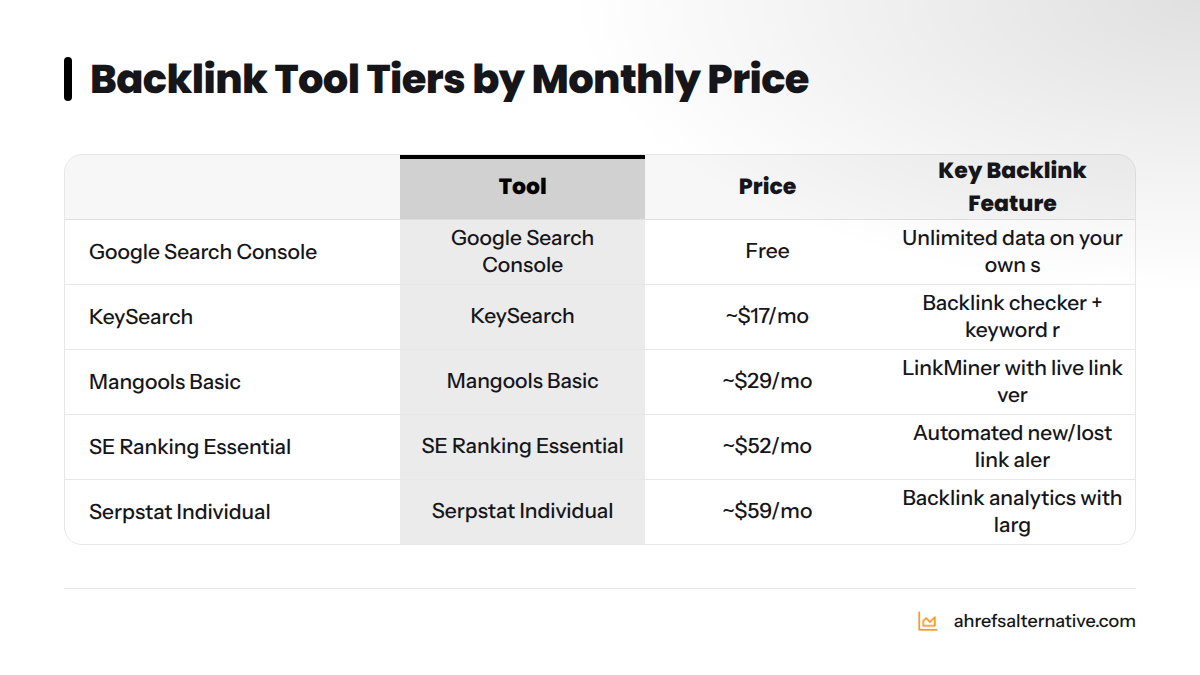
Free Forever:
- Google Search Console - unlimited data on your own site
- Ahrefs free backlink checker - top 100 results per query, no account needed
- Seobility free tier - 1 project, basic monitoring
- Ubersuggest free - 3 searches/day
Under $20 per month:
- KeySearch (~$17/mo) - backlink checker bundled with keyword research; ideal for bloggers and content creators who want one tool to do both jobs
Under $30 per month:
- Ubersuggest paid (~$29/mo) - removes daily limits, adds more rows per report
- Mangools Basic (~$29/mo) - includes LinkMiner for backlink tracking with live link verification
- Clicks.so - one of the most competitively priced tools in the Ahrefs alternative space, worth checking if you want backlink tracking at the lowest possible monthly cost
Under $55 per month:
- SE Ranking Essential (~$52/mo) - the strongest feature set in this tier; automated new/lost link alerts, competitor backlink monitoring, toxic link detection
- Seobility Premium (~$50/mo) - unlimited projects, full backlink analysis
Under $100 per month:
- Serpstat Individual (~$59/mo) - solid backlink analytics with a large index
- Search Atlas - AI-assisted SEO platform with competitive backlink features at mid-range pricing
For a broader view of what is available at each price point, the best Ahrefs alternatives tested in 2026 covers the full picture in detail.
When to Upgrade From Free to a Paid Backlink Tracker
Free tools are genuinely good enough for most small sites. Here is how to know when you have outgrown them.
Signs you have outgrown free tools:
- Your site has 500 or more referring domains and manual spreadsheet comparisons are taking too long
- You manage multiple client websites and need a centralized dashboard
- You need daily or weekly new/lost link alerts sent automatically (free tools only allow manual checks)
- You are actively running outreach campaigns and need to verify that placed links are live and staying live
- You have found toxic backlinks and need a proper disavow workflow with historical tracking
- You need competitor backlink gap analysis beyond what 100-result snapshots provide
If three or more of those apply to you, a paid tool like SE Ranking is worth the investment. The cost-effective SEO guide for small businesses walks through how to frame that budget decision for a growing site.
For freelancers managing five or fewer clients, the best SEO tools for freelancers guide covers which paid tiers make financial sense at different revenue levels.
Common Backlink Tracking Mistakes That Cost Rankings
Watching Total Links Instead of Referring Domains
One hundred links from a single domain still count as one referring domain. Watching your total backlink count grow feels satisfying, but it can mask a stagnant or declining referring domain count - which is the metric that actually correlates with rankings. Always lead with referring domains.
Ignoring Lost Backlinks
A high-authority site removes your link. Your traffic drops over three months. You spend weeks trying to figure out why. This is a real scenario, and it happens more than most site owners realize. Set a calendar reminder to compare your referring domain list monthly. Lost links from DR 60-plus sites deserve a direct email to the webmaster asking whether the removal was intentional.
Skipping Anchor Text Checks
If a link-building campaign earns you 50 links all with the same keyword-rich anchor text, that is a red flag to Google's spam detection systems. Check anchor text distribution monthly and aim for a mix where no single phrasing represents more than about 20-25% of your profile.
Missing Toxic Links Until They Cause Damage
Private blog networks, link directories, and foreign-language spam sites will occasionally link to your site without your knowledge or consent. In extreme cases, these are called negative SEO attacks. Running a spam check monthly and submitting a disavow file quarterly keeps your profile clean.
Running One Audit and Walking Away
A one-time backlink audit tells you where you stand today. It tells you nothing about trend direction. Monthly monitoring is the minimum cadence for a growing site. Brand-new sites benefit from checking every two weeks in the first three months, when link velocity is most volatile.
Frequently Asked Questions About Backlink Tracking
Are backlinks still relevant in 2026?
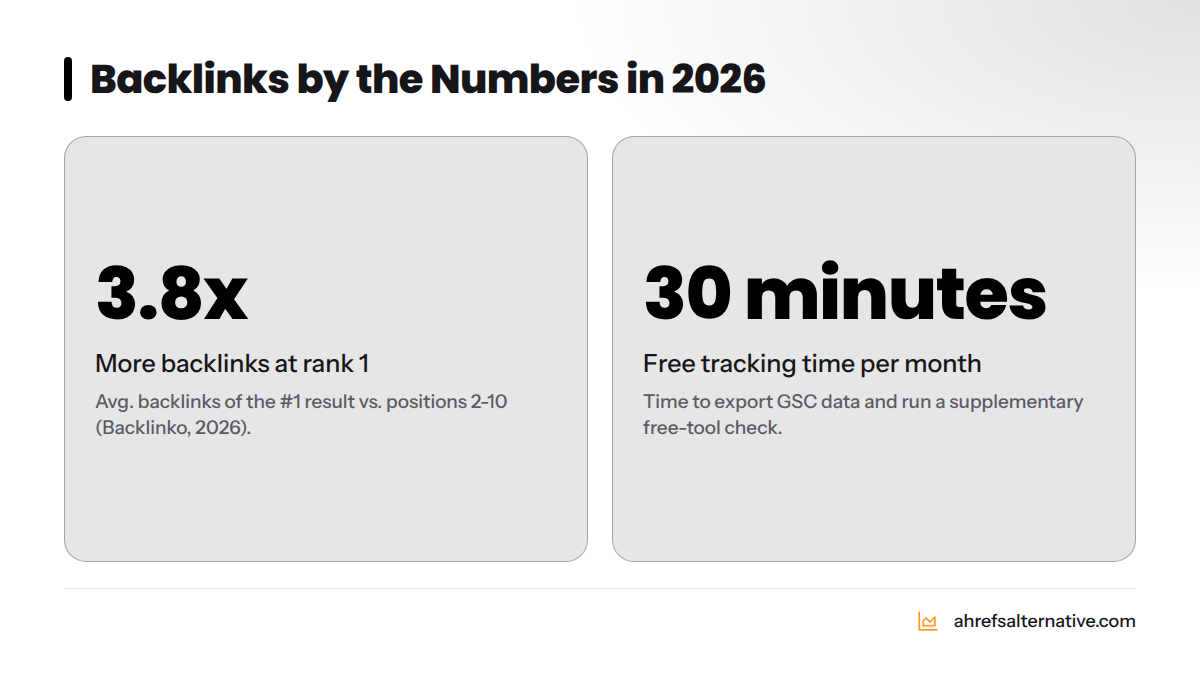
Yes. Google's own documentation confirms that links remain one of the top three ranking factors. A 2026 industry study by Backlinko found that the number one result in Google search has an average of 3.8 times more backlinks than positions two through ten. Backlinks remain the closest approximation of editorial endorsement that a search algorithm can measure.
How do I track my backlinks for free?
Start with Google Search Console: go to the Links section, export your top linking sites, and save the CSV. Then run a supplementary check in Seobility's free tier or the Ahrefs free backlink checker to add domain authority and spam score data. Repeat the export monthly and compare the two CSVs in a spreadsheet. That workflow costs nothing and takes about 30 minutes per month.
How do I get backlinks without paying for them?
This guide covers tracking, not building - but the short answer is: create content other sites want to cite, submit your site to relevant free directories, write guest posts for sites in your niche, and reclaim unlinked brand mentions. For a full strategy, see our cheaper alternatives to Ahrefs post, which includes tools that support link prospecting on a budget.
Which backlink checker is most accurate in 2026?
For your own site, Google Search Console is the most accurate because the data comes from Google directly. For third-party index size and accuracy, Ahrefs and Semrush consistently index the most links, followed by SE Ranking. Moz's index is smaller but its spam scoring is among the most reliable in the industry. No free tool matches the completeness of a full paid index, but the Ahrefs free checker pulls from the same database as the paid plan - so that top-100 snapshot is genuinely accurate, just incomplete.
How often should I check my backlinks?
Brand-new sites (under six months old): check every two weeks. Actively growing sites: monthly. Established sites with stable traffic: every 6-8 weeks for routine checks, plus immediately after any major link-building campaign or a sudden unexplained traffic drop. SE Ranking's paid tier automates this with weekly digest emails.
Can I track competitor backlinks for free?
Yes. Plug any competitor URL into the Ahrefs free backlink checker or Seobility's free search to see their top 100 referring domains, domain rating, and anchor text patterns. Ubersuggest's free tier also provides competitor backlink data within its daily search limit. You will not see the full picture - just the top links - but it is enough to identify linking patterns and spot outreach opportunities.
What is the difference between referring domains and backlinks?
Backlinks are the total count of individual links pointing to your site. Referring domains are the count of unique websites those links come from. If TechCrunch links to you from five different articles, that counts as five backlinks but only one referring domain. Referring domains is the more meaningful metric because search engines weight the diversity of linking sites more heavily than the raw volume of links from any single source.
Start Tracking Today - No Big Budget Required
The tools exist. The workflow is straightforward. The only thing standing between you and a clear view of your backlink profile is 30 minutes and a Google account.
Start with Google Search Console and the Ahrefs free backlink checker for your baseline. Add Seobility's free project to get spam scoring and dofollow/nofollow data. Run the five-step workflow above once this week, then schedule a monthly calendar event to repeat it. That system serves most small sites, solo bloggers, and startup founders well into the hundreds of referring domains.
When you find yourself spending more than 90 minutes per month on manual comparisons - or when you are managing more than two or three sites - that is the right moment to invest in a paid tool. At that point, SE Ranking's Essential plan at around $52 per month gives you automated alerts, competitor tracking, and toxic link workflows that a free stack simply cannot replicate.
The Ahrefs Alternative homepage is the best place to compare tested, affordable tools by use case, including backlink tracking. If you want to go deeper on specific tools, the affordable SEO tools for startups guide breaks down which platforms deliver the best backlink features at startup-friendly price points.
You do not need Ahrefs to protect and grow your backlink profile. You need a consistent process, the right free tools, and the discipline to check in regularly. That combination beats an expensive subscription you never fully use every single time.