Target one primary keyword and two to five secondary keywords per article. The primary keyword should appear in the title, the first paragraph, and at least one subheading. Secondary keywords should appear naturally throughout the content. Targeting more than one primary keyword per page risks splitting your content's focus and sending mixed intent signals to search engines.
Ahrefs costs $129 a month just to get started. For a freelancer writing their first blog, a startup founder watching every dollar, or a small business owner who just wants more Google traffic, that price tag is a wall - not a door.
Here is the truth: you do not need Ahrefs to do great keyword research. You never did.
This guide is written for people who want to skip the $129-a-month bill and still build a keyword strategy that drives real organic traffic. By the time you finish reading, you will know what keyword research is, which metrics matter, which tools to use at every budget level (including zero), and exactly how to run a keyword research workflow from scratch. No filler, no tool-vendor bias, no upsell buried in the footnotes.
According to a widely cited Ahrefs study on organic traffic, roughly 90% of pages get zero organic traffic from Google - and the number one reason is failing to target keywords people actually search for. Keyword research fixes that problem. Let's get into it.
What Keyword Research Actually Does
Keyword research is the process of identifying the words and phrases people type into search engines, then using that information to create content those people will actually find. Done well, it connects your content to real human demand. Done poorly - or skipped entirely - it leaves your pages invisible.
The Role Keywords Play in SEO
Every piece of content you publish either answers a question someone is already asking, or shouts into the void. Keywords tell you what questions people are asking. Search engine optimization (SEO) lives and dies by this alignment between what you publish and what your audience searches for.
Choose the right keywords and you write content that ranks. Rank, and you get organic traffic - visitors who arrive without you paying for ads. According to BrightEdge's Channel Share report, organic search drives roughly 53% of all website traffic, making it the single largest source of visitors for most businesses. That figure holds in 2026, even as paid and social channels compete harder for attention.
What Happens When You Skip It
Skipping keyword research is like opening a shop on a street with no foot traffic. You might have a great product, but no one walks by. Without keyword data, you end up writing about topics your audience never searches for, using language they never type, targeting competition so fierce that a new site has no realistic chance of ranking.
I have seen this pattern repeatedly. A content team publishes 50 blog posts over six months, gets almost no traffic, and burns out. The problem is almost never writing quality. It is almost always keyword selection. They targeted high-volume, high-competition head terms like "SEO tips" instead of specific, answerable queries like "how to do keyword research for a new blog with no budget."
How AI Overviews and Conversational Search Changed the Game in 2026
Keyword research looked different before Google's RankBrain algorithm, and then again before BERT) changed how Google understood context and natural language. In 2026, the biggest shift is the widespread rollout of Google's AI Overviews - the AI-generated answer blocks that appear at the top of many search result pages.
These AI Overviews pull answers directly from pages without the user needing to click. That changes the game for some keyword types while strengthening the case for others. Informational, question-based keywords now compete for placement inside AI summaries, while transactional and commercial-intent keywords still drive traditional click-through traffic. SparkToro's research on search behavior shows that zero-click searches are growing - which means targeting keywords where your content can appear as a cited source, rather than just a ranked blue link, is more important than ever.
Keep this in mind: Keyword research is not just about finding what people search for - it is about understanding what they mean and what they need. The words are the surface; the intent is what matters.
Six Keyword Metrics Every Beginner Should Understand
Before you open any tool, you need to know what you are looking at. These six core metrics determine whether a keyword is worth targeting.
| Metric | What It Means | Why It Matters |
|---|---|---|
| Search Volume | Estimated monthly searches for a keyword | Shows demand - higher volume means more potential traffic |
| Keyword Difficulty (KD) | A score (0-100) indicating how hard it is to rank | Helps you find realistic targets, especially for new sites |
| CPC (Cost Per Click) | What advertisers pay per click in Google Ads | High CPC signals commercial value and purchase intent |
| Search Intent | The underlying reason behind a search | Determines what type of content you need to create |
| SERP Features | Snippets, PAA boxes, image packs, ads on the results page | Affects how many real clicks your page will get even if it ranks |
| Clicks per Search | Percentage of searches that result in an actual click | More accurate than volume alone for estimating real traffic |
Search Volume - What the Numbers Mean for Beginners
Search volume tells you how many times per month a keyword gets searched. A keyword with 10,000 monthly searches sounds exciting, but that number rarely equals 10,000 visitors - especially after subtracting zero-click searches, paid ads, and SERP features that answer the query without a click.
Low-volume keywords are underrated for beginners. A keyword searched 300 times per month with a Keyword Difficulty score of 8 is far more valuable than one searched 10,000 times with a KD of 75. You can actually rank for the first one. The second will bury your page on page 12 for years.
Keyword Difficulty - Why Low-Competition Keywords Win
Keyword Difficulty (KD) is a score, usually from 0 to 100, that estimates how hard it will be to rank in the top 10 results. The score is typically calculated based on the number and quality of backlinks pointing to pages that already rank.
Target KD scores under 30 if your site is new. Once your domain has some authority and a track record of ranking content, you can push toward KD 40-50. Chasing KD 70+ from the start is one of the most common and costly beginner mistakes.
Search Intent - The Most Underrated Metric
Search intent is the "why" behind a keyword. Google classifies intent broadly into four types:
- Informational: The user wants to learn something ("how to do keyword research")
- Navigational: The user wants to find a specific site ("Ahrefs login")
- Commercial: The user is comparing options before buying ("best keyword research tools")
- Transactional: The user is ready to buy or sign up ("KeySearch pricing")
If you write a product comparison page targeting an informational keyword, Google will rank tutorials instead - because that is what the searcher wants. Matching your content to intent is not optional. It is the difference between ranking and not ranking.
Long-Tail vs. Short-Tail Keywords: Which Should Beginners Target?
Short-tail keywords are short, broad phrases (one to two words): "keyword research," "SEO tools," "blogging." They have enormous search volume and brutal competition. Long-tail keywords are longer, more specific phrases (three or more words): "free keyword research tools for new bloggers," "how to find low-competition keywords without paying for Ahrefs."
Long-tail keywords win for beginners. Here is why:
- Fewer established sites are targeting them
- Specific queries often signal the searcher is closer to a decision
- A specific question gets a specific answer - intent is easy to match
- A new site can realistically rank for a long-tail keyword within weeks
Beginner tip: Start with long-tail keywords. They have lower competition, clearer intent, and give your new site a real shot at ranking. Build traffic and authority there first, then work your way up.
Why Ahrefs Is Not Always the Right Starting Point
Ahrefs is genuinely one of the most capable SEO tools available. My honest opinion? It is excellent - if you need its full feature set and can justify the cost. For a large share of beginners, it is the wrong first tool.
How Much Does Ahrefs Cost?
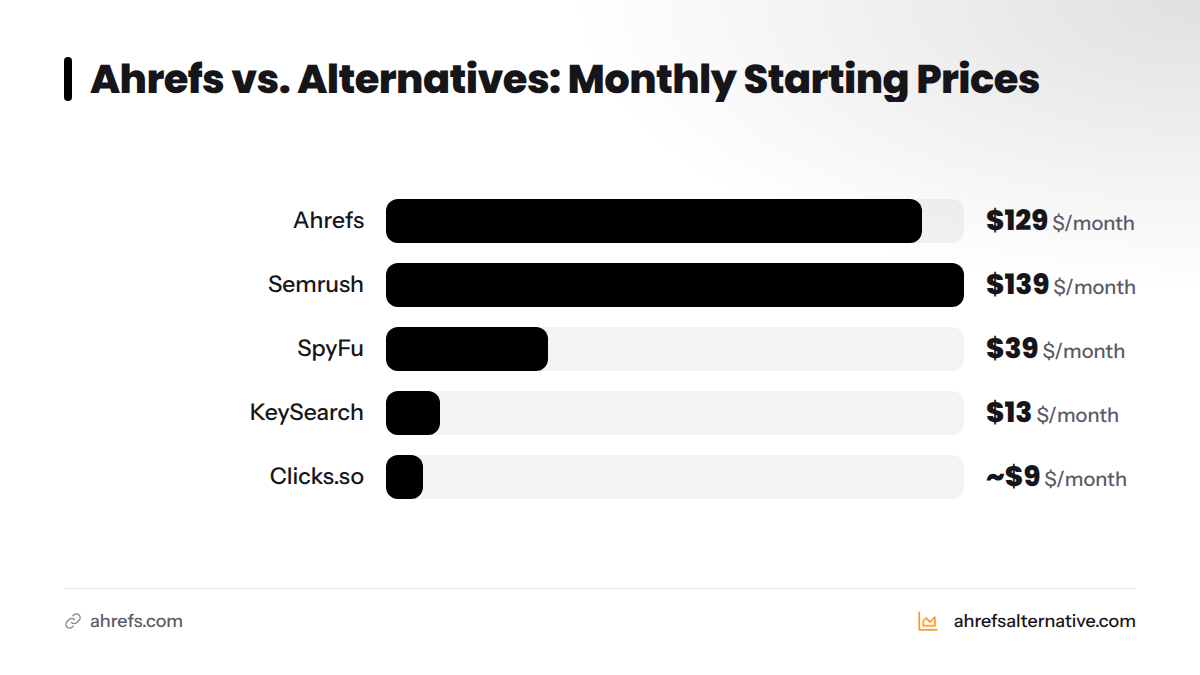
As of 2026, Ahrefs starts at $129 per month for their Lite plan. The Standard plan, which unlocks more data and features, runs $249 per month. Annual billing brings a discount, but even at the lowest tier, you are looking at $1,548 per year. For a blogger just starting out or a small business owner running their own content, that is a serious commitment.
For more context on what you are paying for, our Ahrefs review covers the full feature set honestly - including where it falls short.
Who Should Look for an Ahrefs Alternative?
You should look elsewhere if:
- You are starting a new blog or website and have not yet generated revenue from it
- Your monthly SEO budget is under $50
- You only need keyword research, not the full suite of backlink auditing, site crawling, and content explorer tools
- You are a freelancer managing a handful of clients without the scale to justify enterprise pricing
- You are a startup founder doing your own SEO and need results before spending heavily on tools
The best Ahrefs alternatives in 2026 cover a wide range of budgets and use cases - many of them give you 80% of Ahrefs' keyword research power at 10-20% of the price.
What Features Do Beginners Actually Need?
Most beginners need far less than Ahrefs provides. Here is the minimum feature set for effective keyword research:
- Keyword suggestions from a seed term - enter one idea, get dozens more
- Monthly search volume data - know how many people are searching
- Keyword difficulty score - find terms you can realistically rank for
- SERP overview or competitor analysis - see who already ranks and why
- Long-tail keyword generation - expand beyond obvious head terms
- Export functionality - save your keyword lists for content planning
Every tool in this guide provides most or all of these features at a fraction of Ahrefs' price.
The Best Free Keyword Research Tools
You can run a complete keyword research process without spending a dollar. These five free tools, used together, cover every stage of keyword discovery and validation.
Google Keyword Planner - Best for Search Volume Data
Google Keyword Planner is a free tool inside Google Ads. You do not need to run ads to use it. It provides real search volume data sourced directly from Google - the most authoritative source that exists.
Who it's for: Beginners who want reliable search volume data, PPC managers, and anyone who wants Google's own numbers.
Pros:
- Free with a Google account
- Volume data comes straight from Google
- Shows related keyword ideas from any seed term
- Displays historical trends and competition levels for paid ads
Cons:
- Volumes are shown in ranges (e.g., "1K-10K") unless you run active ad campaigns
- No keyword difficulty score for organic SEO
- Interface is designed for advertisers, not SEOs
Mini workflow:
- Sign in at ads.google.com and go to Keyword Planner
- Click "Discover new keywords" and enter 2-3 seed terms from your niche
- Filter by country and language for your target audience
- Sort results by average monthly searches
- Export the list to a spreadsheet and flag terms in the 100-2,000 monthly search range as priority targets
Google Search Console - Best for Optimizing Existing Content
Google Search Console shows you exactly which keywords your site already appears for in Google - even for pages that rank on page 3 or 4. This is free, accurate, and almost entirely overlooked by beginners.
Who it's for: Anyone with an existing website who wants to find quick ranking wins.
Pros:
- 100% free and directly connected to your Google Search data
- Shows real impressions, clicks, and average position by keyword
- Identifies keywords where you rank 8-20 ("page 2 opportunity" keywords)
- No third-party estimates - this is your actual data
Cons:
- Only works for your own site - you cannot research competitors
- Does not show search volume or keyword difficulty
- Data is limited to the past 16 months
Mini workflow:
- Open Search Console and click "Search results" in the left sidebar
- Set the date range to the last 90 days
- Click "Average position" to enable the position column
- Filter for queries with average position between 8 and 20
- These are your quick-win keywords - your content already has some relevance; a refresh and optimization push can move them to page 1
Google Trends - Best for Identifying Rising Topics
Google Trends shows relative search interest for any keyword over time. It will not give you an absolute search volume number, but it tells you whether a topic is growing, declining, or seasonal - information that changes how you prioritize.
Who it's for: Content marketers, news-adjacent sites, and anyone building a content calendar around timely topics.
Pros:
- Free and available globally
- Shows interest over time - spot rising trends before they peak
- Compare up to five keywords side by side
- Breaks interest down by geography, sub-region, and related queries
Cons:
- No absolute search volume - relative interest only
- Not useful for granular keyword difficulty analysis
- Works best as a complement to other tools, not a standalone research platform
Mini workflow:
- Go to trends.google.com and enter your target keyword
- Check the 12-month trend - is interest rising, flat, or declining?
- Scroll to "Related queries" and filter by "Rising" to find breakout topics
- Compare your keyword against 2-3 alternatives to see which has stronger momentum
- Use rising topics as content calendar priorities
AnswerThePublic - Best for Question-Based Keywords
AnswerThePublic visualizes the questions, prepositions, and comparisons people search around any topic. Type in a seed keyword and it generates a map of real questions people are asking in search engines.
Who it's for: Bloggers, content creators, and FAQ writers who want to capture informational and question-based search traffic.
Pros:
- Visual keyword discovery makes it easy to spot question clusters
- Excellent for finding People Also Ask (PAA) opportunities
- Free tier allows a limited number of daily searches
- Generates "who," "what," "when," "where," "why," and "how" keyword variations automatically
Cons:
- Free tier is capped - heavy users will need a paid plan
- Does not show search volume or keyword difficulty
- Results need cross-referencing with a volume tool like Google Keyword Planner
Mini workflow:
- Enter a seed keyword on answerthepublic.com
- Switch to the "Data" view for a clean list instead of the visual wheel
- Copy all question-format keywords (starting with "how," "what," "why," etc.)
- Paste them into Google Keyword Planner to check volume
- Prioritize questions with volume above 100/month - these are direct FAQ and blog post opportunities
Ubersuggest (Free Tier) - Best All-in-One Free Option
Ubersuggest, built by Neil Patel, offers a free tier that includes keyword suggestions, search volume, keyword difficulty, and basic SERP analysis. It is the closest thing to a full keyword research tool at no cost.
Who it's for: Beginners who want one tool that does most things without paying anything - at least to start.
Pros:
- Free searches available daily (limited but useful)
- Shows search volume, SEO difficulty, and paid difficulty
- Provides content ideas and SERP overview for free
- Beginner-friendly interface with a low learning curve
Cons:
- Free tier limits daily searches (around 3 per day)
- Data accuracy is not always on par with paid tools
- Some features (like historical data) are paywalled
Mini workflow:
- Go to neilpatel.com/ubersuggest and enter your seed keyword
- Review the keyword overview - note the search volume, SEO difficulty score, and CPC
- Scroll to "Keyword Ideas" for related, question, and comparison keywords
- Filter by SEO Difficulty under 40 and volume above 100
- Export the filtered list and build your content plan around the top 10-20 results
You can build a complete keyword strategy using only free tools. The free-only workflow section below walks you through the full process from start to finish.
Affordable Paid Keyword Research Tools Under $50/Month
Once your budget opens up - even slightly - your options multiply. These tools give you professional-grade keyword data at prices that make sense for individuals and small teams.
KeySearch - Best Budget Keyword Tool for Bloggers
Starting price: $13/month (Starter plan)
KeySearch is the tool I recommend first to any blogger or content creator working with a tight budget. At $13/month, it is the most affordable full-featured keyword research tool available, and it punches well above its price point.
Read our full breakdown: KeySearch: Best Alternative to Ahrefs
Key features:
- Keyword research with search volume, KD score, and CPC
- Competitor analysis - see what keywords competitors rank for
- SERP checker to analyze the top 10 results for any keyword
- YouTube keyword research included
- Content assistant for on-page optimization
Pros: Extremely affordable, accurate KD scores, clean interface, excellent for bloggers Cons: Smaller keyword database than Semrush or Ahrefs; fewer backlink analysis features
Best for: Bloggers, niche site builders, and beginners on a strict budget
Mini workflow - find 10 keywords in 15 minutes:
- Enter your seed keyword in KeySearch's Keyword Research tab
- Set the KD filter to "Easy" (under 35) and minimum volume to 100
- Sort by search volume descending
- Look at the top 20 results and note any with a green KD score
- Click into your 5 best candidates and check the SERP analysis - are the top-ranking pages from large authoritative sites, or from smaller blogs?
- Select keywords where smaller sites rank on page 1 - those are your entry points
- Export your final list and map each keyword to a content type (blog post, comparison page, FAQ)
Mangools / KWFinder - Best for Beginners Who Want a Premium Feel
Starting price: $29/month (Entry plan)
Mangools packages five tools - KWFinder, SERPChecker, SERPWatcher, LinkMiner, and SiteProfiler - into a suite that feels polished and professional without Ahrefs' complexity. KWFinder is its standout keyword research tool.
See our review: Mangools: Best Ahrefs Alternative
Key features:
- KWFinder delivers keyword suggestions, volume, KD, and trend data
- SERPChecker shows detailed metrics for the top 20 SERP results
- SERPWatcher tracks your keyword rankings over time
- Clean, visual interface designed for usability
Pros: Beautiful UI, very accurate KD scores, excellent SERP analysis, great customer support Cons: More expensive than KeySearch; some data limits on the entry plan
Best for: Beginners and freelancers who want a professional tool experience without the Ahrefs learning curve
Mini workflow:
- Open KWFinder and enter your seed keyword
- Use the "Related keywords" tab to find long-tail variations
- Filter by KD below 35 - Mangools color-codes difficulty from green (easy) to red (impossible)
- Click on any keyword to see the SERP overview on the right - check domain authority of top-ranking pages
- Add your best finds to a keyword list inside Mangools for tracking
SE Ranking - Best Value for Small Business Owners
Starting price: $23/month (Essential plan, billed annually)
SE Ranking is a full SEO platform - keyword research, rank tracking, site audit, backlink analysis, and competitor research - at a price that makes sense for small businesses. It is one of the best dollar-for-dollar tools in this category.
Read the deep dive: SE Ranking: Best Alternative to Ahrefs and see how it stacks up in our SE Ranking vs Ahrefs comparison.
Key features:
- Keyword research with volume, KD, CPC, and competition data
- Rank tracker for monitoring keyword positions daily
- Competitor analysis - enter any domain and see its top keywords
- White-label reporting (useful for freelancers with clients)
Pros: Full SEO platform for the price of a basic keyword tool; excellent rank tracking; white-label reports Cons: Interface can feel busy for true beginners; full feature set takes time to explore
Best for: Small business owners, local SEOs, and freelancers who need rank tracking alongside keyword research
Mini workflow:
- Go to SE Ranking's Keyword Research module and enter your target keyword
- Review the overview - volume, KD, CPC, and SERP features present
- Click "Similar keywords" for related ideas and "Low search volume keywords" for niche long-tails
- Use the Competitive Research module - enter your top competitor's URL to see their top-traffic keywords
- Filter for keywords your competitor ranks for that you do not - this is your keyword gap
This approach to cost-effective SEO for small businesses is exactly how SE Ranking pays for itself within the first month.
Ubersuggest (Paid) - Best for Solo Entrepreneurs
Starting price: $29/month (Individual plan)
Ubersuggest's paid plans remove the daily search limits and unlock historical data, site audit, rank tracking, and a backlink checker. For solo entrepreneurs managing one website, it covers the essentials without overwhelming complexity.
Full breakdown: Ubersuggest: Top Ahrefs Alternative
Pros: Affordable one-site plan, Neil Patel's educational resources built in, beginner-friendly Cons: Data lags behind Semrush and Ahrefs in accuracy; limited competitive analysis depth
Best for: Solo bloggers and entrepreneurs managing a single website
Clicks.so - Cheapest Paid Ahrefs Alternative
Starting price: ~$9/month
Clicks.so is the lowest-cost paid Ahrefs alternative with a meaningful feature set. For under $10 a month, you get keyword research, search volume data, keyword difficulty, and backlink data.
Review: Clicks.so: Cheapest Alternative to Ahrefs
Pros: The most affordable entry point in the paid tier; covers the core keyword research bases; no steep learning curve Cons: Smaller database than mid-tier tools; fewer advanced features; best treated as a starter tool
Best for: Absolute beginners who want paid-tool accuracy without the paid-tool price
For a full breakdown of budget-tier pricing, see our guide to cheaper alternatives to Ahrefs.
Mid-Range Tools With Advanced Features
Once your site grows and your SEO needs become more complex, these tools bring capabilities that budget options cannot match.
Semrush - Best for Competitive Analysis
Starting price: $139/month (Pro plan)
Semrush is the closest all-around competitor to Ahrefs at scale. Its keyword database is one of the largest available, and its competitive research features - particularly the Keyword Gap tool - are class-leading.
Our full take: Semrush: Top Best Ahrefs Alternative
Key features: Keyword Magic Tool (20+ billion keywords), Keyword Gap analysis, Traffic Analytics, Position Tracking, Site Audit, and more
Best for: Content marketers, agencies, and advanced SEOs who need full competitive intelligence and are willing to pay for it
SpyFu - Best for PPC + SEO Combined Research
Starting price: $39/month (Basic plan)
SpyFu is uniquely strong at revealing competitor keyword strategies for both organic SEO and paid search. If you run Google Ads alongside your SEO, SpyFu's combined PPC and SEO keyword data is hard to beat at this price.
Full review: SpyFu on Ahrefs Alternative
Best for: Businesses running both SEO and PPC campaigns who want to see where competitors invest their ad spend
Serpstat - Best for Teams on a Budget
Starting price: $59/month (Individual plan)
Serpstat gives teams access to keyword research, site audit, rank tracking, and backlink analysis with multi-user support at a price point that Semrush and Ahrefs cannot match.
Detailed look: Serpstat: Best Ahrefs Alternative
Best for: Small agencies and content teams that need shared access to a full SEO platform without agency-tier pricing
Search Atlas - Best for AI-Era Content Strategy
Starting price: Varies by plan (check site for current pricing)
Search Atlas integrates AI-driven content strategy with keyword research, making it one of the more forward-looking tools for 2026. Its AI-powered content briefs and topic clustering features help you build topical authority faster than manual keyword mapping allows.
Our review: Search Atlas: Best Ahrefs Alternative
Best for: Content strategists and site owners focused on building topical authority in the AI-era SERP
Want to explore the full list? Browse all alternatives to Ahrefs across every budget and use case.
Tool Comparison - Features and Pricing at a Glance
Here is every major tool side by side. Use this table to make your decision in under two minutes.
| Tool | Starting Price | Search Volume | KD Score | SERP Analysis | Long-Tail Gen | Free Plan | Best For |
|---|---|---|---|---|---|---|---|
| Ahrefs Alternative | See site | ✅ | ✅ | ✅ | ✅ | See site | Budget-focused SEOs wanting Ahrefs-level insight |
| Google KW Planner | Free | ✅ | ❌ | ❌ | ✅ | ✅ | Beginners, PPC users |
| Ubersuggest | Free / $29/mo | ✅ | ✅ | ✅ | ✅ | ✅ | Solo entrepreneurs |
| KeySearch | $13/mo | ✅ | ✅ | ✅ | ✅ | ❌ | Bloggers, beginners |
| Mangools | $29/mo | ✅ | ✅ | ✅ | ✅ | Trial | Beginners, freelancers |
| SE Ranking | $23/mo | ✅ | ✅ | ✅ | ✅ | Trial | Small businesses |
| Clicks.so | ~$9/mo | ✅ | ✅ | ✅ | ✅ | ❌ | Absolute budget users |
| SpyFu | $39/mo | ✅ | ✅ | ✅ | ✅ | Limited free | PPC + SEO users |
| Serpstat | $59/mo | ✅ | ✅ | ✅ | ✅ | Limited free | Teams |
| Semrush | $139/mo | ✅ | ✅ | ✅ | ✅ | Limited free | Agencies, marketers |
| Ahrefs | $129/mo | ✅ | ✅ | ✅ | ✅ | ❌ | Advanced SEOs, agencies |
Pricing reflects 2026 entry-level plans. Always verify current pricing on each tool's official pricing page before purchasing.
Which Tool Is Right for You? A Decision Framework
Stop overthinking the tool selection. Work through these questions in order and you will have your answer.
Do you have any budget at all?
- No budget - Use Google Keyword Planner, Google Search Console, AnswerThePublic, and Google Trends (all free). See the free-only workflow below.
Budget under $20/month?
- Yes - Start with Clicks.so (~$9/month) or KeySearch ($13/month). Both deliver real keyword data at a price that is hard to argue with.
Budget of $20-$50/month?
- Are you a beginner or solo creator? - Mangools ($29/month) or Ubersuggest ($29/month)
- Running a small business or managing clients? - SE Ranking ($23/month) - more features per dollar
Budget of $50-$140/month?
- Need competitive intelligence across multiple domains? - Serpstat ($59/month)
- Running paid search campaigns alongside SEO? - SpyFu ($39/month)
- Need AI-powered content planning? - Search Atlas
Budget of $140+/month?
- Full agency-grade competitive research? - Semrush ($139/month)
- Advanced backlink analysis + keyword research combined? - Ahrefs ($129/month) - but if you are on this site, you already know there are better-value alternatives
No budget? No problem. The next section walks through a complete, zero-cost keyword research workflow using only free tools.
For freelancers specifically, our guide to best SEO tools for freelancers breaks down tool selection by client type and project scope. If you are launching a startup, affordable SEO tools for startups has you covered.
How to Do Keyword Research Step by Step
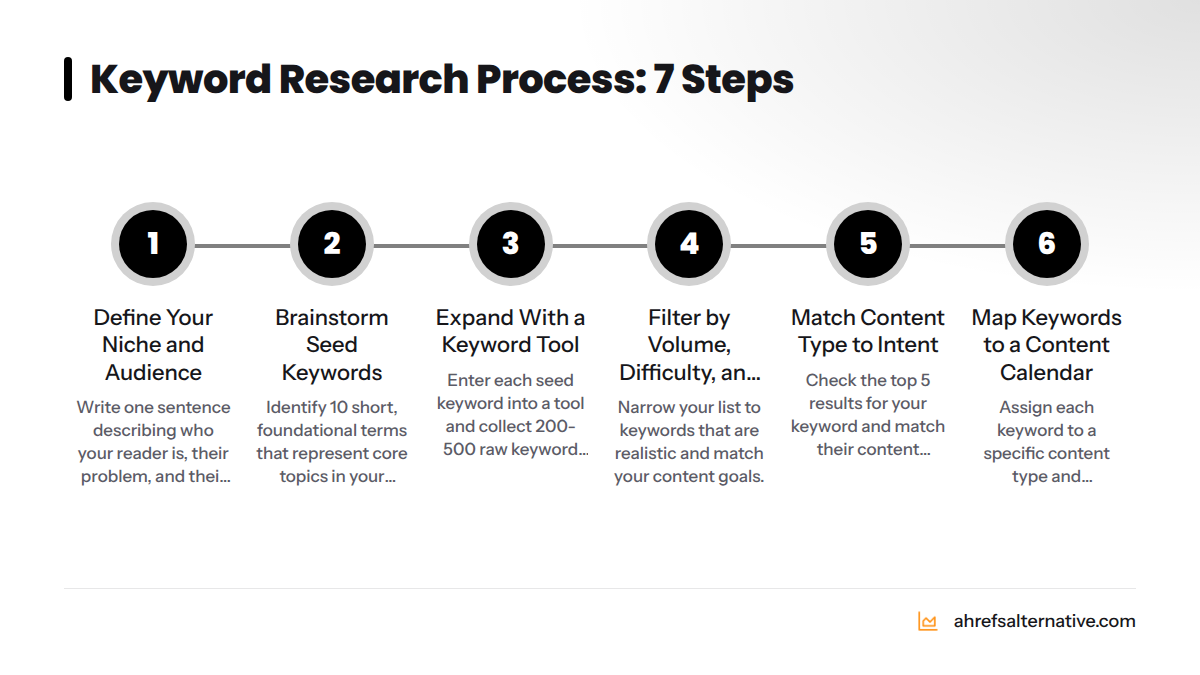
This is the core process - seven steps that take a beginner from "I have no idea where to start" to "I have a keyword strategy and a content calendar."
Here is a tutorial that walks through the mechanics alongside the steps:
Step 1 - Define Your Niche and Target Audience
Before you touch a keyword tool, get specific about who you are writing for and what niche you are in. "Health" is not a niche. "Strength training for women over 40 who work from home" is a niche.
Write one sentence that describes: who your reader is, what problem they face, and what outcome they want. Every keyword you research should connect back to that sentence.
Step 2 - Brainstorm Seed Keywords
A seed keyword is a short, foundational term that represents a core topic in your niche. It is not your target keyword - it is the starting point you feed into a keyword tool to generate hundreds of related ideas.
Brainstorm 10 seed keywords by asking:
- What would my ideal reader type into Google when they first realize they have this problem?
- What product, service, or topic categories does my site cover?
- What do my competitors' homepages and category pages talk about?
For a personal finance blog targeting millennials, seed keywords might include: "budget," "debt payoff," "emergency fund," "side hustle," "frugal living."
Step 3 - Expand Your List With a Keyword Tool
Enter each seed keyword into your chosen tool (any from the free or paid options above). Collect all the related keyword suggestions. Do not filter yet - just gather. Aim for 200-500 raw keyword ideas across all your seed terms.
Step 4 - Filter by Volume, Difficulty, and Intent
Now filter. Apply these criteria:
- Keyword Difficulty: under 30 for new sites, under 45 for sites with some authority
- Search Volume: minimum 50-100/month (do not reject low-volume keywords entirely - a 50-search/month keyword with zero competition and strong commercial intent can still be worth targeting)
- Intent match: does the keyword match the type of content you can create?
Step 5 - Rank Keywords by Priority
After filtering, you likely have 20-80 strong candidates. Rank them by a simple priority score:
- High priority: KD under 25, volume over 200, clear informational or commercial intent
- Medium priority: KD 25-40, volume 100-200, or slightly ambiguous intent
- Lower priority: KD above 40 (tackle these later as your domain authority grows)
Step 6 - Group Keywords Into Topic Clusters
Topic clusters are groups of related keywords that all point to a central subject. Instead of publishing 20 isolated blog posts on random topics, you build a hub page (the "pillar" page) covering a broad topic, with cluster pages covering specific subtopics in depth.
A pillar page on "home coffee brewing," for example, would be supported by cluster pages on: "how to use a French press," "best coffee grind size for pour-over," "cold brew coffee ratio," and so on. All cluster pages link back to the pillar. This structure builds topical authority - Google's signal that your site is a genuine expert source on a topic.
Step 7 - Map Keywords to Content and Optimize
Assign one primary keyword and two to five secondary keywords to each planned piece of content. Write the primary keyword into the page title, the first paragraph, at least one H2 or H3 heading, and naturally throughout the body. Do not force it - if a sentence sounds awkward with the keyword in it, rewrite the sentence.
Keyword research workflow checklist:
- Niche and target audience defined in one clear sentence
- 10 seed keywords brainstormed
- Keyword tool selected and accessed
- 200+ raw keyword ideas collected
- Filtered by KD < 30 and volume > 50
- Intent verified for each shortlisted keyword
- Top 20-30 keywords organized into topic clusters
- Primary and secondary keywords mapped to specific pages
- Content calendar built around priority keywords
A Complete Free Keyword Research Workflow (Zero Budget)
No credit card. No free trial. No paid tool. Here is how to build a keyword strategy spending nothing.
Step 1 - Mine Google Autocomplete and People Also Ask
Go to Google and start typing your seed keyword into the search bar. Do not press Enter yet - watch the autocomplete suggestions that drop down. Each suggestion is a real keyword that real people search. Write them all down.
Now press Enter and look at the search results page. Scroll to the "People Also Ask" box - the accordion of questions that expands as you click. Each question is a keyword. Click one and more appear. You can mine 20-30 keyword ideas from a single Google search this way, for free, in five minutes.
Step 2 - Check Volume in Google Keyword Planner
Take your list from Step 1 and run each keyword through Google Keyword Planner (free at ads.google.com). You will get search volume ranges and related keyword suggestions. Flag every keyword with a volume of at least 100/month as a potential target.
Step 3 - Spot Momentum in Google Trends
Open Google Trends and search for your top five keyword candidates. Check the 12-month trend - is interest growing or fading? A keyword with 500 monthly searches and rising interest is better than one with 1,000 searches and a declining trend. Prioritize the growers.
Step 4 - Pull Question Keywords From AnswerThePublic
Go to AnswerThePublic, enter your seed keyword, and grab every question-format result. Cross-check the interesting ones in Google Keyword Planner for volume. Any question with over 50 monthly searches is a blog post or FAQ opportunity.
Step 5 - Track Performance in Google Search Console
Once you publish content and it starts indexing, Google Search Console shows you which queries your pages appear for. Check back every 30 days. Look for keywords where you have impressions but low clicks - these are candidates for title and meta description improvements to lift click-through rate.
For more ways to monitor your SEO without paying for tools, see our guide on how to track backlinks for free.
Common Keyword Research Mistakes Beginners Make
Even with great tools and solid intent, beginners consistently make the same errors. Here they are - and how to avoid each one.
Mistake 1 - Targeting Keywords That Are Too Competitive
This is the most common and most costly mistake. A new site trying to rank for "best SEO tools" - a keyword dominated by Moz, Search Engine Journal, and HubSpot - is not going to crack the top 10. The domain authority gap is too wide.
Fix: Set a strict KD cap (under 30 for new sites) and only raise it as you accumulate rankings and backlinks.
Mistake 2 - Publishing the Wrong Content Type for the Keyword
You can have the right keyword and the wrong content type. If Google's top 10 results for a keyword are all "how to" tutorials and you publish a product page, you will not rank - regardless of how well-optimized your page is.
Fix: Before writing any piece of content, look at the top 5 results for your target keyword. What format are they in? Match that format.
Mistake 3 - Only Targeting Short, High-Volume Keywords
Short keywords feel exciting because of their search numbers. "Keyword research" sounds better than "how to do keyword research for a new blog." But the short version is 10 times harder to rank for and often converts worse because the intent is too broad.
Fix: Build your content calendar primarily around long-tail keywords. Use short-tail keywords as secondary targets once your site has authority.
Mistake 4 - Keyword Stuffing Instead of Natural Writing
Keyword stuffing - repeating a target keyword awkwardly throughout a page to "signal" relevance to Google - has been penalized since Google's Panda algorithm update in 2011. In 2026, with Google's natural language processing powered by systems like BERT and RankBrain, it actively hurts your rankings.
Fix: Write for the reader first. Use the keyword naturally in the title, the opening paragraph, and a few subheadings. Let synonyms and related terms carry the rest.
Mistake 5 - Never Revisiting Your Keyword Strategy
Keyword research is not a one-time task. Search behavior changes. Topics trend up and down. Competitors enter and exit your target keywords. A keyword strategy built 18 months ago and never revisited is a strategy built for a different SERP.
Fix: Schedule a keyword audit every six months. Use Google Search Console to check which keywords are gaining or losing impressions and adjust your content accordingly.
Even the best keyword tool won't help you if you're targeting the wrong terms. Intent is everything - and no tool can substitute for understanding your reader.
Keyword Research in the Age of AI - 2026 Update
The search environment shifted with Google's AI Overviews rollout, and keyword research strategy needs to shift with it. Here is what has changed and what it means for the tools and tactics you use.
Which Keywords AI Overviews Are Eating Into
AI Overviews appear above the traditional "10 blue links" for a growing share of informational queries. When they appear, they satisfy the user's question without requiring a click to any website. Search Engine Journal's coverage of AI Overviews documents how click-through rates on informational queries have dropped in categories where AI Overviews trigger.
Purely informational keywords - the "what is" and "how does" queries with simple answers - are increasingly zero-click territory. Keyword strategy in 2026 must account for this by targeting:
- Keywords with complex, nuanced answers that AI cannot summarize in three sentences
- Commercial and transactional intent keywords where users want to compare, choose, or buy
- Long-form "how to" topics where the value is in the detailed steps, not just the answer
Why Conversational and Question-Based Keywords Are Rising
AI Overviews are trained on natural language. The content they cite tends to directly answer conversational, question-based queries. This makes question-format keywords - "how do I find low-competition keywords without paying for Ahrefs?" - more valuable than ever for the pages that get cited inside AI answers.
Targeting questions in your content is no longer just a PAA strategy. It is now an AI citation strategy.
How to Adapt Your Keyword Approach for AI-Era Search
- Prioritize expertise signals: AI Overviews favor content with clear E-E-A-T signals. Be specific, cite sources, and write with demonstrable experience.
- Target "comparison" and "best for" keywords: These commercial-investigation queries still drive clicks because AI cannot make the final decision for a user who wants to know "which tool is best for my specific situation."
- Build topical authority: A site that comprehensively covers a topic earns both traditional rankings and AI citation mentions. Topic clusters are not optional in 2026 - they are the foundation.
- Use structured content: Numbered lists, tables, and clearly labeled FAQ sections are the formats AI Overviews pull from. Structure your content to make it easy for AI to quote.
Which Tools Work Best for AI-Era Keyword Research?
- Search Atlas - its AI-powered content planning features are specifically designed around topical authority and AI-era SERP structures
- SE Ranking - its SERP analysis clearly shows when AI Overviews trigger for a keyword, helping you decide whether to target it
- Semrush - its AI-integrated Keyword Magic Tool now flags keywords with high AI Overview presence
- KeySearch - budget-friendly and still highly effective for finding the long-tail and question-based keywords that succeed in AI-era SERPs
Frequently Asked Questions About Keyword Research Alternatives
Google Keyword Planner is the best starting point for beginners who want search volume data directly from Google at no cost. Pair it with Google Search Console (for your own site's data), AnswerThePublic (for question-format keywords), and Google Trends (for topic momentum) and you have a complete free research stack.
Yes - absolutely. Ahrefs is one option among many, and for most beginners it is not the right first choice. Tools like KeySearch ($13/month), SE Ranking ($23/month), and Mangools ($29/month) provide comparable keyword research capabilities at a fraction of the price. The free tools outlined in this guide cover the basics at no cost at all.
Google Keyword Planner is accurate for showing relative search demand because the data comes directly from Google. Its main limitation for SEOs is that it shows volume in broad ranges (e.g., "1,000-10,000") unless you have active Google Ads campaigns. For organic SEO, use it for directional guidance and cross-reference with a paid tool's more precise estimates when precision matters.
Clicks.so is currently the cheapest paid Ahrefs alternative with a meaningful keyword research feature set, at approximately $9/month. KeySearch at $13/month is the next step up and offers notably more depth. If free is the requirement, Google Keyword Planner covers the basics at zero cost.
Keyword difficulty (KD) is a score from 0 to 100 that estimates how hard it would be to rank in the top 10 Google results for a given keyword. It is typically calculated based on the backlink profiles of pages that currently rank. A KD of 10-20 is considered easy; 40-60 is moderate; 70+ is hard to very hard. Beginners should focus on keywords with KD under 30, where it is realistic to rank without an established backlink profile.
Short-tail keywords are broad, one-to-two-word phrases with high search volume and high competition ("SEO tools," "keyword research"). Long-tail keywords are specific, three-or-more-word phrases with lower volume but lower competition and clearer intent ("best free keyword research tools for new bloggers"). Beginners should prioritize long-tail keywords because they are realistically rankable and often convert better.
Use Google Autocomplete to find specific long-tail variations, then check volume in Google Keyword Planner. Filter for keywords in the 100-1,000 monthly search range. Use AnswerThePublic to find question-format keywords - questions tend to be more specific and therefore less competitive. Cross-check your candidates by searching the keyword on Google and examining the domain authority of the top-ranking pages. If smaller sites and blogs rank on page 1, you have a realistic shot.
Ubersuggest and Ahrefs are not equivalent tools. Ahrefs has a significantly larger keyword database, more accurate backlink data, and deeper site audit capabilities. Ubersuggest is a solid, beginner-friendly tool for keyword discovery and basic competitive research at a much lower price point. For most beginners and solo entrepreneurs, Ubersuggest provides enough functionality. For agencies and advanced SEOs who need precision backlink data and large-scale site audits, Ahrefs (or Semrush) is the better fit.
Search intent is the underlying goal behind a search query. It falls into four main categories: informational (learning something), navigational (finding a specific site), commercial (comparing options before buying), and transactional (ready to purchase). Keyword choice must match content type to intent - an informational keyword needs an educational article; a transactional keyword needs a product page or comparison guide. Mismatching intent is one of the fastest ways to ensure your content does not rank.
Review your keyword strategy every six months. Use Google Search Console to check which keywords are gaining or losing impressions. Re-run your top-priority keywords in your chosen tool to check if competition has increased or if new long-tail variations have emerged. Annual shifts in search behavior - especially in fast-moving niches - can make a previously strong keyword list outdated within a year.
A seed keyword is a short, broad term that represents a core topic in your niche. It is not the keyword you target for content - it is the term you feed into a keyword research tool to generate a long list of related keywords. "Keyword research" is a seed keyword. From it, a tool generates hundreds of related terms like "keyword research tools for beginners," "free keyword research," and "how to do keyword research without Ahrefs."
Log in to Google Search Console, go to "Search results," and enable both the "Impressions" and "Average position" columns. Filter for queries where your average position is between 8 and 25 - these are keywords where your pages already have relevance signals but are not yet on page 1. Updating and improving those pages is often faster than creating new content from scratch. This is a zero-cost way to find high-value, low-effort ranking opportunities.
KeySearch is one of the best value keyword research tools available, especially for bloggers and niche site builders. At $13/month, it provides accurate keyword difficulty scores, search volume data, SERP analysis, and competitor research. For beginners who want paid-tool accuracy without committing to a $29-$139 monthly plan, KeySearch is one of the strongest recommendations in this guide.
Among professionals working with small budgets, SE Ranking and KeySearch consistently come up as top picks. SE Ranking at $23/month provides a full platform - keyword research, rank tracking, site audit, and backlink analysis. KeySearch at $13/month is the go-to for bloggers who primarily need keyword discovery and difficulty data. Mangools at $29/month rounds out the top three for those who want a polished, beginner-friendly experience. For teams with more budget, Semrush and Serpstat offer agency-grade features without Ahrefs' price tag.
Choosing the Right Tool for Where You Are Right Now
Keyword research is not a luxury for established SEO professionals. It is the foundation of any content strategy that actually drives traffic. And you do not need a $129-a-month subscription to do it well.
Here is the recommendation matrix, by user type:
| User Type | Recommended Free Tools | Recommended Paid Tool | Budget |
|---|---|---|---|
| New blogger / beginner | Google KW Planner + AnswerThePublic | KeySearch | $0-$13/mo |
| Freelancer with clients | Google Search Console + Trends | SE Ranking or Mangools | $23-$29/mo |
| Small business owner | Google KW Planner + Search Console | SE Ranking | $23/mo |
| Startup founder | Google Trends + AnswerThePublic | Clicks.so or KeySearch | $9-$13/mo |
| Content marketer | Full free stack above | Semrush or Mangools | $29-$139/mo |
| Agency / advanced SEO | - | Semrush or Ahrefs | $129-$139/mo |
The right tool is always the one that matches your budget, your site's current authority, and the complexity of your keyword research needs. Start with what you can afford. Upgrade as your site grows and your SEO returns justify the investment.
Every tool reviewed in this guide is active and currently operating. Prices, features, and plans change - always verify current pricing on each tool's official website before subscribing.
Ready to go deeper? Browse all alternatives to Ahrefs across every category and budget tier. If you know a tool that belongs on this site, submit it for consideration. We review every submission and cover the tools that genuinely serve budget-conscious SEOs.
Sources
- Ahrefs Study: Why 90% of Pages Get No Organic Traffic from Google
- SparkToro Blog - Search Behavior and Audience Research
- Search Engine Journal - Google AI Overviews Coverage
- Google Keyword Planner - Official Tool
- Google Search Console - Official Tool
- Google Trends - Official Tool
- AnswerThePublic - Keyword Discovery Tool
- Ubersuggest by Neil Patel
- KeySearch - Official Site
- Mangools - Official Site
- SE Ranking - Official Site
- Semrush - Official Site
- SpyFu - Official Site
- Serpstat - Official Site
- Search Atlas - Official Site
- Clicks.so - Official Site
- Ahrefs Pricing Page