Choosing the wrong SEO tool is an expensive mistake. You sign up, spend weeks building keyword lists and rank tracking setups, then realize the data quality is shaky - or the pricing jumps 60% the moment you need one extra feature. I've been through that cycle more than once, and it's the reason I built a structured way to evaluate these platforms before committing a dollar.
This guide gives you exactly that: a reusable, seven-pillar framework for comparing any SEO tool against Ahrefs - the platform most of the industry treats as the measuring stick. Whether you're paying $129 a month for Ahrefs right now and wondering if it's worth it, or you're shopping for your first SEO tool and using Ahrefs as a reference point, this framework will help you make a confident, data-backed decision.
You'll also find a full pillar-by-pillar comparison of nine tools, audience-specific recommendations, a free-trial stress-test checklist, a 12-month cost breakdown, and a guide to switching away from Ahrefs without losing your workflow. For a curated, tested shortlist of best Ahrefs alternatives across every budget, that resource runs alongside this guide.
Why Ahrefs Is the Benchmark
Ahrefs earned its benchmark status through three things done consistently well: a massive, frequently refreshed backlink index, a large keyword database covering billions of queries across dozens of search engines, and a clean interface that makes complex SEO data accessible without a developer in the room.
When SEOs talk about Domain Rating (DR) - a logarithmic score from 0 to 100 that estimates the strength of a domain's backlink profile - they're referencing an Ahrefs-specific metric that has become so widely cited it functions almost like an industry standard, even though it's proprietary. The same applies to URL Rating (UR), which measures the link strength of an individual page. Moz has its own Domain Authority (DA) metric, and other tools have their own variants, but Ahrefs DR is the number most SEOs reach for first when qualifying a link prospect or benchmarking a competitor.
Ahrefs also helped popularize content gap analysis as a mainstream workflow. Its Site Explorer, Keywords Explorer, Site Audit, Rank Tracker, and Content Explorer features set the template that most competitors are now measured against.
The Price Problem
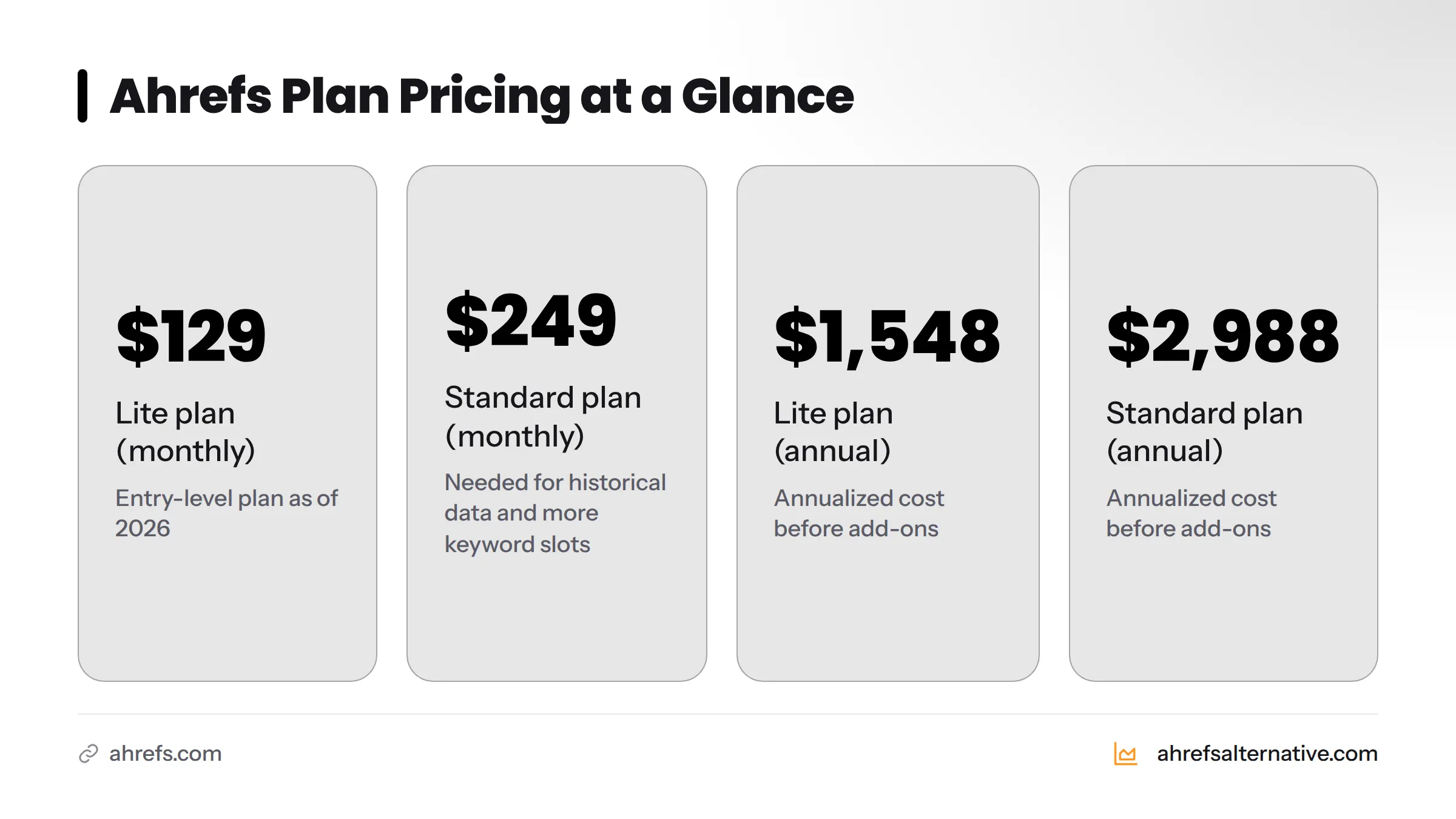
Here's the honest number: Ahrefs' Lite plan starts at $129 per month as of 2026. The Standard plan - which most solo SEOs actually need for historical data and more keyword tracking slots - costs $249 per month. Annualized, that's $1,548 to $2,988 before any add-ons.
For a funded agency running dozens of client accounts, that math works. For a freelancer, a blogger, a startup in its first year, or a small business owner managing their own SEO, it often doesn't. The features-to-price ratio simply doesn't hold when you're only using 30% of the platform.
Quick stat: Ahrefs Lite starts at $129/month ($1,548/year). Many of the affordable SEO tools in this guide deliver the core features most users actually need for $20 to $80 per month - saving $600 to $1,300 per year.
What "Comparing SEO Tools Like Ahrefs" Actually Means
Comparing SEO platforms against Ahrefs means using its feature set, data quality, and pricing as a fixed reference point, then asking: does this alternative hit the same bars that matter for my specific use case? Not every bar - some Ahrefs features are genuinely overkill for most users - but the ones that drive your actual workflow.
That's the core idea behind the framework below. Instead of reading another ranked list and taking someone else's word for it, you build your own scoring model, weight it by what you actually do, and run every candidate through the same test.
The 7-Pillar Framework for Evaluating Any SEO Tool
To compare SEO platforms, evaluate each one across seven core pillars: keyword research capability, backlink database size and freshness, site audit depth, rank tracking accuracy, competitor and content gap analysis, reporting and data export flexibility, and pricing value relative to your use case. Use Ahrefs as the baseline benchmark, then score alternatives against each pillar based on your specific workflow and budget.
Pillar 1 - Keyword Research Capability
Keyword research is the entry point for almost every SEO campaign, which makes it the pillar most users touch daily. The key questions: How large is the keyword database? Does the tool provide reliable search volume estimates, or are they wildly off from Google Search Console actuals? Does it show keyword difficulty (KD) in a way that reflects real ranking competition, not just a generic score?
Ahrefs draws from a multi-billion keyword database and shows KD alongside the number of referring domains the top-ranking pages carry - a genuinely useful signal. Look for alternatives that show similar context, not just a raw difficulty number. For a deeper look at keyword research tools that hold up without Ahrefs, the keyword research alternatives guide covers the workflow in detail.
What to check in any tool:
- Total keywords in the database (look for 1 billion+ for serious use)
- SERP preview for each keyword (who currently ranks and why)
- Keyword clustering or grouping features
- Question-based and long-tail keyword discovery
- Search volume trend data (not just a static monthly average)
Pillar 2 - Backlink Database Size and Freshness
The backlink index is where tools diverge most dramatically. A large index means you see more of a site's real link profile; a stale index means you're making decisions based on links that no longer exist.
Ahrefs has historically maintained one of the largest crawled link indexes, reportedly crawling hundreds of billions of pages. But database size is not the same as data quality. I've run the same domain through multiple tools and found that SE Ranking, for example, misses some links Ahrefs catches - but also flags some as active that Ahrefs has already marked as lost. Freshness matters as much as volume.
For free backlink tracking as a supplement, the track backlinks free guide covers a practical workflow using Google Search Console alongside paid tools.
What to check in any tool:
- How often is the backlink index refreshed? (Daily or weekly is the standard for premium tools)
- Does the tool show lost and new backlinks separately?
- Can you filter by anchor text, link type (dofollow/nofollow), and DR range?
- Is there a spam score or toxicity indicator?
Pillar 3 - Site Audit and Technical SEO
A site audit crawls your domain and surfaces issues that hurt your ability to rank: broken links, missing canonical tags, slow pages, missing schema markup, crawl budget waste, and Core Web Vitals failures. Ahrefs Site Audit is thorough and presents findings in a dashboard most SEOs can navigate without a technical background.
The meaningful difference between tools here is crawl depth and report clarity. Some tools give you a wall of issues without prioritizing them. The best tools tell you what to fix first and why - and link the issue directly to its impact on organic traffic.
What to check in any tool:
- How many pages can you crawl on your plan?
- Does the audit cover Core Web Vitals, schema markup, and index coverage?
- Are issues prioritized by severity, or just listed?
- Can you schedule recurring audits automatically?
Pillar 4 - Rank Tracking Accuracy
Rank tracking answers the simplest question in SEO: are my pages moving up or down? The accuracy problem is real - tracked rankings can vary by device, location, and time of day. Tools that track less frequently or sample from limited data points give you a blurry picture.
Ahrefs Rank Tracker updates daily on higher plans and lets you segment by country, device, and SERP feature (featured snippet, People Also Ask, etc.). The SERP history feature, which shows how rankings evolved over time, is genuinely useful for diagnosing algorithm update impacts.
What to check in any tool:
- Update frequency: daily, weekly, or on-demand?
- Can you track local rankings by city or ZIP code?
- Does the tool show SERP feature presence (featured snippets, image packs)?
- How many keywords can you track on the entry plan?
Pillar 5 - Competitor and Content Gap Analysis
This is where Ahrefs arguably earns its subscription price for content teams. The content gap tool shows keywords your competitors rank for that you don't, letting you prioritize content creation with actual demand data behind it.
Competitor analysis also covers organic traffic estimation, top-page discovery, and SERP overlap. Not every tool executes this equally. Some show the data but bury it in a confusing interface; others give you a clean competitor matrix that takes five minutes to act on.
What to check in any tool:
- Can you compare up to five competitors simultaneously?
- Does the content gap show keyword difficulty alongside the gap?
- Is there an organic traffic estimator for competitor domains?
- Does it show paid keyword overlap too (useful for PPC-aware SEOs)?
Pillar 6 - Reporting and Data Export
Reporting matters more the moment you have a client or a manager to update. Ahrefs lets you export most data to CSV and build custom reports, but it doesn't have a built-in white-label reporting feature on its lower plans - a meaningful gap for agencies.
Google Looker Studio integrations are increasingly standard among mid-tier tools, and some (like SE Ranking) include branded PDF reports even on lower plans.
What to check in any tool:
- Can you export keyword lists, backlink data, and audit reports without a data cap?
- Is there a white-label reporting option?
- Does the tool integrate with Google Search Console, Google Analytics 4, or Looker Studio?
- Can you schedule automated report delivery to clients?
Pillar 7 - Pricing, Value, and Scalability
Pricing is the pillar most people start with, but I recommend saving it for last. Once you know what features you actually need and how each tool scores across the first six pillars, the price becomes a filter, not a starting point.
The key questions: What's the effective cost per tracked keyword? What's the cost per crawled page? Do limits reset monthly or accumulate? And - what happens to your price when you need to scale?
What to check in any tool:
- Are usage limits (keywords tracked, pages crawled, users) tied to plan tier?
- Is annual billing required for the advertised price, or is monthly available?
- Is there a free trial with no credit card required?
- What does the next plan up cost, and when would you realistically need it?
7-Pillar Importance Weight by User Type
| Pillar | Freelancer | Startup | Agency | Content Marketer | Beginner |
|---|---|---|---|---|---|
| Keyword Research | High | High | High | High | High |
| Backlink Database | Medium | Medium | High | Low | Low |
| Site Audit | Medium | High | High | Low | Medium |
| Rank Tracking | High | High | High | Medium | Medium |
| Competitor / Content Gap | Medium | High | High | High | Low |
| Reporting & Export | Low | Medium | High | Low | Low |
| Pricing & Scalability | High | High | Medium | High | High |
How to Score an SEO Tool Against Each Pillar
Here's the step-by-step process I use when evaluating any new SEO tool. Run through it during the free trial period and you'll have a defensible, data-backed decision at the end - not just a gut feeling.
Step 1 - Define Your Primary SEO Use Case
Before you open a single dashboard, write down the three tasks you'll do in an SEO tool every week. For most freelancers it's keyword research for client briefs, rank tracking for monthly reports, and occasional backlink prospecting. For a startup it might be site audits, content gap discovery, and tracking five to ten core money keywords. Your use case determines which pillars carry the most weight in your scoring.
Step 2 - Build Your Feature Priority List
List the specific features you need, ranked from must-have to nice-to-have. Be honest: if you've never used a link intersect tool, it's not a must-have. A must-have list of eight to ten items is manageable; a list of thirty is useless for decision-making.
Step 3 - Map Features to the 7 Pillars
Take your priority list and assign each item to one of the seven pillars. This reveals which pillars dominate your workflow. If seven of your ten must-haves fall under keyword research and rank tracking, those two pillars should carry 60 to 70% of your total score.
Step 4 - Run the Free-Trial Stress Test
This is where most people waste their trial by poking around casually. Instead, run a structured protocol (see the checklist below). Use the same domain, the same target keyword, and the same competitor set in every tool you evaluate. Consistent inputs produce comparable outputs.
Step 5 - Calculate Cost Per Feature
Take the monthly plan price and divide it by the number of must-have features the plan actually delivers. A $99/month tool that hits 9 of your 10 must-haves costs $11 per feature. A $129/month tool that hits all 10 costs $12.90 per feature. At that margin, price is almost irrelevant - but when the $99 tool only hits 5, the effective cost jumps to $19.80 per feature and the comparison shifts dramatically.
Step 6 - Check Integration Compatibility
Confirm the tool connects to the platforms already in your workflow. At minimum: does it pull data from Google Search Console and Google Analytics 4? Can you export to a format your CMS or reporting tool accepts? Integrations listed as "coming soon" don't count.
Step 7 - Score and Rank Your Shortlist
Assign each tool a score from 1 to 5 on each pillar, weighted by the importance you established in Step 3. Total the weighted scores. The tool with the highest weighted score, within your budget ceiling, is your choice. Keep the scorecard - you'll want it in six months when a colleague asks why you chose what you chose.
Free-Trial Stress Test Protocol (12 Steps)
Use this checklist during any SEO tool's trial period. Test the same domain and keyword set in each tool you evaluate.
- 1. Run a full site crawl on a domain you know well. Note how many issues are flagged and whether they match what you already know is broken.
- 2. Look up a keyword you track in Google Search Console. Compare the tool's volume estimate to your actual GSC impression data.
- 3. Check a competitor's backlink profile. Count how many referring domains the tool shows, then compare to the same domain in a second tool.
- 4. Check a backlink you know exists (one you built or earned recently). Confirm the tool shows it as active.
- 5. Check a backlink you know is dead (a link from a site that went offline). Confirm the tool shows it as lost.
- 6. Run a content gap analysis against two competitors. Assess whether the keyword suggestions are relevant or noisy.
- 7. Set up rank tracking for 10 keywords. Note how long it takes to populate and whether the starting rankings match your Google Search Console position data.
- 8. Export a keyword list to CSV. Verify the exported file is clean and usable in a spreadsheet without manual cleanup.
- 9. Test the reporting feature. Generate a report for one of the above tasks. Could you send this to a client or manager as-is?
- 10. Check the data refresh date. When was the backlink index last updated? When were keyword volumes last refreshed?
- 11. Contact support with a real question. Note response time and quality. You'll need this relationship when something breaks.
- 12. Check your usage limits. By day five of a seven-day trial, how much of your keyword tracking, crawl credit, and report allocation have you used? At this rate, would the plan cap out before month-end?
Ahrefs vs. Top Alternatives - Pillar-by-Pillar Comparison
Here's how nine tools score when run through the framework above. Pricing reflects published 2026 rates on entry-level plans.
Ahrefs - Benchmark Scores Across All 7 Pillars
Ahrefs sets the standard: billions of keywords in its database, one of the largest backlink indexes available, a reliable daily-updating rank tracker, and thorough site audits with structured issue prioritization. The weakness is price ($129/month Lite, $249/month Standard) and the fact that the Lite plan restricts historical data to six months - which matters if you want to diagnose traffic drops that happened before you subscribed. A full breakdown lives in the Ahrefs review on this site.
Pillar scores (1-5): Keyword Research: 5 | Backlink: 5 | Site Audit: 4 | Rank Tracking: 5 | Competitor Analysis: 5 | Reporting: 4 | Pricing Value: 2
Semrush - How It Compares to Ahrefs
Semrush is Ahrefs' closest full-feature rival and the tool most agencies reach for when they need paid search data alongside organic SEO. Its keyword database is comparably large, its site audit is thorough, and its Topic Research and Content Marketing Platform features give it an edge for content teams. The Pro plan starts at $139.95/month, putting it in the same price tier as Ahrefs. The main trade-off: Semrush's backlink index has historically been considered slightly smaller than Ahrefs', though both cover the vast majority of high-authority links. For a detailed look at the Semrush alternative profile, that page covers its key differentiators.
Pillar scores (1-5): Keyword Research: 5 | Backlink: 4 | Site Audit: 5 | Rank Tracking: 4 | Competitor Analysis: 5 | Reporting: 5 | Pricing Value: 2
SE Ranking - The Best Mid-Range Alternative?
In my testing, SE Ranking is the most complete mid-range tool available in 2026. Its Essential plan starts at $65/month (monthly billing), its backlink checker covers most link-building use cases, its site audit is genuinely thorough, and its rank tracker updates daily. What impressed me most was its white-label reporting - available on plans that cost half what Ahrefs charges - which makes it a strong pick for freelancers with clients. The content gap tool is functional, though it lacks the depth of Ahrefs' content gap for large-scale content operations. The full SE Ranking vs Ahrefs breakdown covers this head to head, and the SE Ranking alternative page has pricing detail.
Pillar scores (1-5): Keyword Research: 4 | Backlink: 3 | Site Audit: 4 | Rank Tracking: 4 | Competitor Analysis: 3 | Reporting: 5 | Pricing Value: 5
Mangools - Best for Beginners and Freelancers?
Mangools bundles five tools - KWFinder, SERPChecker, SERPWatcher, LinkMiner, and SiteProfiler - into plans starting at $29/month (annual billing). KWFinder in particular is one of the cleanest keyword research interfaces available: it shows search volume, trend, keyword difficulty, and SERP difficulty all on one screen without cognitive overload. LinkMiner is a solid backlink discovery tool for basic link prospecting. Where Mangools falls short: its backlink index is smaller than Ahrefs', its site audit is less deep, and its keyword database covers fewer markets. For a freelancer or blogger who needs clean keyword data and monthly rank tracking, it clears the bar at a price that's hard to argue with. See the Mangools alternative page for current plan details.
Pillar scores (1-5): Keyword Research: 4 | Backlink: 3 | Site Audit: 2 | Rank Tracking: 3 | Competitor Analysis: 3 | Reporting: 2 | Pricing Value: 5
Seobility - Best Budget-Friendly Option?
Seobility leads with its site audit capability, which is genuinely strong at the price point. The free plan lets you crawl up to 1,000 pages of one project - useful for small sites. The Premium plan at $50/month adds more projects, more crawl depth, and rank tracking. Backlink analysis is present but limited compared to Ahrefs. For a business whose main SEO need is technical health monitoring and on-page optimization, Seobility delivers solid value. For link building or deep competitor analysis, pair it with a free Google Search Console setup. The Seobility alternative page has a current feature breakdown.
Pillar scores (1-5): Keyword Research: 3 | Backlink: 2 | Site Audit: 4 | Rank Tracking: 3 | Competitor Analysis: 2 | Reporting: 3 | Pricing Value: 5
KeySearch - Best for Content Marketers on a Budget?
KeySearch is a purpose-built keyword research tool with a side of rank tracking. At $17/month (or $169/year), it's one of the most affordable tools that still gives you meaningful keyword difficulty scores, SERP analysis, and competitor keyword data. I find it genuinely useful for content-focused workflows where the primary need is finding low-competition long-tail keywords fast. Its backlink data and site audit are thin - treat it as a keyword research specialist, not an all-in-one platform. The KeySearch alternative page covers its limits clearly.
Pillar scores (1-5): Keyword Research: 4 | Backlink: 2 | Site Audit: 1 | Rank Tracking: 3 | Competitor Analysis: 3 | Reporting: 2 | Pricing Value: 5
Ubersuggest - Worth Considering?
Ubersuggest, built by Neil Patel, offers a freemium model with paid plans starting at $29/month. It covers keyword research, backlink data, site audits, and rank tracking in a single dashboard. The keyword database is solid for English-language markets. Where it struggles: the backlink index is noticeably smaller than Ahrefs or Semrush, and the site audit lacks the granularity that technical SEOs need. For someone brand-new to SEO who wants a no-commitment entry point, the free tier is genuinely useful. For anything beyond basic research, the value ceiling is lower than SE Ranking or Mangools at a similar price. The Ubersuggest alternative page has a current feature summary.
Pillar scores (1-5): Keyword Research: 3 | Backlink: 2 | Site Audit: 3 | Rank Tracking: 3 | Competitor Analysis: 3 | Reporting: 2 | Pricing Value: 4
Serpstat - Agency Value Play?
Serpstat positions as a multi-purpose SEO platform for agencies and in-house teams. Its Individual plan starts at around $59/month and includes keyword research, backlink analysis, rank tracking, and site audit. The keyword database is large and covers multiple search engines. Serpstat's batch analysis feature - where you upload hundreds of domains and get metrics back in bulk - is a genuine time-saver for agency workflows. The interface is denser than Mangools or SE Ranking, which means a steeper learning curve for new users. The Serpstat alternative page walks through the agency-specific features.
Pillar scores (1-5): Keyword Research: 4 | Backlink: 3 | Site Audit: 3 | Rank Tracking: 4 | Competitor Analysis: 4 | Reporting: 4 | Pricing Value: 4
Clicks.so - The Cheapest Credible Option?
Clicks.so occupies the lowest price tier of any credible SEO tool on this list, with plans starting under $10/month. Its keyword research and rank tracking functionality cover the basics, making it a legitimate option for a solo blogger or micro-business that needs rank monitoring without a significant monthly outlay. I wouldn't use it as a primary tool for client work or competitive research - the database depth and feature breadth are limited compared to mid-tier alternatives - but as a starter tool or a rank-tracking add-on alongside free tools from Google, it earns its price. The Clicks.so alternative page covers what you get at each plan level.
Pillar scores (1-5): Keyword Research: 2 | Backlink: 2 | Site Audit: 2 | Rank Tracking: 3 | Competitor Analysis: 2 | Reporting: 2 | Pricing Value: 5
Master SEO Tool Comparison Table
| Tool | Starting Price/mo | Keyword DB | Backlink Index | Site Audit | Rank Tracking | Best For | Overall Score vs. Ahrefs |
|---|---|---|---|---|---|---|---|
| Ahrefs Alternative | See site | - | - | - | - | Finding the right alternative fast | Benchmark directory |
| Ahrefs | $129 | ★★★★★ | ★★★★★ | ★★★★ | ★★★★★ | Agencies, advanced SEOs | Benchmark (34/35) |
| Semrush | $139.95 | ★★★★★ | ★★★★ | ★★★★★ | ★★★★ | Agencies, PPC + SEO teams | 33/35 |
| SE Ranking | $65 | ★★★★ | ★★★ | ★★★★ | ★★★★ | Freelancers, small agencies | 28/35 |
| Serpstat | $59 | ★★★★ | ★★★ | ★★★ | ★★★★ | Agencies, batch analysis users | 26/35 |
| Mangools | $29 | ★★★★ | ★★★ | ★★ | ★★★ | Beginners, bloggers, freelancers | 22/35 |
| Seobility | $50 | ★★★ | ★★ | ★★★★ | ★★★ | Technical SEO focus, small sites | 22/35 |
| Ubersuggest | $29 | ★★★ | ★★ | ★★★ | ★★★ | Beginners, entry-level research | 19/35 |
| KeySearch | $17 | ★★★★ | ★★ | ★ | ★★★ | Content marketers, bloggers | 18/35 |
| Clicks.so | ~$10 | ★★ | ★★ | ★★ | ★★★ | Micro-businesses, solo bloggers | 16/35 |
Scores are weighted composites based on the 7-pillar framework applied across published features and hands-on testing. Pricing reflects monthly billing as of 2026; annual billing typically reduces costs by 15-25%.
Audience-Specific Recommendations: Which Tool Should You Choose?
Freelancers (Budget Under $30/mo)
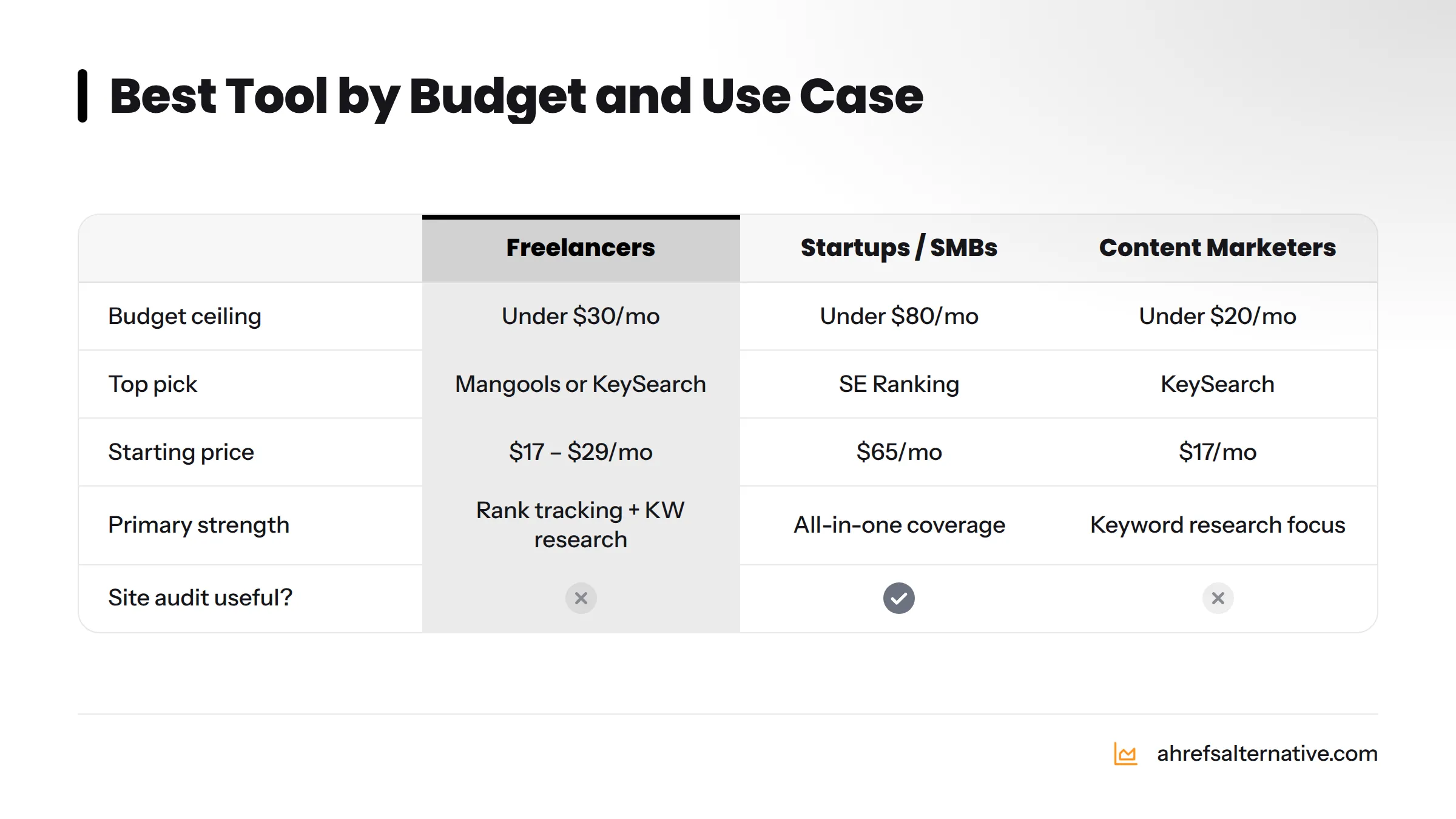
Your primary needs are keyword research for client briefs, monthly rank reports, and occasional backlink checks. You don't need a 500,000-page crawl limit or white-label reporting for 20 clients. Mangools at $29/month (annual billing) or KeySearch at $17/month are the strongest fits. Mangools wins if you need rank tracking and backlink prospecting; KeySearch wins if keyword research is 90% of your work.
The guide on SEO tools for freelancers covers this decision in more depth, with specific workflow examples.
Decision path: Budget under $30 + keyword research focus - KeySearch. Budget under $30 + need rank tracking - Mangools.
Startups and Small Businesses (Budget Under $80/mo)
You need a tool that covers all the bases - keyword research, site audit, rank tracking, and enough backlink data to monitor your link-building efforts - without a plan jump the moment you add a second project. SE Ranking at $65/month is the strongest choice here. It scales cleanly, includes white-label reports if you ever need them, and the site audit depth is genuinely useful for fixing technical issues on a CMS like WordPress or Shopify.
The guide on affordable SEO tools for startups goes deeper on what startup-stage teams need from an SEO platform.
Decision path: Budget under $80 + need all-in-one coverage - SE Ranking. Budget under $80 + primarily need technical audits - Seobility.
Content Marketers Focused on Keywords
Content marketers live in keyword research and content gap analysis. The backlink database matters less; the site audit matters very little. KeySearch at $17/month covers the core need. If you want more SERP context and content ideas, Mangools' KWFinder adds SERP previews and competitor page analysis. Semrush's Topic Research tool is class-leading if you can stretch to that budget - but for most content marketers, KeySearch or Mangools deliver 80% of the value at 15% of the cost.
Pair whichever tool you choose with Google Search Console for impression data and you have a workflow that beats the Ahrefs Lite plan for content-only use cases.
Agency Owners (Multi-Client Needs)
Agencies have different constraints: multiple client projects, white-label reporting, and often a need for bulk data exports. Semrush and SE Ranking both handle multi-project setups well. Serpstat's batch analysis is uniquely useful when you manage 20+ domains and need to generate metrics in bulk. If backlink analysis is central to your client deliverables, Semrush edges out SE Ranking. If reporting flexibility and cost matter more, SE Ranking is the smarter choice.
For teams currently overpaying for Ahrefs, the comparison of affordable SEO tools that outperform Ahrefs on specific tasks is worth reading before renewal.
Complete Beginners
Start with a tool that teaches you as it goes. Mangools presents keyword data in a way that explains what you're looking at; Ubersuggest includes a built-in SEO audit score with plain-language explanations. Both offer free tiers or trials that let you learn the workflow before committing. Don't start with Ahrefs - the interface assumes you already know what you're looking for, and the price creates real pressure to get value immediately before you understand how.
Once you know what keywords you're targeting, what your site audit issues mean, and how rank tracking works, you can reassess whether you need to step up to a more capable tool.
Decision path (simplified):
- No budget - Google Search Console + Bing Webmaster Tools (free)
- Under $20/month - Clicks.so or KeySearch
- Under $30/month - Mangools or Ubersuggest
- Under $80/month - SE Ranking or Seobility
- Under $150/month - Ahrefs Lite or Semrush Pro
- Agency / advanced - Semrush, Ahrefs Standard, or Serpstat
The Real Cost of SEO Tools - Beyond the Monthly Price
How to Calculate Cost Per Feature
Take the list of must-have features you built in Step 2 of the framework. Check how many of those features the tool's entry plan actually delivers - not just what's listed on the marketing page, but functions that work as expected on the plan you'd subscribe to. Divide the monthly price by that number.
Here's a concrete example: SE Ranking at $65/month delivers keyword research, rank tracking, site audit, backlink analysis, white-label reporting, and GSC/GA integration - six of the six must-haves for a typical freelance workflow. That's $10.83 per must-have feature. Ahrefs Lite at $129/month delivers the same six features (with more power in each) - but also restricts historical data to six months and charges more for additional users. At $21.50 per must-have feature, the premium is real. Whether it's worth it depends on how much you use that additional capability.
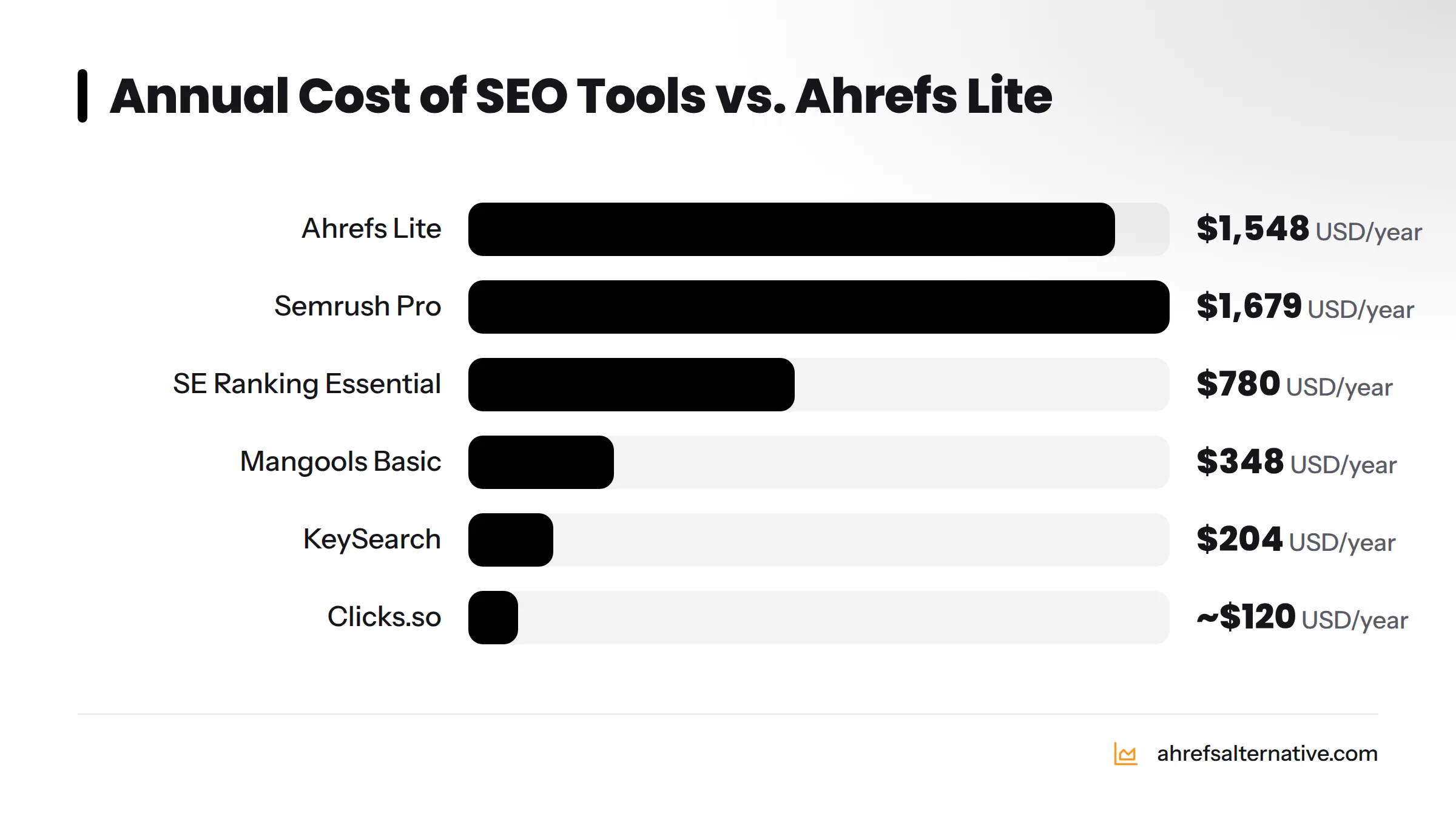
Total Cost of Ownership: 12-Month View
| Tool | Monthly Price | Annual Cost | Annual Cost vs. Ahrefs Lite |
|---|---|---|---|
| Ahrefs Lite | $129 | $1,548 | Baseline |
| Semrush Pro | $139.95 | $1,679 | +$131 |
| SE Ranking Essential | $65 | $780 | -$768 saved |
| Serpstat Individual | $59 | $708 | -$840 saved |
| Seobility Premium | $50 | $600 | -$948 saved |
| Mangools Basic | $29 | $348 | -$1,200 saved |
| KeySearch | $17 | $204 | -$1,344 saved |
| Clicks.so | ~$10 | ~$120 | -$1,428 saved |
Prices reflect monthly billing as of 2026. Annual billing discounts (typically 15-25%) reduce costs further for most tools.
The Hidden Costs of Switching From Ahrefs
Switching has real costs that don't show up in a pricing table. Here's what to budget for:
- Data export time: Exporting your keyword lists, backlink data, and rank tracking history from Ahrefs takes time. Budget two to four hours for a moderately active account.
- Workflow rebuild: Your rank tracker in the new tool starts from zero. You won't have historical ranking data for the first 30 days, which means you can't show month-over-month movement until week five at the earliest.
- Learning curve: A new interface costs productivity time. Budget two weeks of slower output while you learn the new tool's navigation and reporting structure.
- Data gaps: No alternative has an identical backlink index. You'll initially see a different set of links than you're used to. This is not data loss - it's a different crawl perspective - but it can feel disorienting.
For more on making the switch work smoothly, the guide on cheaper alternatives to Ahrefs includes transition advice.
Free Tools That Plug the Gaps
Before you pay for any feature, check whether a free tool already covers it:
- Google Search Console: Free, first-party rank data, keyword impressions, index coverage, Core Web Vitals - no SEO tool replicates this for your own domain.
- Google Analytics 4: Free organic traffic data, landing page performance, conversion tracking by channel.
- Bing Webmaster Tools: Free crawl diagnostics, keyword data, and backlink data for Bing - underused but genuinely useful, especially for markets with high Bing share.
A mid-tier paid tool (SE Ranking, Mangools, or KeySearch) plus these three free tools covers nearly every need of a freelancer or small business, at a fraction of the Ahrefs price. For specific guidance, the cost-effective SEO for small businesses guide walks through exactly this setup.
Red Flags - When to Walk Away From an SEO Tool
Outdated Backlink Index
A credible SEO tool refreshes its backlink index at least weekly for standard plans and daily for premium plans. If a tool's "last updated" timestamp on backlink data is more than 30 days old, the data isn't trustworthy for active link-building decisions. Ask the vendor directly: how often is the backlink index crawled? If they can't give you a specific answer, that's itself a red flag.
No Transparent Pricing
If you have to book a demo or speak to a sales representative to find out what a plan costs, the tool isn't built for independent buyers. Every credible SEO SaaS product publishes its pricing page publicly. Hidden pricing almost always means the cost is tied to negotiation, which means unpredictable renewals.
Missing Core Feature Categories
Any tool that markets itself as a full SEO platform but lacks even a basic version of site audit, keyword research, rank tracking, or backlink analysis is not a full SEO platform. These are table-stakes features in 2026. A tool that outsources one of these to a third-party integration rather than building it natively adds friction and potential data inconsistency to your workflow.
Unsubstantiated Data Accuracy Claims
Legitimate tools publish how they build and refresh their databases. They cite crawl frequency, index size, and data sources. If a tool claims to have "the most accurate backlink data" with zero supporting evidence - no numbers, no methodology, no third-party comparisons - treat the claim as marketing copy, not fact.
No Free Trial or Money-Back Guarantee
In 2026, a 7-day free trial is the minimum standard for a credible SEO SaaS tool. A 14-day trial is better. Any tool that requires a paid subscription before you can test it is asking you to make a decision without data - which is the opposite of what an SEO tool is supposed to help you do.
Red Flag Checklist - 8 Warning Signs of a Low-Quality SEO Tool
- Backlink index last updated more than 30 days ago
- No public pricing page
- Keyword database size not disclosed
- No free trial or money-back guarantee
- Core features (audit, keyword, backlink, rank tracking) missing or outsourced
- No data source or methodology documentation
- No named support channel (email, chat, or phone)
- Overwhelmingly positive reviews with no verified critical feedback
How to Switch From Ahrefs Without Losing Your Workflow
Export Your Ahrefs Data Before You Leave
Log into Ahrefs and export everything you'll want to reference later:
- Your tracked keyword lists (from Rank Tracker - export to CSV per project)
- Backlink reports for your domains (Site Explorer > Backlinks > Export)
- Site audit snapshots (download the PDF or CSV summary for each project)
- Content gap reports for your key competitors
Store these in a shared drive folder organized by project. You're not going to import all of this into your new tool - but having it as a reference baseline for the first 60 days after switching is genuinely useful.
Rebuilding Your Rank Tracking Setup
Your new tool starts with no historical data. Set up rank tracking on day one of your new subscription - not day ten. The earlier you start, the sooner you have a meaningful baseline. Import your keyword list from the CSV you exported from Ahrefs, group keywords by page or topic cluster, and set the correct country and device targets before your first data pull.
Expect the first week of rankings to differ slightly from what Ahrefs showed - this is normal. Different tools pull SERP data from different data centers and at different times of day. Give it 30 days before drawing conclusions about which tool is "more accurate."
Migrating Your Keyword Lists
Most tools accept CSV keyword imports. Format your exported Ahrefs keyword list as a single column with one keyword per row, add a header "Keyword," and import it. Check whether your new tool supports keyword grouping or clustering on import - SE Ranking and Semrush both do, which saves significant manual organization time.
Getting Operational in Your New Tool
Connect Google Search Console and Google Analytics 4 on day one. This imports your actual ranking and traffic data immediately, giving the new tool real context before its own crawls and data pulls have had time to accumulate. Configure your site audit to run weekly (or daily if the tool offers it), and set up automated rank tracking report delivery so you're not manually pulling reports each week.
Once the integrations are live and the first full audit is complete, you're effectively operational. The first 30 days feel slower than Ahrefs because you're missing historical context - but by month two, the new tool's data is your new baseline and the switch is largely invisible to your workflow.
Frequently Asked Questions
What is the best free alternative to Ahrefs? No single free tool replicates Ahrefs' full feature set, but the combination of Google Search Console (keyword and traffic data), Google Analytics 4 (organic performance), and Bing Webmaster Tools (crawl diagnostics and backlink data) covers the most common SEO needs for a site owner at zero cost. Ubersuggest and Seobility also offer genuinely useful free tiers for keyword research and site auditing respectively.
Can any tool match Ahrefs' backlink database? Semrush maintains a comparably large backlink index and is the closest match to Ahrefs for link analysis at scale. No budget tool currently matches the raw index size of either. Database size is also not the same as data quality - freshness, spam filtering, and link classification matter just as much as the total link count. For most small-site use cases, SE Ranking's backlink checker is sufficient even if it covers a smaller slice of the total web.
Is Semrush better than Ahrefs for keyword research? Both are excellent and largely equivalent for English-language keyword research. Semrush edges ahead on paid keyword data and competitive advertising intelligence. Ahrefs edges ahead on keyword database depth for non-English markets and on the quality of its SERP history data. For most users, the choice between the two comes down to whether you also run PPC campaigns (Semrush wins) or focus purely on organic SEO (Ahrefs wins by a slim margin).
What SEO tools do professional SEOs actually use? According to Backlinko's SEO industry surveys, Ahrefs and Semrush dominate among professional SEOs. SE Ranking has grown substantially in professional adoption for its price-to-feature ratio. Most working SEOs also use Google Search Console and Screaming Frog SEO Spider as standard parts of their toolkit, regardless of which paid platform they use.
How do I evaluate an SEO tool's data accuracy? Cross-reference the tool's outputs against sources you can verify. Compare keyword volume estimates to your Google Search Console impression data for keywords you already rank for. Compare backlink counts to another tool or to a GSC link report. Check whether "active" backlinks in the tool actually resolve when you visit the source page. Tools with transparent methodology documentation - crawl frequency, data sources, index size - are inherently more trustworthy than those making unsubstantiated claims.
What SEO tool is best for a beginner? Mangools is the most beginner-friendly paid tool: clean interface, plain-language explanations, and a feature set that matches beginner needs without overwhelming complexity. For zero cost, Google Search Console is the first tool any beginner should learn - it shows exactly which keywords Google sees your site for, which pages have indexing issues, and which Core Web Vitals need attention.
Is Ahrefs worth $129/month for a small business? It depends entirely on what you'll use it for. If your SEO work involves regular keyword research, competitor monitoring, and link building across multiple projects, the Lite plan at $129/month delivers clear value. If you mainly want to track 20 keywords and check your site for basic errors once a month, you're paying for features you won't use. SE Ranking at $65/month or Seobility at $50/month would cover that use case at roughly half the price.
How long should I use a free trial before deciding? Use the full trial period and run the 12-step stress test protocol above. For a 7-day trial, complete steps 1 through 8 in the first three days, steps 9 through 12 in the final four days. For a 14-day trial, run the full protocol in week one and spend week two doing real work - a keyword research session, a site audit, and a rank report - then make your decision based on both the structured test and real-world usability.
Can I use multiple SEO tools together? Yes, and many professionals do. A common setup is a primary all-in-one tool (SE Ranking or Semrush) plus a specialist tool for one specific workflow (KeySearch for deep keyword research, or Screaming Frog for large-scale technical audits). The risk is paying for overlapping features across two tools. Map your feature priorities first and confirm that the second tool genuinely fills a gap the first doesn't cover.
What is the difference between Domain Rating and Domain Authority? Domain Rating (DR) is Ahrefs' proprietary metric, scored 0 to 100 on a logarithmic scale, estimating the strength of a domain's backlink profile based on the quantity and quality of its referring domains. Domain Authority (DA) is Moz's equivalent metric using its own link index and algorithm. Both estimate link strength, neither is a Google ranking factor, and they'll often differ significantly for the same domain because they're built from different indexes using different methodologies. Use them as relative benchmarks within the same tool, not for cross-tool comparisons.
Which SEO tool has the largest keyword database in 2026? Ahrefs and Semrush both claim multi-billion keyword databases covering hundreds of countries and search engines. Both are in the same tier for sheer database size. SE Ranking and Serpstat sit in the next tier, with hundreds of millions of keywords. KeySearch and Mangools are smaller but still cover the high-volume queries that drive most SEO decisions.
How often do the best SEO tools update their backlink indexes? Ahrefs and Semrush both crawl the web continuously and update their backlink indexes daily for active links. SE Ranking updates its backlink data several times per week. Budget tools like Mangools and KeySearch update less frequently - often weekly or biweekly for backlink data. For rank tracking, most premium tools update daily; budget tools may update weekly on their entry plans.