Every freelancer hits the same wall eventually. You're quoting a client, mapping out an SEO strategy, and then you open the Ahrefs pricing page - $129/month for the Lite plan - and the math just doesn't work. Not when you're running a solo practice, juggling three to five clients, and trying to keep overhead tight enough to actually turn a profit.
The good news isn't that there's some secret stack nobody knows about. It's simpler: you don't need enterprise tools to do professional SEO work. A well-chosen set of free and affordable SEO tools for freelancers - most costing under $50/month combined - can cover every core SEO function you actually need. I've tested dozens of these tools specifically for freelance workflows. What follows is the result of that work: real pricing, honest limitations, and a practical system you can plug into your practice today.
If you want the broader picture of what the best SEO tools for freelancers look like in 2026, that companion guide is worth bookmarking. This article addresses one specific problem: building the most cost-effective SEO setup possible without compromising the quality of work you deliver to clients.
Premium SEO Tools Cost More Than Most Freelancers Can Justify
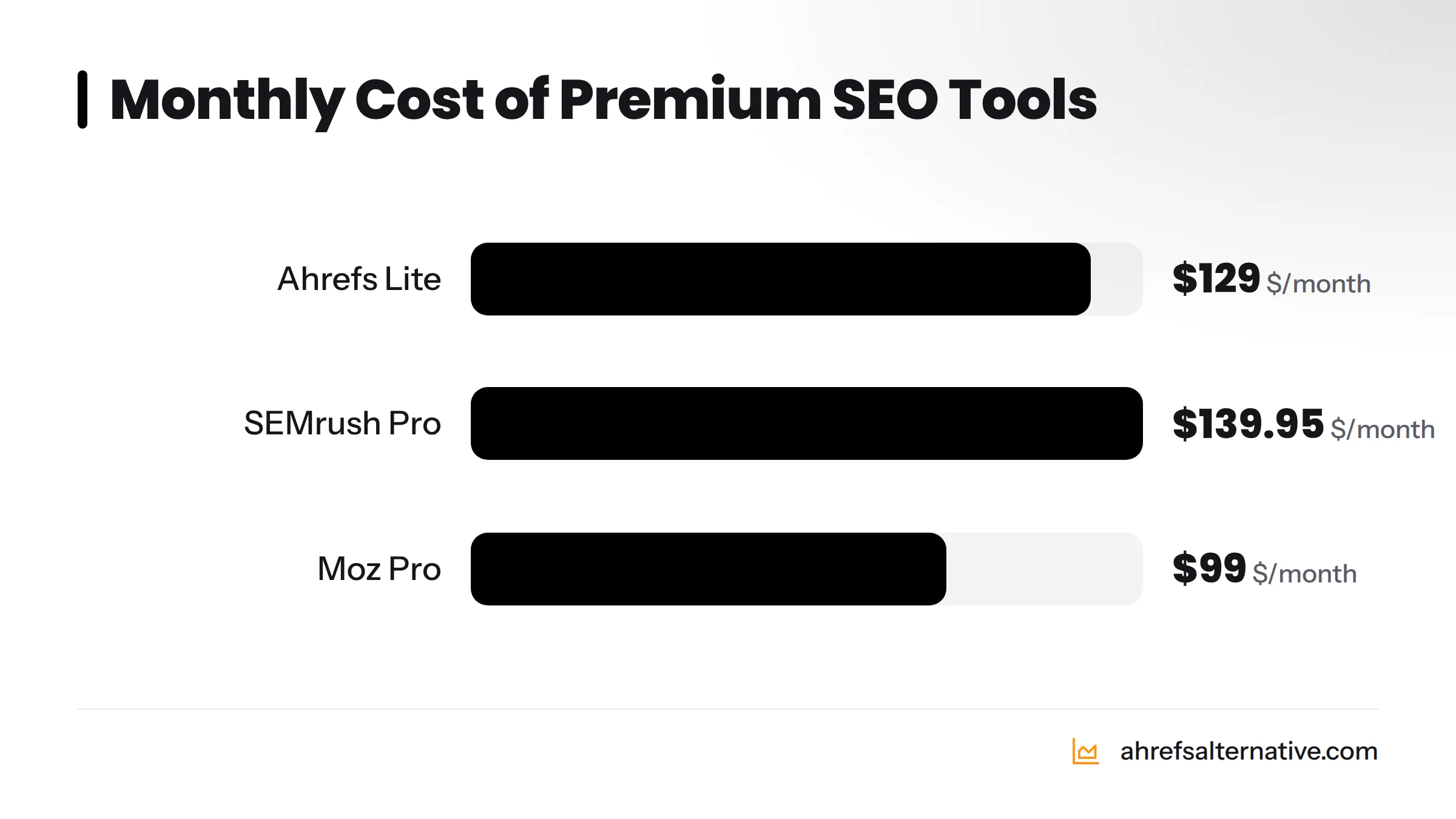
Ahrefs Lite starts at $129/month. SEMrush Pro sits at $139.95/month. Moz Pro runs $99/month. For an agency billing $20,000+ per month across dozens of client accounts, those prices make sense. For a freelancer managing four clients at $800/month each, spending $130+ on a single tool eats nearly 4% of gross revenue before you've paid for anything else.
Most premium tool features exist for agency-scale workflows. Ahrefs' ability to track 10,000 keywords simultaneously, run unlimited site crawls, or pull data for hundreds of competing domains - none of that applies when you're running SEO for a local dentist or a B2B SaaS startup. You need maybe 5% of those capabilities.
Thinking about cost-effective SEO for small businesses reveals the same pattern: the gap between what you need and what premium tools offer is enormous at the smaller end of the market.
What SEO Functions Every Freelancer Actually Needs
Strip away the enterprise features and a freelancer's real SEO needs come down to five core functions:
- Keyword research - finding what your client's audience is searching for
- On-page SEO - optimizing titles, meta descriptions, headers, and content
- Technical SEO and site auditing - identifying crawl errors, page speed issues, and Core Web Vitals problems
- Backlink analysis - understanding a client's link profile and finding link-building opportunities
- Rank tracking and reporting - showing clients their progress month over month
Every tool you pay for should map directly to at least one of these functions. If it doesn't, it's not earning its spot in your budget.
The "Good Enough" Principle: Affordable Tools vs. Enterprise Features
There's a concept worth naming clearly: "good enough" data for freelance-scale decisions. Ahrefs pulls backlink data from one of the largest link indexes in the industry, updated constantly. A tool like Google Search Console pulls backlink data directly from Google's own index - which is the search engine that actually determines your rankings. For most freelance clients, GSC's backlink data is not just "good enough" - it's arguably the most authoritative source available, and it's completely free.
The rule that saves freelancers money: You don't need Ahrefs at $129/month when a $29/month stack can do 90% of the same work for a 1-5 client freelance practice. The 10% you give up is real, but it rarely affects outcomes at this scale.
The 5 Core SEO Functions: A Quick-Reference Tool Map
Here's a quick-reference map of which tools handle which functions - including whether they offer a free tier and what they cost to get started:
| SEO Function | Recommended Tools | Free Tier? | Starting Price |
|---|---|---|---|
| Keyword Research | Google Keyword Planner, KeySearch, Mangools KWFinder | Yes (GKP), Yes (limited) | $0 / $17/mo / $29/mo |
| On-Page SEO | Yoast SEO, Rank Math, Seobility | Yes | $0 (WordPress plugins) |
| Technical SEO / Site Audit | Google PageSpeed Insights, Seobility, SE Ranking | Yes | $0 / $50/mo / $23/mo |
| Backlink Analysis | Google Search Console, Mangools LinkMiner, SE Ranking | Yes | $0 / $29/mo / $23/mo |
| Rank Tracking | Google Search Console, SE Ranking, Mangools SERPWatcher | Yes (limited) | $0 / $23/mo / $29/mo |
| Competitor Analysis | Ubersuggest, SpyFu, KeySearch | Yes (limited) | $0 / $39/mo / $17/mo |
| Reporting | Google Looker Studio | Yes | $0 |
Print this table, stick it on your wall, and check every tool you're considering against it. If a new tool overlaps with something you already use, it's probably not worth adding.
The Best Free SEO Tools for Freelancers (Zero Cost)
The best free SEO tool for freelancers in 2026 is Google Search Console - it provides direct performance data from Google's own index, including keyword impressions, click-through rates, backlink data, and crawl errors, all at zero cost. Pair it with Google Analytics 4, Google Keyword Planner, and Rank Math, and you have a surprisingly capable free stack.
Here's what each free tool delivers and how to use it practically.
Google Search Console - Your Free Backlink and Performance Dashboard
Google Search Console (GSC) is the single most underused free tool in most freelancers' arsenals. It shows you exactly which queries are driving impressions and clicks to a client's site, which pages are indexed (and which aren't), Core Web Vitals scores, mobile usability issues, and a backlink report showing who links to your client.
The backlink data in GSC comes directly from Google - the same data Google uses when it ranks pages. For backlink analysis, I'd argue this is more actionable than third-party indexes for most freelance use cases. You can learn more about how to track backlinks free using GSC as your primary source.
Practical tip: Set up GSC for every new client in week one. Use the "Search Results" report filtered by page to find which existing pages are ranking on page two for strong keywords - these are your fastest optimization wins.
Google Keyword Planner - Free Keyword Research with Search Volume Data
Google Keyword Planner is free inside Google Ads. The catch: without an active Google Ads campaign, search volumes appear as ranges (e.g., "1K-10K") rather than exact numbers. That's a real limitation for precision keyword research. The tool still delivers keyword ideas, seasonal trends, and competitive bid data - all useful signals even in range form.
Practical workaround: Cross-reference GKP keyword ideas with GSC's "Queries" report for the same client to get actual click and impression data, which is more meaningful than estimated search volume anyway.
Google Analytics 4 - Free Website Traffic and Behavior Analysis
Google Analytics 4 (GA4) tracks who visits a client's site, where they come from, which pages they engage with, and whether they convert. For reporting, the organic traffic segment in GA4 is your proof-of-performance data - it shows clients that rankings are translating into real visits.
Practical tip: Create a custom GA4 exploration report filtered to organic traffic, segmented by landing page. This becomes the backbone of your monthly client report.
Google PageSpeed Insights - Free Technical Performance Auditing
Google PageSpeed Insights scores any URL against Core Web Vitals - Largest Contentful Paint (LCP), Interaction to Next Paint (INP), and Cumulative Layout Shift (CLS). These metrics directly influence Google's ranking assessment according to Google Search Central documentation. Run this on a client's homepage and their top five landing pages during onboarding.
Rank Math (Free) vs. Yoast SEO (Free) - On-Page Optimization for WordPress Sites
For freelancers working with WordPress clients - which is the majority of the market - both Yoast SEO and Rank Math offer free tiers that handle title tags, meta descriptions, schema markup, XML sitemaps, and canonical tags. Rank Math's free version is particularly generous: it includes multi-keyword optimization, local SEO schema, and a detailed on-page analysis score.
My recommendation: Rank Math Free outperforms Yoast Free in terms of features per dollar (both are $0). If a client's site is on WordPress, install Rank Math before anything else.
Bing Webmaster Tools - The Underrated Free SEO Toolkit
Bing Webmaster Tools is genuinely underrated. Beyond Bing's own search performance data, it includes a free site audit tool (SEO Reports), keyword research data, and backlink analysis - all free, with no limits on crawl volume for small sites. Bing's index can surface technical issues that GSC misses, making it a useful double-check during technical audits.
Ubersuggest (Free Tier) - Keyword Ideas and Domain Overview
Ubersuggest's free tier allows three searches per day, which sounds limiting but is workable for occasional research. It shows keyword suggestions, search volume, keyword difficulty, and a domain overview for competitor sites. It won't replace a paid keyword tool for active client work, but it's a useful supplementary check.
Free SEO Tool Starter Kit - What to Set Up in Week 1:
- Verify client site in Google Search Console
- Connect Google Analytics 4 and confirm organic traffic tracking
- Run Google PageSpeed Insights on homepage and top 5 pages
- Set up Bing Webmaster Tools (import GSC data with one click)
- Install Rank Math (Free) or Yoast SEO (Free) on WordPress sites
- Pull GSC backlink report and export referring domains list
- Identify top 10 ranking queries and their average positions in GSC
Best Budget SEO Tools Under $30/Month
Once you've hit the limits of free tools - typically when you need more keyword data, rank tracking across multiple clients, or deeper competitor analysis - the under-$30/month tier is where the real value lives. These cheap SEO software options are built for practitioners working at freelance scale.
KeySearch ($17/month) - Affordable Keyword Research and Competitor Analysis
KeySearch is one of the best-value keyword research tools available in 2026 at $17/month (Starter plan). It provides keyword difficulty scores, search volume data, SERP analysis, competitor keyword research, and a rank tracker for up to 200 keywords. The data quality is solid for freelance-scale work - not Ahrefs-level index depth, but more than adequate for targeting keywords in the sub-50,000 monthly search volume range, which is where most freelance clients compete.
In my testing, KeySearch's keyword difficulty scores correlate well with actual ranking difficulty for local and niche markets. For a freelancer running keyword research on a plumbing company or a boutique law firm, it delivers everything needed.
Best for: New-to-intermediate freelancers who need reliable keyword research and basic rank tracking at the lowest possible price.
Seobility (Free + $50/month) - Site Auditing and On-Page SEO on a Budget
Seobility offers a genuinely useful free tier - one project with crawl data for up to 1,000 URLs - plus a Premium plan at $50/month for unlimited projects and deeper crawl limits. For freelancers managing a handful of small business clients, the free tier handles most site audit needs. The tool checks for crawl errors, duplicate content, missing meta tags, broken links, and page speed issues with a clear, client-friendly report format.
Best for: Technical SEO auditing on small-to-medium client sites without spending anything.
Mangools ($29/month) - Keyword Research, Rank Tracking, and Backlink Analysis
Mangools bundles five tools for $29/month on the Basic plan: KWFinder (keyword research), SERPChecker (SERP analysis), SERPWatcher (rank tracking), LinkMiner (backlink analysis), and SiteProfiler (domain authority metrics). That's a near-complete SEO toolkit at a price that fits comfortably inside a freelance budget.
KWFinder's keyword data is accurate and the interface is genuinely one of the cleanest in the industry. SERPWatcher tracks up to 200 keywords per day and sends automated rank change alerts - useful for client reporting. LinkMiner accesses Majestic's link index, which is one of the strongest available outside of Ahrefs.
Best for: Freelancers who want one affordable tool that covers keyword research, rank tracking, and backlink analysis simultaneously.
Clicks.so - The Cheapest All-in-One SEO Tool for Freelancers
Clicks.so is the most budget-friendly all-in-one SEO platform available in 2026, with entry plans starting below $10/month depending on the subscription tier. It covers keyword research, rank tracking, site auditing, and backlink analysis in a single interface. For a freelancer just starting out who needs everything in one place at the absolute lowest cost, Clicks.so is worth serious consideration. The data depth doesn't match Mangools or SE Ranking at this price point, but for clients in lower-competition local markets, it's more than capable.
Best for: Freelancers starting their first paid tool subscription who need the widest functional coverage at the lowest entry price.
SE Ranking (From $23/month) - Rank Tracking and Keyword Research at Low Cost
SE Ranking starts at $23/month on the Essential plan (annual billing), which includes rank tracking for 500 keywords, a site audit tool, keyword research, and a backlink checker. The rank tracker is one of the most accurate in this price range - a point confirmed in Search Engine Journal's independent tool comparisons. The site audit tool rivals tools costing three times as much, checking for over 120 on-page and technical SEO factors.
Best for: Freelancers who prioritize accurate rank tracking and need a solid site auditor for client reporting.
KeySearch vs. Mangools vs. SE Ranking - Head-to-Head Comparison:
| Feature | KeySearch ($17/mo) | Mangools ($29/mo) | SE Ranking ($23/mo) |
|---|---|---|---|
| Keyword Research | Yes | Yes (KWFinder) | Yes |
| Rank Tracking | 200 keywords | 200 keywords/day | 500 keywords |
| Backlink Analysis | Basic | Yes (LinkMiner/Majestic) | Yes |
| Site Audit | Basic | No | Yes (120+ checks) |
| SERP Analysis | Yes | Yes (SERPChecker) | Yes |
| Competitor Research | Yes | Yes (SiteProfiler) | Yes |
| Free Trial | 7-day trial | 10-day free trial | 14-day free trial |
| Annual Discount | Yes | Yes (~35% off) | Yes (~20% off) |
| Best For | Budget keyword research | Multi-function value | Rank tracking + audits |
Best Budget SEO Tools Under $50/Month
This tier adds tools with broader data sets, more reporting features, or specialist capabilities that justify a slightly higher monthly spend.
Ubersuggest (Paid Plans) - Lifetime Deal Option for Freelancers
Ubersuggest by Neil Patel offers monthly plans starting at $29/month for the Individual plan, but the real value is the lifetime deal - a one-time payment (typically $99-$290 depending on the plan) that eliminates recurring costs entirely. For a freelancer who wants keyword research, site auditing, and backlink data without any monthly subscription, the lifetime deal makes Ubersuggest one of the most cost-effective long-term investments in this space.
Best for: Freelancers who prefer to pay once for a usable all-in-one tool rather than manage recurring subscriptions.
Serpstat - Budget-Friendly All-in-One SEO Platform
Serpstat offers an Individual plan starting at $59/month (or lower with annual billing, bringing it close to the $50 threshold). It covers keyword research, rank tracking, site auditing, backlink analysis, and competitor research. Serpstat's competitor analysis features are particularly strong - it shows which keywords competitors rank for and where their traffic comes from, which is useful for building content strategies for clients in competitive niches.
Best for: Freelancers doing heavy competitor analysis for clients in crowded markets.
SpyFu - Competitor PPC and SEO Research on a Budget
SpyFu starts at $39/month and specializes in competitive intelligence - showing historical ranking data, competitor keyword strategies, and PPC ad history. If you serve clients who run Google Ads alongside organic SEO, SpyFu's combined SEO and PPC competitor data makes it uniquely useful. The keyword research features are solid, and the domain comparison tool helps freelancers pitch competitive gap analyses during client onboarding.
Best for: Freelancers serving clients who run both SEO and paid search campaigns.
Search Atlas - Affordable Entry Plans with Strong Content Optimization
Search Atlas has positioned itself as a content-first SEO platform with entry plans in the $49-$99/month range. Its content optimization tools - particularly its on-page content grader - compete directly with Surfer SEO at a lower price point. It also includes keyword research, site auditing, and rank tracking. For freelancers whose primary deliverable is SEO content optimization rather than technical SEO, Search Atlas offers strong value.
Best for: Freelancers specializing in content SEO who need an on-page optimization tool that rivals Surfer SEO.
All Low Cost SEO Tools Under $50/Month - Feature and Use Case Summary:
| Tool | Starting Price | Key Strength | Free Tier | Best Use Case |
|---|---|---|---|---|
| Clicks.so | ~$10/mo | Lowest all-in-one cost | No | New freelancers, low-competition clients |
| KeySearch | $17/mo | Budget keyword research | No (7-day trial) | Keyword-heavy workflows |
| SE Ranking | $23/mo | Rank tracking + site audit | No (14-day trial) | Multi-client rank tracking |
| Mangools | $29/mo | 5-tool bundle value | No (10-day trial) | All-round freelance toolkit |
| Ubersuggest | $29/mo or lifetime | Lifetime deal option | Yes (3/day) | No-subscription preference |
| SpyFu | $39/mo | Competitor + PPC intel | No | SEO + PPC clients |
| Search Atlas | ~$49/mo | Content optimization | No | Content SEO specialists |
| Serpstat | ~$50/mo (annual) | Deep competitor analysis | No | Competitive niche clients |
Build Your Freelancer SEO Stack (A Practical System)
A "freelancer SEO stack" is a deliberately chosen combination of two to four tools that together cover every core SEO function without overlap and without exceeding your budget. The goal is to map your gaps first, then fill them - never pay for two tools that do the same thing.
Stack Rule: Map your SEO function gaps before you buy anything. If you already have keyword research covered, don't add another keyword tool - add rank tracking or backlink analysis instead.
The 100% Free Stack (Best for New Freelancers)
This stack covers all five core SEO functions at zero monthly cost. The trade-offs are real - keyword data is range-based, backlink data is limited - but it's entirely workable for a freelancer's first three to six months or for clients in low-competition local markets.
| SEO Function | Tool |
|---|---|
| Keyword Research | Google Keyword Planner |
| On-Page SEO | Rank Math Free (WordPress) |
| Technical SEO / Site Audit | Seobility Free + Google PageSpeed Insights |
| Backlink Analysis | Google Search Console |
| Rank Tracking | Google Search Console (position tracking) |
| Reporting | Google Looker Studio (free templates) |
| Monthly Cost | $0 |
The Under-$30/Month Stack (Best for Growing Freelancers)
Adding one paid tool transforms the free stack into a genuinely professional setup. Mangools at $29/month fills the biggest gaps: precise keyword research, accurate rank tracking with client-friendly reports, and backlink analysis via LinkMiner.
| SEO Function | Tool |
|---|---|
| Keyword Research | Mangools KWFinder + Google Keyword Planner |
| On-Page SEO | Rank Math Free |
| Technical SEO / Site Audit | Seobility Free + Google PageSpeed Insights |
| Backlink Analysis | Mangools LinkMiner + Google Search Console |
| Rank Tracking | Mangools SERPWatcher |
| Reporting | Google Looker Studio + SERPWatcher reports |
| Monthly Cost | ~$29/month |
The Under-$50/Month Stack (Best for Established Freelancers with Multiple Clients)
For freelancers managing four or more clients, this stack adds SE Ranking's superior rank tracking and site audit capabilities alongside Mangools' keyword and backlink tools, without duplicating functions.
| SEO Function | Tool |
|---|---|
| Keyword Research | SE Ranking + KeySearch |
| On-Page SEO | Rank Math Free + SE Ranking on-page audit |
| Technical SEO / Site Audit | SE Ranking Site Audit |
| Backlink Analysis | SE Ranking Backlink Checker + Google Search Console |
| Rank Tracking | SE Ranking (500 keywords) |
| Reporting | SE Ranking reports + Google Looker Studio |
| Monthly Cost | ~$40/month (SE Ranking $23 + KeySearch $17) |
You can find more ideas for assembling a budget-conscious setup in our guide to affordable SEO tools for startups - the overlap with freelance workflows is significant.
SEO Tips for Freelancers: Get More From Every Dollar You Spend
Having the right tools is half the equation. How you buy and use them determines whether they're genuinely cost-effective or just another line item eating into your margin.
Start With Free Tools and Upgrade Only When You Hit Limits
Don't buy a paid tool speculatively. Use free tools until you hit a concrete, workflow-blocking limitation - keyword data is too vague, you can't track enough keywords, or you need to crawl a larger site. The upgrade should solve a real problem, not an imagined one.
Use Annual Plans to Cut Tool Costs by 20-40%
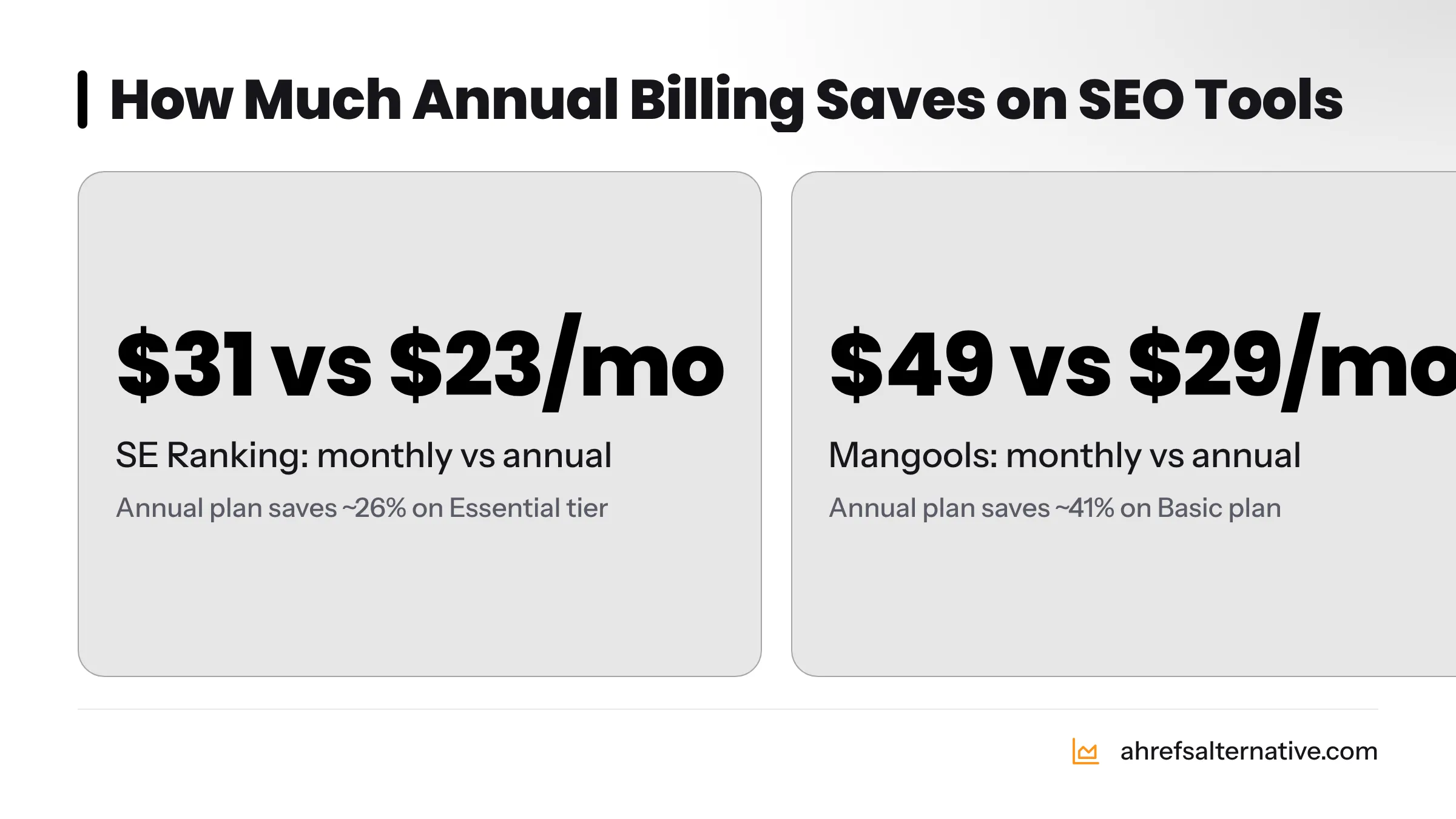
Most SEO tools offer 20-40% discounts for annual billing. SE Ranking's annual plan brings the Essential tier to roughly $23/month versus $31/month on monthly billing. Mangools annual billing reduces the Basic plan to $29/month from $49/month. If you're confident you'll use a tool for a year, annual billing is an easy saving.
Leverage Lifetime Deals (AppSumo and Direct Offers)
AppSumo regularly features SEO tools at one-time lifetime deal prices. Ubersuggest's lifetime deal has historically been available for $99-$290. These deals eliminate subscription fatigue entirely. The risk is that the tool may be less established - vet the vendor's track record before purchasing. Direct lifetime deals from tool vendors (outside AppSumo) also appear occasionally; following SEO Twitter or the vendors' email lists catches these early.
Understand the Risks of Group Buy SEO Tools
Group buy SEO tool services pool subscriptions across many users to lower individual costs. The appeal is obvious: access to Ahrefs or SEMrush data for a few dollars a month. The reality is more complicated. Group buys violate the terms of service of virtually every major SEO tool. Your account access can be revoked without warning. Data quality is often throttled or restricted. For client work, relying on group buy access introduces genuine delivery risk. Skip group buys entirely and put that money toward a legitimate low-cost alternative instead.
Treat Google Search Console as Your Primary Data Source
GSC data is first-party data from Google's own index. For most client reporting needs - which keywords drive traffic, which pages perform, which backlinks Google has discovered - GSC is not a "free alternative" to paid tools. It's the most authoritative source available. Build your reporting workflow around GSC first, then use paid tools to supplement.
Automate Reporting With Free Google Looker Studio Templates
Google Looker Studio (formerly Data Studio) connects directly to GSC and GA4 and lets you build automated, branded client reports at zero cost. The Search Engine Journal community has published free Looker Studio SEO report templates you can clone. A polished automated report saves two to three hours per client per month - time you can redirect to actual SEO work.
Prioritize Tools That Cover Multiple Functions
Every tool that covers two or three SEO functions simultaneously is more cost-effective than a point solution. Mangools covers keyword research, rank tracking, and backlink analysis. SE Ranking covers rank tracking, site auditing, and keyword research. Single-function tools are harder to justify unless their data quality is significantly better than multi-function alternatives.
Track ROI on Every Tool Subscription
Frame every tool cost against your freelance income. A $29/month tool that helps you deliver better keyword research and win one additional client per quarter - at even $500/project - generates $2,000 in revenue against $348 in annual cost. That's the financial lens to apply to every subscription. Conversely, a $50/month tool you use for one client project per month is costing you $600/year for marginal value. Review your tool subscriptions quarterly and cut anything that isn't generating measurable workflow value.
For more tactical SEO strategies on a small budget, the approaches that work for small business owners translate directly to freelance practices.
A Sample Freelancer SEO Workflow Using Affordable Tools
This workflow uses the Under-$29/Month stack (Mangools + free Google tools) and covers the full cycle of a typical freelance SEO engagement.
Month 1 - Client Onboarding Audit (Using Free Tools)
- Verify site in Google Search Console - confirm ownership, check for crawl errors, review Index Coverage report
- Connect Google Analytics 4 - confirm organic traffic tracking, set up a Looker Studio dashboard
- Run Seobility free crawl - identify broken links, duplicate content, missing meta tags, and thin pages
- Run Google PageSpeed Insights on homepage and top five traffic pages - flag Core Web Vitals issues
- Pull GSC backlink report - export referring domains and identify any toxic or irrelevant links
- Run Mangools KWFinder on the client's top five competitor URLs - build a priority keyword list
- Set up SERPWatcher rank tracking for 20-50 target keywords - establish baseline positions
- Deliver an audit report via Looker Studio connecting GSC + GA4 organic data
Time required: 4-6 hours. Tool cost: $0-$29.
Ongoing Monthly Workflow - Keyword Tracking, Content Review, Reporting
- Pull SERPWatcher rank changes weekly - flag drops for investigation
- Review GSC "Search Results" for new ranking queries entering the top 20 - these are content optimization opportunities
- Use Mangools KWFinder to research keywords for the month's planned content
- Check GA4 organic traffic trends against previous month
- Deliver a 1-page Looker Studio report to the client showing ranking movement, organic traffic, and top performing pages
Time required per client: 2-3 hours/month.
Quarterly Deep Dive - Backlink Audit and Technical SEO Check
- Re-run Seobility crawl - check for new technical issues
- Pull GSC backlink data and compare against the previous quarter's export - identify new referring domains
- Use Mangools LinkMiner to analyze the top 10 competitors' backlink profiles - identify link-building targets
- Review GSC Core Web Vitals report - flag any pages that have dropped below passing thresholds
- Update rank tracking keyword list to reflect content published in the previous quarter
Monthly Freelancer SEO Workflow Checklist:
- Check SERPWatcher for ranking changes (weekly - monthly summary)
- Review GSC Search Results for new top-20 queries
- Research content keywords for next month's deliverables (KWFinder)
- Pull GA4 organic traffic report
- Check GSC for new crawl errors or coverage drops
- Deliver client report via Looker Studio
- Quarterly: re-crawl site with Seobility
- Quarterly: pull and compare backlink reports (GSC + LinkMiner)
- Quarterly: review and renew/cancel tool subscriptions based on usage
Here's a broader look at how freelancers and startups approach the same function-mapping challenge:
Honest Trade-Offs: Where Budget Tools Fall Short vs. Ahrefs
Budget tools are genuinely capable for freelance-scale work - but there are specific areas where premium tools like Ahrefs hold real advantages, and you should know what those are before committing to a budget-only approach.
Where Ahrefs Genuinely Outperforms Budget Alternatives
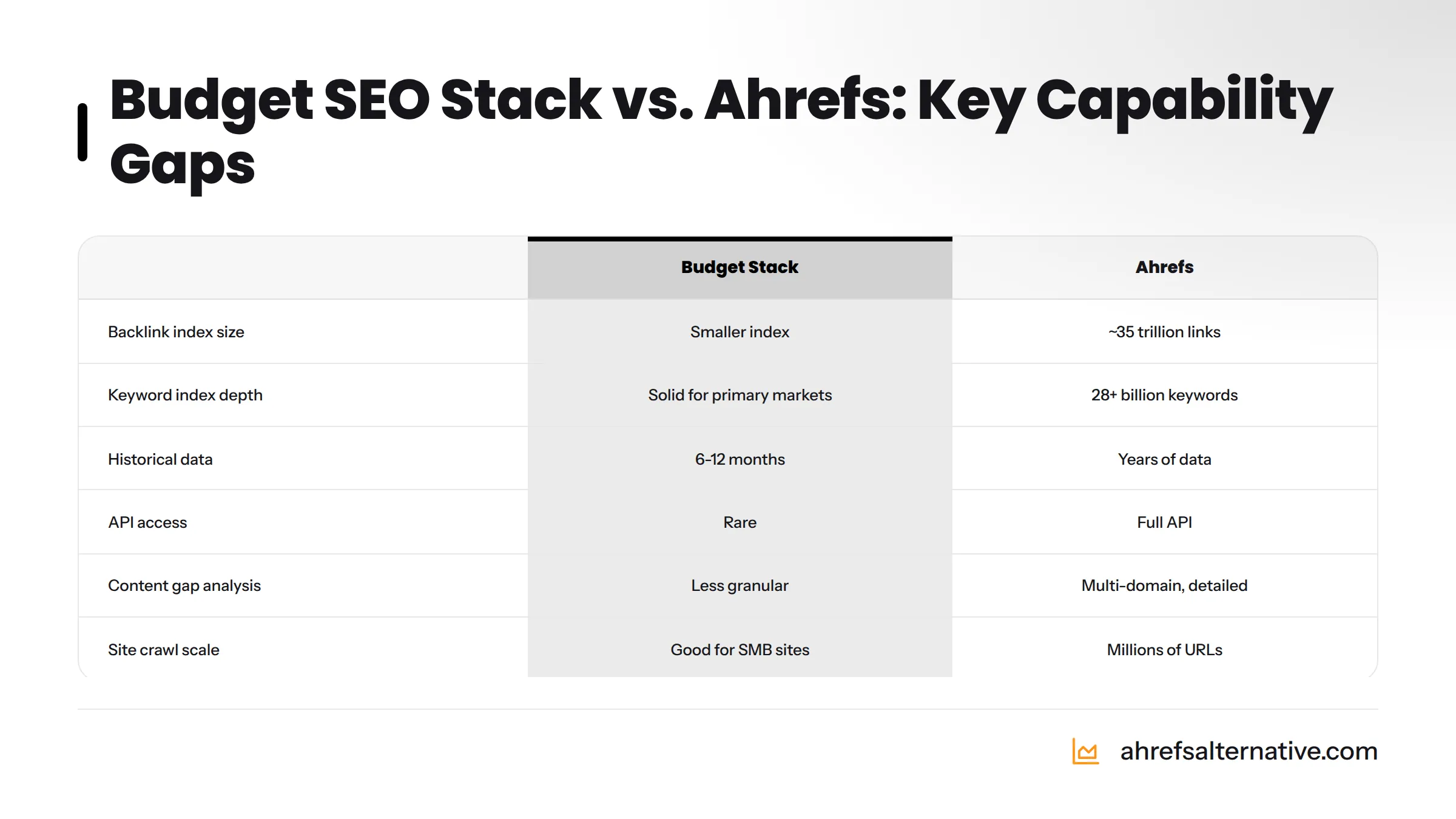
| Capability | Ahrefs | Budget Stack | Gap Size |
|---|---|---|---|
| Backlink Index Size | Largest independent index (~35 trillion links) | Smaller (Majestic via Mangools is good; GSC is authoritative but limited view) | Large for competitive link research |
| Keyword Index Depth | 28+ billion keywords across 170 countries | Solid for primary markets; thinner for niche/international terms | Moderate |
| Site Crawl Speed and Scale | Crawl millions of URLs | Seobility/SE Ranking handle SMB sites well; slower on large sites | Large for enterprise clients |
| Content Gap Analysis | Very detailed, multi-domain gap analysis | Available in SE Ranking and Serpstat, but less granular | Moderate |
| Historical Data Depth | Years of historical rank and backlink data | Limited to 6-12 months in most budget tools | Moderate |
| API Access | Full API for custom integrations | Rare in budget tools | Large for technical workflows |
For a detailed examination of where the gaps are smallest, the affordable SEO tools that outperform Ahrefs breakdown is worth reading - the difference is narrower than most people expect for typical freelance client profiles.
When It Makes Sense to Upgrade to a Premium Tool
The upgrade decision is financial, not emotional. Consider moving to a premium tool like Ahrefs when:
- You're billing more than $5,000/month in SEO retainers across multiple clients
- A client operates in a highly competitive national or international market where backlink index depth matters
- You're regularly losing pitches because your competitor analysis data is thinner than a competing agency's
- You're managing more than 500 keyword positions simultaneously and need daily rank updates
- A client asks for API-level data integration into their own reporting dashboards
Until those conditions apply, the budget stack described in this guide covers the actual workflow needs of the overwhelming majority of freelance SEO practitioners. The best Ahrefs alternatives guide walks through each option in depth if you're at that evaluation stage.
Frequently Asked Questions About Cost-Effective SEO Tools for Freelancers
Google Search Console is the best free SEO tool for freelancers in 2026. It provides first-party data directly from Google's index, covering keyword performance, page indexing status, Core Web Vitals, backlink data, and crawl errors - all at zero cost. Pair it with Google Analytics 4 and Rank Math Free for a complete free on-page and analytics setup.
Yes. A combination of Google Search Console (free), Mangools ($29/month), and SE Ranking ($23/month) covers keyword research, rank tracking, backlink analysis, site auditing, and reporting - the full professional freelance SEO workflow - for under $52/month combined. For most freelance client profiles, this stack produces results equivalent to Ahrefs at a fraction of the cost. See the full comparison of cheaper alternatives to Ahrefs for a detailed breakdown.
Based on community surveys and tool provider data, the most commonly used SEO tools among freelancers in 2026 are Google Search Console (near-universal), Google Analytics 4, SE Ranking, Mangools, Semrush (among higher-earning freelancers), and Rank Math for WordPress on-page SEO. Budget tools like KeySearch and Ubersuggest are common among newer practitioners.
A practical guideline: spend no more than 5-8% of your monthly SEO retainer revenue on tools. If you bill $2,000/month, $100-$160/month in tools is reasonable. If you bill $500/month, the free stack plus one $29/month tool is the right level. As you scale to $5,000+/month, investing $100-$200/month in tools becomes easy to justify.
Yes, for most freelance engagements. KeySearch at $17/month provides reliable keyword difficulty scoring, search volume data, SERP analysis, and 200-keyword rank tracking - more than sufficient for small-to-medium business clients in local or niche markets. Where it falls short is in backlink analysis depth and international keyword coverage. For those functions, pair it with Google Search Console for backlinks. Learn more at the KeySearch tool page.
Clicks.so is the cheapest all-in-one SEO tool for freelancers in 2026, with entry-level plans starting below $10/month. It covers keyword research, rank tracking, site auditing, and backlink analysis in a single platform. For freelancers in low-competition markets or those just launching their practice, it offers the widest functional coverage at the lowest price point.
Google Search Console's "Search Results" report shows your average position for every query your site appears for in Google Search - for free. The limitation is that it shows average position over time, not a clean daily snapshot for a custom keyword list. For more structured rank tracking, SE Ranking's Essential plan at $23/month tracks 500 keywords with daily updates. Mangools SERPWatcher tracks 200 keywords per day at $29/month with automated alerts. Both are well under the $50/month threshold.
No - not for professional client work. Group buy services violate the terms of service of tools like Ahrefs and SEMrush, meaning your access can be terminated at any time without notice. Data quality is often throttled. Using group buy access introduces delivery risk for client projects. The minor cost saving is not worth that exposure. Choose legitimate low-cost alternatives instead - the tools in this guide cost less than most group buy subscriptions when billed annually.
Pay for a tool when it solves a workflow problem the free version cannot. The highest-value paid tools for freelancers are: (1) a rank tracker - SE Ranking or Mangools SERPWatcher, because GSC's position data is not granular enough for consistent client reporting; (2) a keyword research tool - KeySearch or Mangools KWFinder, because Google Keyword Planner's range-based volumes are too imprecise for competitive keyword targeting; (3) a site audit tool - SE Ranking or Seobility Premium, for clients with large sites where free crawl limits are insufficient. Everything else can run on free tools for most freelance engagements.
Which SEO Tools Should a Freelancer Invest In First?
Use this decision framework to prioritize your tool spending:
-
Are you just starting out with your first 1-2 clients? - Start with the 100% free stack. Add Rank Math Free immediately if clients use WordPress.
-
Do you need to show clients rank tracking reports? - Add SE Ranking Essential ($23/month) or Mangools SERPWatcher as your first paid tool.
-
Is keyword research taking too long with free tools? - Add KeySearch ($17/month) or Mangools KWFinder ($29/month, which also solves rank tracking).
-
Are you managing 4+ clients with technical SEO needs? - Upgrade Seobility to Premium ($50/month) or use SE Ranking's site audit alongside its rank tracker.
-
Do you serve clients in highly competitive national markets? - Consider the best Ahrefs alternatives with deeper backlink indexes, or evaluate whether Ahrefs itself is now justified by your billing volume.
You can browse the full catalogue of vetted tools with pricing and feature breakdowns at Ahrefs Alternative - the site exists specifically to help SEO practitioners find the right tool at the right price point. For a structured methodology on how to evaluate options side by side, the how to compare SEO tools guide walks through the evaluation process step by step.
The takeaway is straightforward: the freelancer who builds a deliberate, function-mapped SEO tool stack - spending $0 to $50/month - can deliver professional results for clients, outreport competitors using generic free tools, and keep their margins healthy. Start with what's free, upgrade surgically when you hit real limits, and never pay for overlap.
Sources
- Google Search Console - Support Documentation, Google
- Google Analytics 4 Help Center, Google
- Core Web Vitals and Search Ranking, Google Search Central
- Google PageSpeed Insights Tool, Google
- Bing Webmaster Tools, Microsoft
- AppSumo - Lifetime Software Deals, AppSumo
- Search Engine Journal - SEO Tool Coverage and Industry Data
- Search Engine Land - SEO News and Updates