If you've ever Googled your own service and watched competitors sit on page one while your site languishes on page three, you already know the frustration. SEO feels like a game built for companies with big budgets, full-time content teams, and agency retainers. I've heard this from bakery owners, plumbers, boutique consultants, and e-commerce founders. The gap between "can't afford SEO" and "ranking on Google" is genuinely smaller than those competitors want you to believe.
This guide is organized by budget tier. Whether you have $0, $50, or $200 a month to work with, every section maps to where you are right now. You'll leave with a prioritized action plan, a vetted set of affordable tools, and a realistic picture of what to expect in your first 12 months. No agency required.
SEO Builds Assets. Paid Ads Rent Them.
SEO gives small businesses a compounding return that paid ads can't match. Every dollar you put into organic search builds a ranked page that keeps delivering traffic long after the work is done. Paid clicks stop the moment your budget runs out.
The Cost Comparison Every Small Business Owner Needs to See
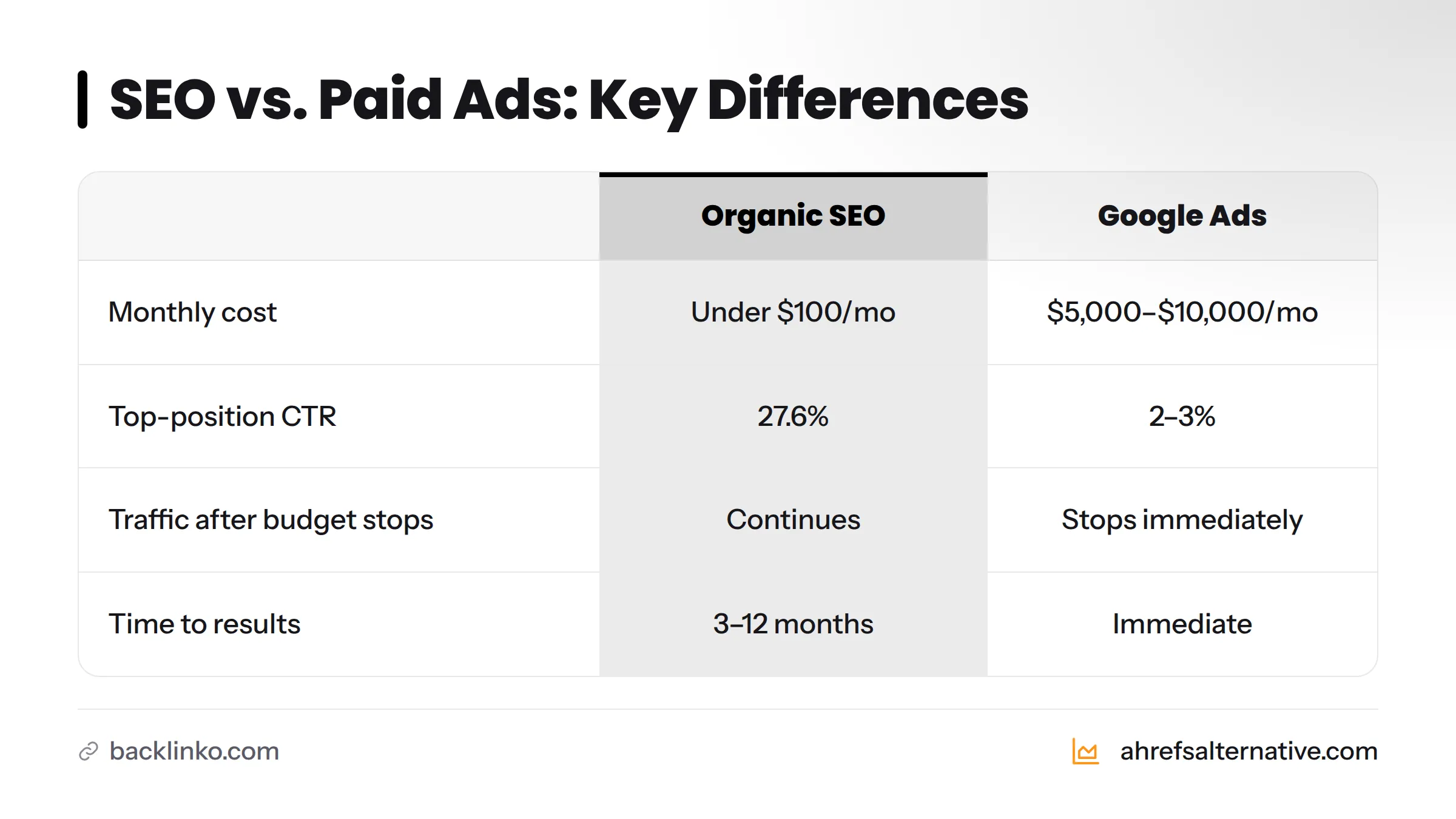
The numbers are stark. The average Google Ads campaign for small businesses costs between $5,000 and $10,000 per month for meaningful reach, while a focused DIY SEO effort often runs under $100 per month in tools - with the rest being your time. According to Backlinko's organic CTR research, the #1 organic result on Google earns an average click-through rate of 27.6%, compared to roughly 2-3% for the top paid ad in the same position. That's not a marginal difference - that's a structural advantage for anyone willing to invest consistently in organic rankings.
SEO also compounds. A well-optimized blog post you write today can bring in leads for years. A paid ad disappears the moment your card is charged.
A Realistic SEO Timeline (The Answer Most Guides Skip)
SEO takes three to six months to show meaningful movement for a new or under-optimized site, and six to twelve months to generate reliable organic traffic. Google's own Search Central documentation acknowledges this openly. That timeline shrinks when you target the right keywords, optimize existing pages first, and get your local SEO setup right.
The timeline isn't a reason to delay - it's a reason to start today.
Setting Your SEO Budget Before You Touch a Single Meta Tag
Most small businesses either spend nothing and wonder why nothing happens, or they hand money to an agency before their site has a solid foundation. Getting your budget right first saves you from both mistakes.
What Should a Small Business Realistically Spend on SEO?
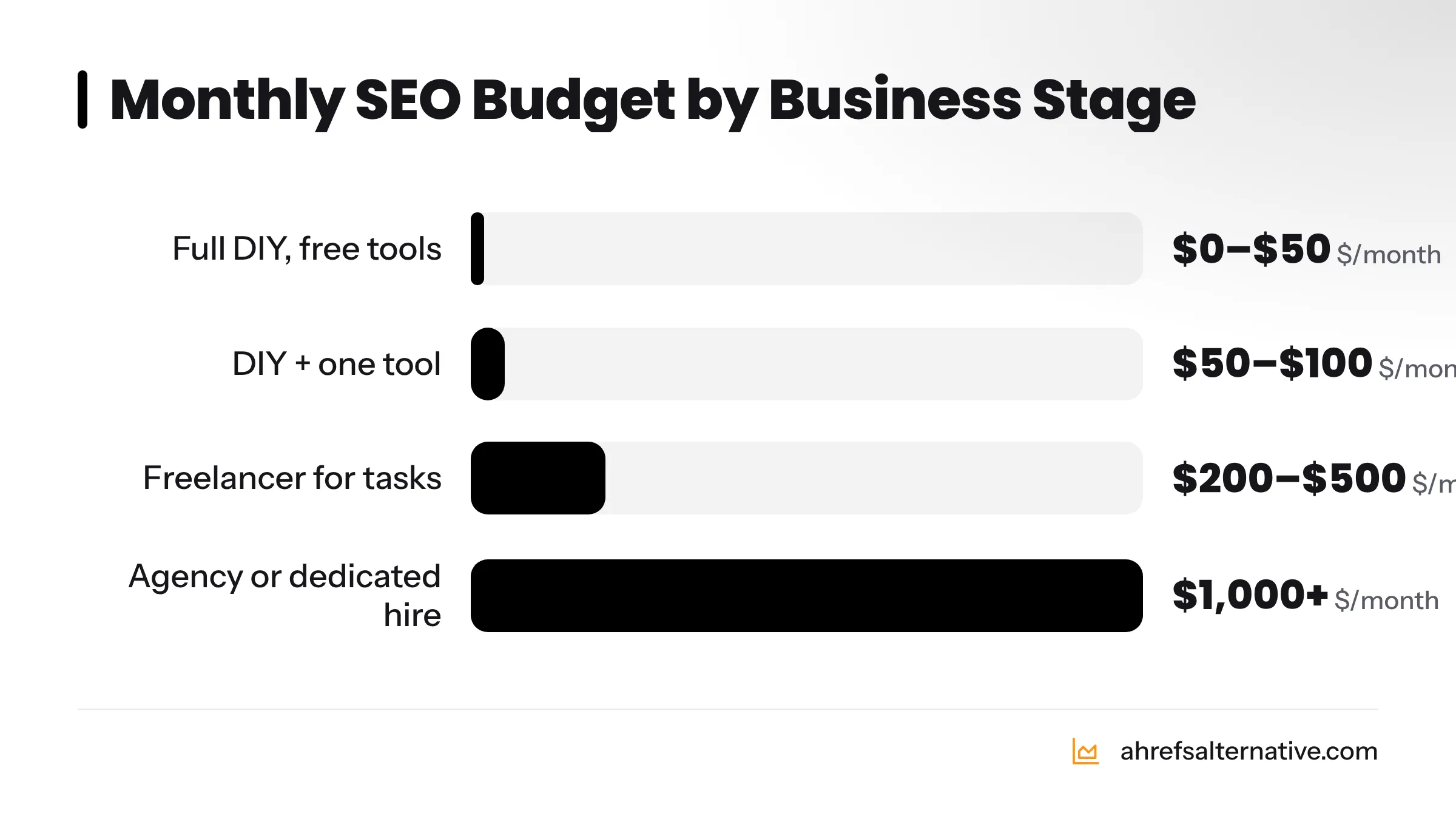
Real results - especially in local markets - are achievable with $0 to $50 per month if you're willing to put in four to six hours per week. Stepping up to $100-$200 per month unlocks tools that cut your research and reporting time considerably. For most small businesses, spending more than $500 per month makes sense only after the fundamentals are working and you've pushed as far as you can yourself.
For a deeper look at what each dollar actually buys, read the guide on cost-effective SEO for small businesses.
DIY vs. Freelancer vs. Agency - Which Is Right for You?
The right choice depends on three variables: available time, current site health, and how competitive your market is.
| Your Situation | Recommended Approach | Estimated Monthly Cost |
|---|---|---|
| New site, local market, 4+ hrs/week available | Full DIY with free tools | $0-$50 |
| Established site, some traffic, 2-3 hrs/week | DIY + one affordable tool subscription | $50-$100 |
| Growing site, competitive niche, limited time | Freelancer for specific tasks (content, links) | $200-$500 |
| Multi-location, national competition, revenue at stake | SEO agency or dedicated hire | $1,000+ |
DIY SEO makes the most sense in your first six to twelve months, especially for local businesses. You know your customers, your service area, and your competitors better than any outside contractor. The tools covered in this guide - several of them free - give you everything you need to execute without outside help.
For freelancers, the SEO tools built for freelancers guide covers what to hand off and what to keep in-house.
How to Spot SEO Scams Before They Drain Your Budget
Predatory SEO vendors target small businesses specifically because small business owners often don't know enough to challenge their claims. Watch for these red flags:
SEO Scam Red Flags Checklist:
- Guaranteed #1 rankings on Google - no one can promise this
- Pricing that sounds too good: "$99/month full SEO" is a loss-leader at best, harmful at worst
- No transparency about what work they'll actually do
- Refusal to give you access to your own Google Search Console or Analytics account
- Vague reports showing "rankings improved" without specifying which keywords or pages
- Link-building from "networks" or private blog networks (PBNs) - these violate Google's spam policies
- Pressure to sign long-term contracts before showing any results
- Claims of a "special relationship" with Google
- No named contact person or verifiable company address
- They can't explain what they'll do in plain language
Two or more boxes checked? Walk away.
Step 1 - Build Your Technical SEO Foundation (Free or Low-Cost)
Technical SEO is the scaffolding your entire strategy rests on. If Google can't crawl and index your pages efficiently, every piece of content you write and every link you earn is partially wasted. Most technical issues on small business websites are fixable without a developer and without spending a dollar.
Why Technical SEO Comes First
Technical SEO covers the behind-the-scenes configuration of your website that affects how search engine crawlers discover, read, and rank your pages - crawlability, indexability, page speed, mobile responsiveness, HTTPS security, and structured data. Publishing great content on a technically broken site is like printing beautiful menus for a restaurant with a broken front door.
Run a Free Technical SEO Audit (Step-by-Step)
You can run a full technical audit for free using two tools: Seobility and Google Search Console.
Using Seobility Free:
- Go to Seobility.net and create a free account.
- Enter your domain and start a new project crawl.
- Navigate to the "SEO Check" section after the crawl completes.
- Review the "Meta" section for missing or duplicate title tags and meta descriptions.
- Check the "Page Quality" section for thin content, broken links, and slow pages.
- Export the list of issues ranked by severity - fix "critical" items first.
Using Google Search Console:
- Go to search.google.com/search-console and add your property.
- Verify ownership via HTML tag, DNS record, or your Google Analytics account.
- Navigate to "Coverage" (now called "Indexing" in the updated interface) to see which pages are indexed and which are blocked or erroring.
- Submit your XML sitemap under "Sitemaps" so Google can find all your pages.
- Review "Core Web Vitals" to identify pages with poor load-speed scores.
Fix Your Biggest Technical Issues Without a Developer
Work through this checklist in order once you have your audit results:
Technical SEO Quick-Fix Checklist:
- HTTPS: Confirm your site loads on https://, not http://. Most hosting providers (Bluehost, SiteGround, Hostinger) include free SSL via Let's Encrypt
- XML sitemap: Generate one using Yoast SEO or RankMath (both free on WordPress) and submit it to Google Search Console and Bing Webmaster Tools
- robots.txt: Confirm your robots.txt file isn't accidentally blocking important pages
- Broken links: Use Screaming Frog SEO Spider (free up to 500 URLs) to find and fix 404 errors
- Canonical tags: Ensure each page has a single canonical URL to avoid duplicate content issues
- Redirect chains: Fix any 301 redirects that bounce through three or more hops - they dilute link equity
- Page speed: Compress images, enable browser caching, and consider a CDN (Cloudflare's free tier works well)
Core Web Vitals - What They Mean for Your Site
Core Web Vitals are Google's three key page-experience metrics - a speed test, an interactivity test, and a visual stability test rolled into a ranking signal:
- LCP (Largest Contentful Paint): How long before the main content on your page loads. Aim for under 2.5 seconds.
- INP (Interaction to Next Paint): How quickly your page responds when a visitor clicks or taps. Aim for under 200 milliseconds.
- CLS (Cumulative Layout Shift): How much your page layout shifts as it loads. Aim for a score below 0.1.
Check your scores for free using Google PageSpeed Insights.
Making Your Site Mobile-Friendly Without Spending a Dollar
Google uses mobile-first indexing, meaning it ranks your site based on how it performs on mobile, not desktop. On WordPress, a modern responsive theme - Astra, Kadence, or GeneratePress all offer free tiers - handles most of this automatically. Test your current state using Google's Mobile-Friendly Test. Fix font sizes smaller than 16px, tap targets closer than 48px apart, and any content that overflows the screen.
Adding Schema Markup Without Writing a Single Line of Code
Schema markup is structured data that tells search engines what your content is about - business name, address, phone number, reviews, FAQs, and more.
- WordPress users: Install Yoast SEO or RankMath (both free). They automatically add Article, Organization, and WebPage schema to your pages.
- All sites: Use Google's Structured Data Markup Helper to generate schema code, then paste it into your page's
<head>section. - Local businesses: Add LocalBusiness schema with your NAP (Name, Address, Phone) details to your homepage and contact page using RankMath's schema builder.
Test your markup using Google's Rich Results Test.
Step 2 - Small Business Keyword Research on a Zero or Near-Zero Budget
Most small businesses make the same first mistake: targeting the same broad, high-competition terms that enterprise brands spend millions to own. "Plumber" is not your keyword. "Emergency drain cleaning in [your city]" might be. Here's how to find those opportunities without paying for Ahrefs or Semrush.
Why Small Businesses Get Keyword Research Wrong
Keyword research is the process of identifying the search queries your potential customers type into Google, then prioritizing which ones to target based on search volume, competition level, and relevance. Small businesses typically get this wrong in two ways: they target keywords too broad to rank for, or they skip research entirely and write about whatever feels interesting. Both burn time with little payoff.
How to Find the Right Keywords Using Free Tools
Here's a step-by-step workflow using entirely free tools:
- Start with Google Search Console - Go to "Performance" and filter by queries with more than 100 impressions but a click-through rate below 3%. These pages are already showing up but not getting clicked. They're your fastest wins.
- Use Google Keyword Planner - Available free inside any Google Ads account. Type in your core service (e.g., "wedding photographer Seattle") and look for variations with moderate search volume and low competition. Export the list.
- Run searches on Google itself - Type your keyword and study the autocomplete suggestions, the "People Also Ask" boxes, and the "Related Searches" section at the bottom. These are real queries from real people.
- Use KeySearch's free features or trial - KeySearch offers one of the most affordable full-access plans available at around $17/month, and its keyword difficulty scores are accurate enough for small business targeting. The guide on keyword research without Ahrefs walks through this exact process in detail.
- Check competitors' pages - Paste a competitor URL into Ubersuggest (limited free searches available) to see which keywords drive their traffic.
Why Long-Tail Keywords Are Your Fastest Path to Page One
Long-tail keywords are search phrases of three or more words that are highly specific. They carry lower search volume than broad "head" terms, but they also have dramatically lower competition - and they convert better because searchers who type specific queries are usually ready to buy or contact.
| Keyword Type | Example | Est. Monthly Searches | Keyword Difficulty | Search Intent |
|---|---|---|---|---|
| Head keyword | "plumber" | 100,000+ | Very High | Vague / Research |
| Mid-tail keyword | "plumber in Austin" | 5,000-10,000 | High | Local / Research |
| Long-tail keyword | "emergency water heater repair Austin TX" | 200-500 | Low | Ready to hire |
| Long-tail keyword | "how much does a plumber cost in Austin" | 100-300 | Very Low | Price research |
For a small business with a new or low-authority site, long-tail keywords are the fastest path to first-page rankings. A single well-optimized blog post targeting a long-tail question can rank within 60-90 days. Ten of those posts build a traffic base that grows over time.
How to Build a Simple Keyword Map
A keyword map assigns one primary keyword to each page on your site to prevent your own pages from competing with each other - a phenomenon called keyword cannibalization. Start with a simple spreadsheet:
- Column A: Page URL
- Column B: Primary keyword
- Column C: Monthly search volume (approximate)
- Column D: Keyword difficulty (1-100)
- Column E: Search intent (informational, navigational, transactional, local)
Map your homepage and service pages first, then blog posts. Every page should own exactly one primary keyword, with two to four supporting keywords woven naturally into the content.
Finding Content Gaps Your Competitors Have Missed
A content gap is a topic your target audience searches for that your competitors haven't written about - or have covered poorly. The process is straightforward:
- List your top three to five local or niche competitors.
- Put each of their URLs into Ubersuggest's "Competitor Keywords" feature or KeySearch's competitor analysis tool.
- Export their ranking keywords and compare the list against your own site's rankings.
- Topics they rank for that you don't = gaps you can fill.
- Topics neither you nor they rank for, but that clearly match your audience's questions (surfaced via Google's "People Also Ask") = untapped opportunities.
Fill gaps with focused blog posts, FAQ pages, or expanded service pages and you'll pick up traffic they're leaving behind.
Step 3 - On-Page SEO: Optimize Every Page You Already Have
On-page SEO covers every element on an individual page that influences how Google reads and ranks it. The fastest wins in SEO often come not from new content, but from improving what's already on your site.
The On-Page SEO Checklist for Small Business Owners
Run every important page on your site through this checklist:
On-Page SEO Checklist:
- Title tag: 50-60 characters, contains primary keyword near the front, unique for every page
- Meta description: 140-160 characters, includes primary keyword, reads like a compelling reason to click (not a keyword list)
- H1 tag: Exactly one per page, matches or closely mirrors the title tag keyword
- H2 and H3 structure: Subheadings break up content logically and include secondary or related keywords naturally
- Keyword in first 100 words: Primary keyword appears in the opening paragraph
- Image alt text: Every image has a descriptive alt tag that includes relevant keywords where natural
- Internal links: At least two to three links from this page to related pages on your site
- URL structure: Short, descriptive, hyphen-separated - no stop words, no random numbers
- Content length: Matches or exceeds what's ranking for the same keyword (check the top three results)
- Outbound links: At least one link to a reputable external source that validates a claim you make
- Mobile display: Confirmed readable and functional on a phone screen
- Page speed: Loads in under three seconds on mobile (check with PageSpeed Insights)
For a full walkthrough of evaluating and comparing your on-page setup against competing tools, see the guide to comparing SEO tools.
Writing Title Tags and Meta Descriptions That Get Clicked
Your title tag and meta description are your ad copy in the search results. Most small business pages waste them - writing something like "Home | Jim's Plumbing Austin" instead of "Austin Plumber - Emergency Service, Available 24/7 | Jim's Plumbing."
The formula that works:
- Title tag: Primary keyword + unique value proposition + brand name (if space allows)
- Meta description: Address the searcher's problem, mention the keyword, and end with a clear call to action ("Get a free quote today," "Call us now," "Book your appointment in 60 seconds")
Test different variations by watching your GSC click-through rates change month over month.
Internal Linking Strategy for Small Websites
Internal links pass authority from one page to another and help Google understand your site's topic hierarchy. For a small business site with 10-30 pages, the strategy is simple:
- Your homepage should link to your most important service pages.
- Each service page should link to two or three related blog posts or FAQ answers.
- Each blog post should link back to at least one service page (this is where conversions happen) and to two or three other relevant posts.
- Use descriptive anchor text - not "click here" but "emergency plumbing services in Austin."
If you write a blog post about "how to prevent pipe bursts in winter," that post should link to your "Pipe Repair Services" page. The blog drives search traffic; the service page converts it. That loop is the backbone of small business SEO.
Optimizing Images for SEO Without Slowing Your Site
Large image files are one of the most common reasons small business sites load slowly. Fix this without a developer:
- Convert images to WebP format using a free tool like Squoosh.
- Compress images before uploading - aim for under 100KB for most photos.
- Use descriptive file names: "austin-emergency-plumber.webp" not "IMG_3847.jpg."
- Add alt text to every image describing what's in it and, where natural, including your target keyword.
- Use lazy loading - most modern WordPress themes enable this by default, or add it with a free plugin like Smush.
Step 4 - Content Strategy That Drives Traffic Without a Content Team
Every page that answers a genuine question your customers ask is a new entry point to your website - a door Google can send visitors through. You don't need a content team to make this work. You need a plan.
Why Content Is the Most Cost-Effective SEO Lever for Small Businesses
Writing useful content costs time, not money. A 1,000-word blog post that answers a question your audience asks every week can rank on the first page of Google within three to six months and bring in visitors for years. Compare that to a Google Ad costing $5-$15 per click that stops running the moment you pause your card. For small businesses with more time than cash, content is the single best return on effort available.
How to Identify Topics Your Audience Is Actually Searching For
You already know more about your customers' questions than you realize. Start here:
- Mine your own inbox and phone calls: What questions do customers ask before buying? Each one is a potential blog post.
- Use Google's "People Also Ask" boxes: Search your core service and note every question in the PAA box - these come directly from real search queries.
- Check Google's autocomplete: Type your service keyword followed by letters a through z and note every suggestion.
- Read competitor reviews on Google Maps: Customers describe their problems in reviews. Those problems are content ideas.
- Use AnswerThePublic.com (free tier): Enter a keyword and see hundreds of question-based variations.
How Often Should Small Businesses Publish?
Publishing frequency matters less than publishing consistency. One well-researched, 1,000-to-1,500-word post per week outperforms three thin, rushed posts. If one post per week is too much, one solid post every two weeks still builds meaningful momentum over 12 months - that's 24 indexed, optimized pages added to your site.
| Budget Level | Content Volume | Format Focus |
|---|---|---|
| $0/month | 1 post every 2 weeks (DIY) | How-to guides, FAQ answers, local content |
| Under $50/month | 1-2 posts per week (DIY + free tools) | How-to + service pages + GBP posts |
| Under $100/month | 2-3 posts per week or 1 long-form/week | Pillar pages + supporting cluster posts |
| $100-$200/month | Outsource 1-2 posts/month + DIY the rest | Thought leadership + local landing pages |
How to Write SEO-Friendly Blog Posts (Even If You're Not a Writer)
Writing for SEO is a learnable skill. Follow this structure:
- Open with the problem the reader has, in their language.
- Promise what they'll learn by reading on.
- Use short paragraphs - two to four sentences max.
- Use H2 and H3 headings to break up every major point.
- Answer the target keyword's question clearly and early - this is what wins featured snippets.
- Back up claims with a linked stat or source.
- End with a clear next step - contact you, read another post, or download something.
Repurposing Existing Content for More SEO Value
Before creating anything new, audit what you already have. Pages with decent traffic but low conversions need better calls to action. Pages with low traffic but solid keyword targets need deeper content, stronger internal links, and updated title tags. Old blog posts can be refreshed with new data, expanded sections, and updated publish dates - Google re-crawls them and often pushes them higher.
Repurposing is free and often produces faster ranking gains than brand-new content.
Step 5 - Local SEO: The Fastest Win Available to Small Businesses
Local SEO is the highest-return SEO activity for any business serving customers in a specific geographic area. Done right, it puts you in the "local pack" - the three-business map listing that appears above organic results for local searches - and that position alone can double your inbound leads.
What Local SEO Actually Is and Why It Matters
Local SEO is the practice of optimizing your online presence to appear prominently in location-based search results. When someone searches "coffee shop near me" or "best electrician in Denver," Google returns a local pack powered by Google Business Profile data, local citations, and proximity signals - not just website rankings. For a brick-and-mortar or service-area business, local SEO captures buyers at the moment of decision, making it more immediately impactful than national organic SEO in the early months.
How to Optimize Your Google Business Profile (Full 2026 Checklist)
Your Google Business Profile is the single most powerful free SEO tool for local businesses. Most small businesses claim their profile and stop there - leaving a significant amount of visibility behind.
GBP Optimization Checklist (2026):
- Claim and verify your profile at business.google.com
- Choose your primary business category carefully - it's the most important ranking signal in local search
- Add all relevant secondary categories
- Write a keyword-rich business description (750 character limit - use it)
- Upload at least 10 high-quality photos: exterior, interior, team, products/services
- Add your complete NAP (Name, Address, Phone) - must match exactly what appears on your website
- List your services or products with descriptions and pricing where applicable
- Set accurate business hours including holiday hours
- Enable messaging so customers can contact you directly through GBP
- Add a booking link if you take appointments
- Publish a GBP Post at least once per week (Google treats activity as a freshness signal)
- Answer every question in the Q&A section - and seed it with your own FAQ questions
- Respond to every review, positive or negative, within 48 hours
Local Citations and Online Directories: Where to List Your Business
A citation is any online mention of your business's NAP. Citations from authoritative directories signal to Google that your business is legitimate and locally relevant. Start with these:
- Yelp
- Apple Maps
- Bing Places for Business
- Facebook Business
- Foursquare
- Your local Chamber of Commerce directory
- Industry-specific directories (e.g., Houzz for home services, Avvo for legal, Healthgrades for medical)
The key rule: your NAP must be identical across every listing. Even small discrepancies - "St." vs. "Street," or a missing suite number - can confuse Google's understanding of your business.
How to Get More Google Reviews (and Why They Boost Rankings)
According to BrightLocal's Local Consumer Review Survey, 98% of consumers read online reviews for local businesses, and the quantity and recency of Google reviews directly correlates with local pack rankings. Getting reviews doesn't require a complicated system:
- Send a follow-up text or email to every customer after a completed job with a direct link to your Google review page.
- Add a "Leave us a review" link to your email signature.
- Include a QR code linking to your review page on receipts, business cards, and at your front desk.
- Ask verbally right after a customer expresses satisfaction.
- Respond to every review you receive - it encourages more people to leave one.
Do not offer incentives for reviews. Google's policies prohibit it and the penalty is severe.
Local Landing Pages: How to Create Them Without a Developer
If you serve multiple cities or neighborhoods, create a dedicated landing page for each location. Each page should include the city name in the title tag, H1, and throughout the content; mention local landmarks or community details to prove genuine local relevance; include a Google Map embed; and list the specific services available in that area. On WordPress, this is as simple as duplicating a page template and customizing the copy. On Squarespace or Wix, use the page duplication feature.
Voice Search and Local SEO
Voice search queries are longer and more conversational than typed searches. "Hey Google, who's the best pizza place open near me right now?" is a voice query. Optimize for voice by writing content that directly answers natural-language questions (FAQ pages are ideal for this), keeping your GBP hours accurate, and targeting featured snippets - voice assistants read aloud the featured snippet answer.
Step 6 - Backlink Building on a Budget
Backlinks remain one of Google's top three ranking factors in 2026. A backlink is when another website links to yours, effectively vouching for your content. The misconception is that link building requires expensive outreach campaigns or paid placements. For local and niche businesses, it doesn't.
Why Backlinks Still Matter in 2026
Moz's research on link-based ranking factors consistently shows that the quantity and quality of backlinks pointing to a page is among the most predictive signals of where that page ranks. A page with five links from relevant, authoritative sites will almost always outrank a page with zero links, even if the content is equivalent. For a small business, earning even ten to twenty quality backlinks can make a measurable difference in competitive local markets.
You can monitor your growing backlink profile for free - the guide on tracking backlinks without paid tools covers exactly how to do this.
7 Budget-Friendly Link Building Tactics for Small Businesses
1. Local Citations and Directories Every directory listing is a citation and often a backlink. These are free and take 10-15 minutes each to set up.
2. Connectively (Journalist Outreach) Connectively (formerly HARO - Help a Reporter Out) connects journalists seeking expert quotes with sources. Sign up for free, filter queries in your industry, and respond to relevant requests. A single placement in a major publication can deliver a high-authority backlink worth more than dozens of directory links.
3. Guest Posting on Niche Blogs Identify blogs in your industry that accept guest contributions. Write a genuinely useful post for their audience and include one contextual link back to a relevant page on your site. One link from a respected industry blog outweighs ten links from generic sites.
4. Broken Link Building Use Screaming Frog or Seobility's free tools to find broken links on industry resource pages. Email the site owner to flag the broken link and suggest your relevant content as a replacement. This works because you're solving a problem for them, not just asking for a favor.
5. Earning Links Through Original Data or Local Research Publish original research - a local market survey, a compilation of statistics relevant to your industry, or a study about your city or region. Original data gets cited and linked to naturally by journalists and bloggers. Even a simple survey of 50 customers can generate data worth referencing.
6. Partnerships and Local Business Cross-Links Identify complementary businesses in your area - a wedding photographer partnering with florists, venues, and caterers, for example. Each business links to the others on their "Preferred Partners" or "Resources" pages. These local links carry genuine relevance signals for local SEO.
7. Getting Listed on Resource Pages
Many industry associations, local government sites, and community organizations maintain "local resources" pages. Search Google for [your city] + [your industry] + "resources" and email each relevant page owner requesting inclusion.
| Link Building Tactic | Time Investment | Cost | Expected Link Quality |
|---|---|---|---|
| Local directory citations | Low (15 min each) | Free | Low-Medium |
| Connectively responses | Medium (30 min/query) | Free | High |
| Guest posting | High (3-5 hrs/post) | Free or small fee | Medium-High |
| Broken link building | Medium (2-3 hrs/batch) | Free | Medium-High |
| Original data / local research | High (5-10 hrs) | Free | Very High |
| Local business partnerships | Low (1 hr setup) | Free | Medium |
| Resource page outreach | Low-Medium | Free | Medium |
Step 7 - Affordable SEO Tools That Replace Expensive Subscriptions
You don't need Ahrefs at $129/month or Semrush at $139/month to run effective SEO for a small business. A carefully chosen stack of free and budget tools gives you 80-90% of the capability for a fraction of the cost.
Free SEO Tools Every Small Business Should Use
| Tool | Primary Use | Free Tier | Best For |
|---|---|---|---|
| Google Search Console | Indexing, keyword data, crawl errors | Fully free | All small businesses - mandatory |
| Google Analytics 4 | Traffic, conversions, user behavior | Fully free | All small businesses - mandatory |
| Google Keyword Planner | Keyword research, volume data | Fully free (needs Ads account) | Keyword discovery |
| Screaming Frog (free) | Technical site crawl up to 500 URLs | Free up to 500 URLs | Technical audits |
| Seobility (free tier) | Technical audit, on-page scoring | Free (1 project) | Technical health checks |
| Ubersuggest (free) | Keyword ideas, competitor overview | 3 searches/day free | Quick keyword lookups |
| Google PageSpeed Insights | Core Web Vitals, speed issues | Fully free | Page speed analysis |
| Google Rich Results Test | Schema markup validation | Fully free | Structured data QA |
| Bing Webmaster Tools | Bing crawl data, keyword insights | Fully free | Secondary search engine coverage |
| AnswerThePublic (free) | Question-based keyword ideas | Limited free | Content ideation |
Best Budget SEO Tools Under $50/Month
Once you're ready to invest a small amount monthly, these tools deliver professional-grade data at startup-friendly prices:
- Clicks.so - Starting from around $9/month, Clicks.so is one of the most affordable rank trackers and keyword research tools available. Best for businesses with a small keyword portfolio who want daily rank tracking without the enterprise price tag.
- KeySearch - At approximately $17/month, KeySearch gives you keyword research, difficulty scores, competitor analysis, and backlink checking. It's my go-to recommendation for small business owners who are serious about keyword targeting but can't justify $100+/month.
- Seobility - Paid plans start around $50/month, but the free tier is genuinely useful. Its technical audit and on-page scoring features are built for exactly the kind of systematic improvements small businesses need.
Mid-Range Tools Worth the Investment as You Grow
As your site grows and you're tracking more keywords, competing in tighter niches, or managing multiple projects, these tools deliver a meaningful step up:
- SE Ranking - Plans start around $52/month for smaller projects. SE Ranking offers rank tracking, site auditing, keyword research, backlink monitoring, and a white-label reporting feature. It's one of the most complete platforms in this price range, and the SE Ranking vs. Ahrefs comparison shows where it holds its own against premium tools.
- Mangools - At around $29/month for the entry plan, Mangools bundles five tools: KWFinder (keyword research), SERPChecker, SERPWatcher (rank tracking), LinkMiner (backlink analysis), and SiteProfiler (domain authority). The interface is beginner-friendly and the keyword data is solid.
- Ubersuggest - Neil Patel's tool offers a lifetime deal option and monthly plans starting around $12, making it one of the cheapest full-featured options for small businesses focused on keyword research and basic site auditing.
The Full Affordable SEO Tools Comparison
The table below compares the tools I most commonly recommend to small business owners - tools I've personally tested - against the premium benchmarks of Ahrefs and Semrush:
| Tool | Starting Price | Keyword Research | Rank Tracking | Site Audit | Backlink Analysis | Best For |
|---|---|---|---|---|---|---|
| Ahrefs Alternative (vetted stack) | $0-$50/mo | ✓ (GSC + KeySearch) | ✓ (Clicks.so) | ✓ (Seobility) | ✓ (free GSC + tools) | Best overall value for small businesses |
| Clicks.so | ~$9/mo | ✓ | ✓ | Limited | Limited | Ultra-budget tracking |
| KeySearch | ~$17/mo | ✓✓ | ✓ | Limited | ✓ | Keyword-focused businesses |
| Ubersuggest | ~$12/mo | ✓✓ | ✓ | ✓ | Limited | Beginners |
| Mangools | ~$29/mo | ✓✓ | ✓✓ | Limited | ✓ | Well-rounded mid-range |
| Seobility | ~$50/mo | ✓ | ✓ | ✓✓ | ✓ | Technical-focused audits |
| SE Ranking | ~$52/mo | ✓✓ | ✓✓ | ✓✓ | ✓✓ | Full-platform needs |
| Ahrefs | $129/mo | ✓✓✓ | ✓✓✓ | ✓✓✓ | ✓✓✓ | Large businesses / agencies |
| Semrush | $139/mo | ✓✓✓ | ✓✓✓ | ✓✓✓ | ✓✓✓ | Large businesses / agencies |
The verdict: a $0-$50/month stack built around Google Search Console, KeySearch, and Clicks.so gives a small business owner roughly 80% of the capability of Ahrefs at less than 15% of the price. Browse the full vetted list at Ahrefs Alternative - every tool listed there is tested and compared for budget-conscious users. The affordable SEO tools for startups guide also offers a startup-specific breakdown.
Step 8 - Measuring and Adapting Your SEO Strategy
You can't improve what you don't measure. The two most important measurement tools - Google Search Console and Google Analytics 4 - are completely free and more capable than most small businesses ever put them to use.
The Metrics That Actually Matter for Small Business SEO
Skip vanity metrics like "domain authority" in the early months. Focus on:
- Organic impressions: How many times your pages appear in Google results (GSC)
- Organic clicks: How many people actually visit from search results (GSC)
- Average position: Where your pages rank for their target keywords (GSC)
- Click-through rate (CTR): Clicks divided by impressions - low CTR with high impressions signals a title tag problem (GSC)
- Organic sessions: Total visits from search engines (GA4)
- Goal completions: Form fills, phone call clicks, purchases from organic traffic (GA4)
- Keyword rankings: Tracked weekly for your 10-20 most important keywords (Clicks.so, SE Ranking, or Mangools)
How to Use Google Search Console to Find Quick Wins
GSC is where I find 80% of my quick wins. Here's the exact process:
- Log in to Google Search Console and select your property.
- Go to "Performance" > "Search Results." Set the date range to the last 90 days.
- Click "Average Position" to add that column to your view.
- Filter for pages ranking between position 8 and 20 - these are close to page one and often need only minor improvements to break into the top 5.
- Sort by impressions to find the highest-traffic opportunities.
- Click any page URL to see which specific queries it ranks for. If the page ranks for a query it wasn't optimized for, update the page to target that query more directly.
- Go to "Indexing" > "Pages" and review any pages with errors. Fix 404s and "Excluded by noindex tag" issues first.
- Go to "Sitemaps" and confirm your sitemap is submitted and shows no errors.
Repeat this process monthly. Pages gaining impressions but not clicks need better title tags. Pages losing position need content updates or more internal links.
Using Google Analytics to Track SEO Progress
In Google Analytics 4, navigate to Reports > Acquisition > Traffic Acquisition. Set the primary dimension to "Session default channel group" and look at the "Organic Search" row. Track month-over-month growth in sessions and compare engagement metrics - engaged sessions, average engagement time - against other channels. High engagement time from organic visitors signals that your content matches search intent well.
Set up conversion events in GA4 for your most important actions (form submissions, phone number clicks, purchase completions) so you can see which organic pages actually generate revenue, not just traffic.
Building a Simple Monthly SEO Reporting Routine
Set aside 30 minutes on the first Monday of each month to review:
- GSC impressions, clicks, and average position vs. prior month
- Top 5 pages by organic clicks - any drops to investigate?
- Keywords that gained or lost more than 3 positions
- Any new crawl errors in GSC Coverage/Indexing
- Backlinks gained in the past 30 days (check GSC Links > Top linking sites)
- Keyword rank changes in your tracking tool (Clicks.so, SE Ranking, etc.)
Document findings in a simple spreadsheet. Over 12 months, this data shows you exactly what's working and where to double down.
Your Month-by-Month SEO Roadmap for the First 12 Months
SEO is not linear, but it is predictable when you work in a structured sequence. Here is a realistic milestone map for a small business starting from scratch:
| Phase | Months | Focus | Expected Milestone |
|---|---|---|---|
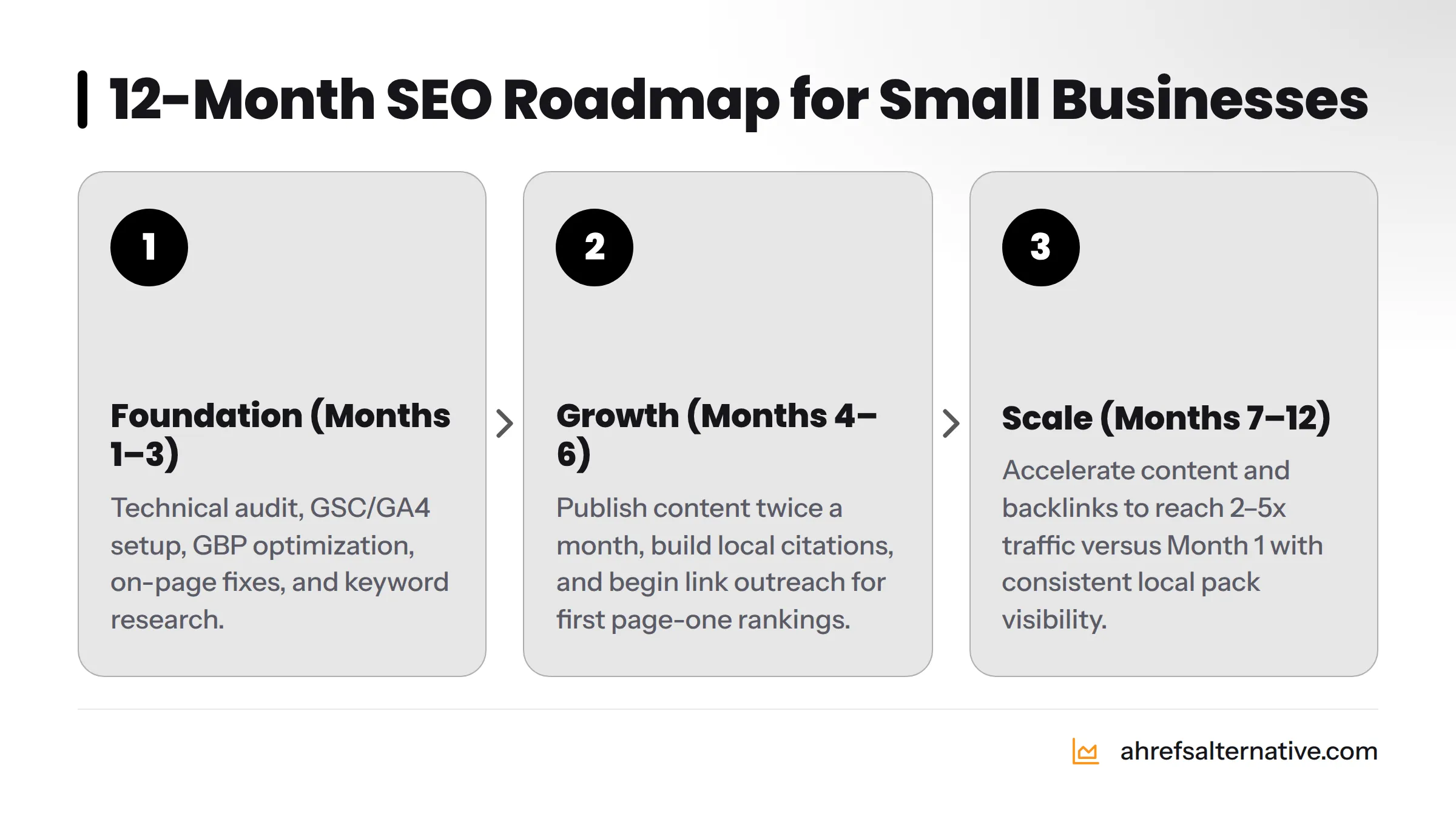
| Foundation | 1-3 | Technical audit, GSC/GA4 setup, GBP optimization, on-page fixes for existing pages, keyword research | Site indexed properly, GBP live and active, top 10 pages optimized, keyword map complete |
| Growth | 4-6 | Content publishing (2x/month min.), local citation building, internal linking, first link-building outreach | First long-tail keywords hit page 1, local pack appearance for primary search term, 20-40% organic traffic increase |
| Scale | 7-12 | Content acceleration, backlink campaign, site authority building, conversion rate optimization | Multiple page-one rankings, consistent local pack visibility, measurable organic lead generation, 2-5x traffic vs. Month 1 |
These timelines assume consistent effort - three to five hours per week - and a site with no major technical penalties.
What to Prioritize When You Have Only 2-3 Hours Per Week
If your time is extremely limited, stack your effort in this order:
- Week 1-2: GBP optimization (biggest ROI per hour for local businesses)
- Week 3-4: Fix GSC crawl errors and optimize title tags on top 5 pages
- Month 2: Write one keyword-targeted blog post
- Month 2-3: Build 10 local directory citations
- Ongoing: Publish one post per month, respond to all reviews, submit one Connectively response per week
Two to three focused hours per week, applied consistently, beats sporadic bursts of effort every time.
When to Know It's Time to Hire Help
Consider bringing in a freelancer or agency when:
- Your site is growing but you've run out of time to produce content consistently
- You're competing in a high-difficulty market where link building requires dedicated outreach
- You're generating $3,000+ per month from organic traffic and need to protect and grow that revenue
- GSC shows consistent technical issues you can't diagnose yourself
When you reach that point, the affordable SEO tools for startups guide can help you evaluate what to hand off first and what to keep in-house.
Frequently Asked Questions About Small Business SEO on a Budget
How much does SEO cost for a small business? SEO for a small business can cost anywhere from $0 (pure DIY with free tools) to $500+ per month depending on your approach. Most small businesses see meaningful results by spending $50-$100 per month on one or two affordable tool subscriptions combined with consistent DIY effort. Full-service agency retainers typically start at $1,000-$2,000 per month and are rarely necessary in the first year.
Can I do SEO myself without any experience? Yes. The fundamentals of small business SEO - setting up Google Search Console, optimizing your Google Business Profile, writing keyword-targeted content, and building local citations - are learnable skills that don't require technical training. The tools covered in this guide, particularly KeySearch and Seobility's free tier, are designed for non-experts. Expect a one to two month learning curve before things click.
How long does it take to see SEO results for a small business? Most small businesses see their first measurable ranking improvements within 60 to 90 days of consistent effort, particularly for long-tail and local keywords. Meaningful organic traffic growth - enough to impact revenue - typically takes four to six months. Competitive markets or sites with existing technical issues may take six to twelve months. SEO is a compounding investment, not a quick-fix channel.
What is the most important SEO strategy for a small business? Google Business Profile optimization delivers the fastest and most measurable return for businesses serving a local area. For non-local or e-commerce businesses, keyword-targeted content creation on a consistent schedule is the single highest-return activity. In both cases, technical health - proper indexing, mobile responsiveness, fast page load - is the prerequisite that must come first.
Is local SEO different from regular SEO? Local SEO focuses on ranking in location-based searches - the Google Map Pack, "near me" queries, and city-specific service searches. It is driven primarily by Google Business Profile signals, local citations, review quantity and recency, and on-site NAP consistency. Regular (national or global) SEO focuses on organic blue-link rankings driven by content quality, backlinks, and domain authority. Small businesses typically benefit from both, but local SEO delivers faster results.
What free SEO tools are best for small businesses? The essential free stack includes: Google Search Console (keyword data, indexing, crawl errors), Google Analytics 4 (traffic and conversion tracking), Google Keyword Planner (keyword research), Screaming Frog free version (technical crawl up to 500 URLs), Google PageSpeed Insights (speed analysis), and Seobility's free tier (on-page and technical scoring). Together, these tools cover everything you need in your first six months.
How many blog posts should I publish per month for SEO? One well-researched, properly optimized post per month is the absolute minimum for building organic momentum. Two to four posts per month accelerates growth considerably. Quality matters more than frequency - a 1,200-word post that directly answers a real search query outperforms three 300-word posts every time. Consistency over 12 months is more important than any single month's output.
Do I need to hire an SEO agency as a small business? Not in your first year. The vast majority of small business SEO work - GBP optimization, on-page improvements, local citation building, content creation, and basic link outreach - is entirely manageable without an agency. Consider hiring help when your organic channel is generating revenue worth protecting, when you're in a genuinely competitive national market, or when your time becomes the binding constraint on growth.
What is the biggest SEO mistake small businesses make? Targeting keywords that are too broad and too competitive. Ranking for "dentist" is effectively impossible for a single-location practice. Ranking for "family dentist accepting new patients in [your neighborhood]" is achievable within months. The second biggest mistake is neglecting technical SEO - publishing content on a site Google can't crawl properly is effort wasted.
How do I know if my SEO is working? Check Google Search Console monthly and track three numbers: total impressions (is Google showing your pages more often?), total clicks (is that exposure converting to visits?), and average position (are you moving up for your target keywords?). Secondary confirmation comes from Google Analytics: is organic traffic growing month over month? Are organic visitors completing goals (form fills, calls, purchases)? If impressions are growing but clicks aren't, your title tags need work. If both are growing and goals aren't completing, your landing pages need stronger calls to action.
What is E-E-A-T and how can a small business demonstrate it? E-E-A-T stands for Experience, Expertise, Authority, and Trust - the four qualities Google's Search Quality Evaluator Guidelines use to assess content quality. Small businesses demonstrate E-E-A-T by including a detailed "About" page with real team photos and credentials; adding author bios to every blog post; citing reputable external sources for factual claims; earning and displaying Google reviews; getting mentioned in local press; and maintaining consistent NAP data across all online listings.
How do affordable tools like KeySearch, Seobility, and SE Ranking compare to Ahrefs? For small business needs, the gap is smaller than the price difference suggests. KeySearch matches Ahrefs' keyword difficulty accuracy for a fraction of the cost. Seobility's technical audit covers the same crawl-error categories as Ahrefs Site Audit at a significantly lower price point. SE Ranking's rank tracker is widely considered as accurate as Ahrefs' for tracked keywords. Where Ahrefs pulls ahead is in backlink database size and content explorer depth - features that matter more for large agencies and enterprise SEO than for a small business building its first 50 backlinks. The best Ahrefs alternatives guide compares them head to head with current 2026 pricing.
Sources
- Google Organic CTR Statistics - Backlinko
- Get Started with Google Search - Google Search Central
- Google Spam Policies - Google Search Central
- Core Web Vitals - Google Search Central
- Mobile-First Indexing - Google Search Central
- Local Consumer Review Survey - BrightLocal
- Search Ranking Factors - Moz
- Google's Search Quality Evaluator Guidelines and E-E-A-T - Google Search Central Blog
- Google PageSpeed Insights
- Schema.org Structured Data Reference